• After 15+ years, we've made a big change: Android Forums is now Early Bird Club. Learn more here.

Measy X7 - Android TV Box - HDD - ARM Cortex A9

  • Thread starter Thread starter SpiderX
  • Start date Start date
Hi Tatubias,

I have written a number of mails to them but no responce.
Good atleast they are communicating with you.

Regards
Kannan


no support it not replying my emails. i had a contact that is a measy re seller.

lets wait this week if the new firmware is released. ;) :D


does any one did find any other good application to share? some one did find any aplication to see tv online or movies?

it does exist an application called CuevanAndroid. thats plays movies from megaupload and other. the application is in spanish. movies are in original language you can are or remove subtitiles usualy subtitles are in spanish. the version that i did used (an old one) movies were played very slow. i dont know the new version. :(


keep allways sending emails to them so they can fix all the issues that the device has not fixed yet ;)
 
i have just downladed the latest version of cuevanadroid i have scaled the cpu to 800mhz and it is not playing yer very well the videos.

you can download the application and test it to have an idea how good it wold be to have it working as expected.

Multiupload.com - upload your files to multiple file hosting sites!


The developer told me that that how good the app works it does depend on the device. i hope with the new firmware this can be fixed.


you can teste here
 
How can I set the CPU at 800mhz using SetCPU.
I have used SetCPU, but the CPU is still 600mhz


you will need to root the device.

use z4root.1.3.0.apk check the post i have done before this. there it is the link.

then when you root the device you can use set cpu to set the cpu to 800mhz.

(dont know if it is safe or not to use it at 800mhz)

i have not tested, but inside the init.rc there it is an value that can be modiffy to 800mhz but i dont know if it does work or will brick the device if you moddify it.
 
Thank you tatubias

I have rooted the device using z4root.1.3.0.apk
and installed setCPU

But I don't know how to set the CPU using SetCPU.
When I start SetCPU, the main screen asks to select a device.
Then the application does the CPU set automatically.

Can I manually set the CPU at 800mhz using SetCPU
 
Thank you tatubias

I have rooted the device using z4root.1.3.0.apk
and installed setCPU

But I don't know how to set the CPU using SetCPU.
When I start SetCPU, the main screen asks to select a device.
Then the application does the CPU set automatically.

Can I manually set the CPU at 800mhz using SetCPU

link: AnTuTu CPU Master Pro v2.1.1.apk (360.16 KB)Multiupload.com - upload your files to multiple file hosting sites!

sorry i did not realize im using ANTUTU CPU MASTER PRO use that it work.

you only need to select the hi frecuency an clic on apply thats all.
 
One killer application
Remote RDP Enterprise


I am using this app i my Measy x7
Working very smoothly


The only RDP client which supports FULL PC keyboard and mouse!

World’s first Remote Desktop mobile client which supports enhanced TLS(SSL) encryption and bidirectional audio, also support enhanced CredSSP encryption (Network Level Authentication, NLA)

Touchpad mode deprecated,use better on-scr mouse instead

1. Support Windows 2000 Server, Windows XP Professional, MCE 2005, Windows Server 2003, Windows Vista Business or Ultimate, Windows Server 2008, Windows 7 Professional, Business or Ultimate, Windows Server 2008 R2.
2. World’s first NON-MS RDP client which supports TLS(SSL) encryption (RDP over SSL). Enterprise Version only.
3. World’s first mobile RDP client which support bidirectional audio. Recording only available in Enterprise Version.
4. Support RDP 7.
5. Support both Admin mode and Application mode.
6. Support session auto-reconnect.
7. Copy/Paste text between local and remote
8. Attach you SD Card to remote computer as a disk, you can download/upload files.
9. Bring sound to your phone.Supports Alaw, Mulaw(ULaw), Adpcm, GSM6.10 etc audio encodings.
10. VOIP level bandwidth usage. 70%-90% less compared with other NON-MS RDP clients (PC or mobile) when playing audio.
Customizable shortcut keys, Export/import you data to SD Card.
11. zoom in /out, zoom buttons like the one in browser
Smart move detecting, flip/fast move for scrolling the screen, normal/slow move(Tap, pause, move) for moving/dragging remote windows.
Smart tap detecting, normal/short tap for left click, long tap for right click.
12. Smart input cursor detecting, show/hide software keyboard automatically.
13. Smart cursor movement (can move mouse cursor more steps when you move scroll ball fast).
14. Mouse wheel support
15. zoom in/out, support pinch zoom
16. 128 bit and TLS (SSL) encryption.
17. Connection manager.
18. Fully international keyboard support, can deliver whatever you can type
19. Small but with much more features, only 143 KB.
20. Optimized for tablet, external mouse and keyboard, support custom resolutions, also support touchpad mode.

Download Link:
http://www.multiupload.com/FVOMELS2SS


Remote-RDP-Enterprise-1-200x300.png
Remote-RDP-Enterprise-2-200x300.jpg
 
I was interested in a good VNC server (is the same like the RDP) but to control the mediaplayer though windows pc. or from a web page. did you find one? or tested any of them?

here it is the link for Remote_RDP_Enterprise_v3.5.2 (i have not tested yet)
Remote_RDP_Enterprise_v3.5.2.apk (551.74 KB)http://www.multiupload.com/IL38UABHW0


was you able to set the cpu to 800mhz??
 
I was interested in a good VNC server (is the same like the RDP) but to control the mediaplayer though windows pc. or from a web page. did you find one? or tested any of them?

here it is the link for Remote_RDP_Enterprise_v3.5.2 (i have not tested yet)
Remote_RDP_Enterprise_v3.5.2.apk (551.74 KB)http://www.multiupload.com/IL38UABHW0


was you able to set the cpu to 800mhz??

Thank you tatubias, I set the CPU to 800mhz. Now the system is fast. I have selected OnDemand governer
 
i was able to install the vnc server (it should be rooted the device)

droid_vnc_server_beta_Ver_0.991.apk (1.57 MB)Multiupload.com - upload your files to multiple file hosting sites!

but i was not able to control the mediaplayer. i can see the screen but can control it. i dont know what can it be.

here it is a vnc viewer for windows.

vnc-4_1_3-x86_win32_viewer.exe (265.33 KB)Multiupload.com - upload your files to multiple file hosting sites!


i hope some one can make it work or find other vnc server for android.
 
By the moment this are the reported Wifi Dongle that are compatible with measy x7.

Wifi Dongle Tester
RTL8192SU yajkram24
RTL8818 Measy Support
RTL8191S Tatubias
 
as i comment before about samaba file server that by the moment does not support the ntfs partition. i had sent some time ago a email to the developer of the application. today he contacted me and ask me to send the logfile of the application. if we have luck for the next update will be fixed ;) :D

also i did try to explain that if wifi is not on. the software shows the message that you should enable wifi to work, and it does not work using ethernet connector.
 
Hi All
is there anyone who can guide me through the process of networking this x7 player. I amusing lan connection but my pc does not see the player what am i doing wrong the ethernet is set to auto.

thanks in advance
 
Hi All
is there anyone who can guide me through the process of networking this x7 player. I amusing lan connection but my pc does not see the player what am i doing wrong the ethernet is set to auto.

thanks in advance


What are you trying to do? if you want to share the files on the player?? by default you cant. it does not bring a samab server you will need to install it (samba server was already published in this forum.. BEFORE installing it you will need to root the device (root the device was already posted in this forum also).

you can access from the device to the computer using a samba client you will need to get it from the web and install it. or install astro file manager and use the smb clietn that it brings. or ghost commander with teh samba client so you can do the same.
 
Hi Tatubias

I am trying to play video files that i have pc through the x7.

My last media player allowed this function.

I am a novice at networking but have managed to root this device
 
installed AndSMB this gives access to my pc shared folders but does not allow direct playing of files only copying to device sdcard etc.

is application to view pc folders and play from x7. it there any programs you know of
thanks:)
 
installed AndSMB this gives access to my pc shared folders but does not allow direct playing of files only copying to device sdcard etc.

is application to view pc folders and play from x7. it there any programs you know of
thanks:)


i have not tested but if you use ghost commandes with the samba client there when you click the movie does not let you allow to select a videplayer like moboplayer or somthing like that?
 
As stated new to this player and not sure of your comments regarding ghost commander.
how can i select file from my pc to play on the x7 without down loading it to player.

searched web and mentions cifsmanager but can't find apk file and android market does not allow to download to player or sdcard.
help:)
 
As stated new to this player and not sure of your comments regarding ghost commander.
how can i select file from my pc to play on the x7 without down loading it to player.

searched web and mentions cifsmanager but can't find apk file and android market does not allow to download to player or sdcard.
help:)

by defaul the player does not bring a sharing shough samba
you need to install an aplication. to do that.

it brings a application as samba client but i did not tested.

if you want to use the samba client that is provided by the device., pleae read the manual. if you don thave the manual check this posts i have provided the english version to be read.
 
today I got a horrible issue in my measy x7

I got frequest blinking after lauching the home screen
then I restarted the system
and I found that the sdcard data is gone

before restarting the system I had 25+ folder
now I have only 3 folder
Data,DCIM and Android

as most of applications were in my phones memory, I didn't loose apps
but few applications were gone
:(
 
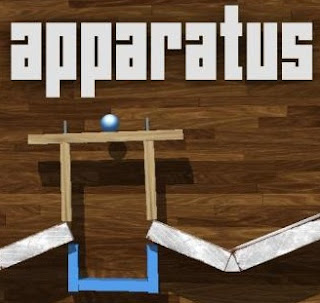
Other Killer game is APPARATUS

Build a complex machine to perform a simple task.

Apparatus is a game about setting up simple mechanical structures to
move one or several marbles to the goal.

“A real life-sapper. Get into Apparatus at your peril – you will lose hours of your life!” – LifeOfAndroid.com (Score: 9.5/10)
Connect cables from batteries to motors, build bridges, set up teeter totters,
swing with ropes, build vehicles, or just let the marble have a happy roller coaster
ride to the goal!

Use the hammer or the wrench to connect planks, wheels and other objects together.
Use the control panel to control your creations, be it a monster truck, a mechanical rifle or anything YOU can imagine!

Creativity is essential in the gameplay Apparatus. If you don’t have the patience to figure
out the challenge levels, why not just play around in the physics sandbox and build whatever
comes to mind? Upload and share your levels in the community section or download and
comment on other players’ levels.

apparatus.jp


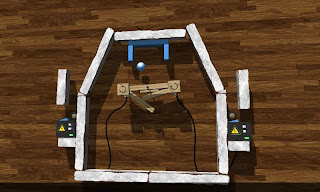
The early levels will teach you how to play the game and go through some basic concepts.
The more you progress the more freedom the levels provide, many levels can
be solved in many different ways.

androidgeekyweebly.jpg


Every time you complete a level, you can go into freebuild mode and modify the level
however you like. If you make the level better, or just harder, you might want to
upload it to the community section and let other people play your modified level.
EXTRA FUN ON TABLETS!

fullapk.jpg


Download Link: Multiupload.com - upload your files to multiple file hosting sites!
 
CUT THE ROPE: killer game

unnamed1.jpg


Cut the Rope is an award-winning physics-based puzzle video game for handheld gaming platforms. It was developed in 2010 by Russian developers ZeptoLab and is published by Chillingo.[1] On iOS, it uses the Crystal and Game Center social networking services. On Android, it uses Scoreloop social networking services. In 2011, it was followed by a sequel, Cut the Rope: Experiments, published by ZeptoLab themselves.


cut-the-rope-10-1.jpg


In creating this unofficial guide to Cut the Rope, We assert its rights under the "fair use" doctrine pursuant to United States copyright law and the equivalent in other jurisdictions. If you believe that there has been a contravention of your proprietary rights then email details to support@boximo.com.


cut-the-rope-apk-android.jpg


The object of each level is to maneuver a piece of candy into the mouth of a green cartoon monster called "Om Nom". The candy hangs by one or several of the titular ropes which the player can cut with a swipe of their finger, and can also be manipulated through other objects including bellows and floating bubbles.[2] Each level pack introduces new objects.

Download: Multiupload.com - upload your files to multiple file hosting sites!
 
Back
Top Bottom