
• After 15+ years, we've made a big change: Android Forums is now Early Bird Club. Learn more here.

Using dial code *#7465625# is your carrier-branded phone SIM Locked?

Using dial code *#7465625# is your carrier-branded phone SIM Locked?

  • 3 branded, Locked

    Votes: 4 13.8%
  • 3 branded, Unlocked

    Votes: 4 13.8%
  • T-Mobile branded, Locked

    Votes: 2 6.9%
  • T-Mobile branded, Unlocked

    Votes: 2 6.9%
  • O2 branded, Locked

    Votes: 2 6.9%
  • O2 branded, Unlocked

    Votes: 0 0.0%
  • Orange branded, Locked

    Votes: 0 0.0%
  • Orange branded, Unlocked

    Votes: 4 13.8%
  • Vodafone branded, Locked

    Votes: 1 3.4%
  • Vodafone branded, Unlocked

    Votes: 4 13.8%
  • Other branded, Locked

    Votes: 1 3.4%
  • Other branded, Unlocked

    Votes: 5 17.2%

  • Total voters
    29

davoid

Android Expert
If you dial the code *#7465625# into your dialer a screen will display, telling you whether Network Lock is ON or OFF. I wanted to compile statistics about which networks are locking their branded phones.

I am on 3UK, and my branded phone is SIM UNLOCKED!
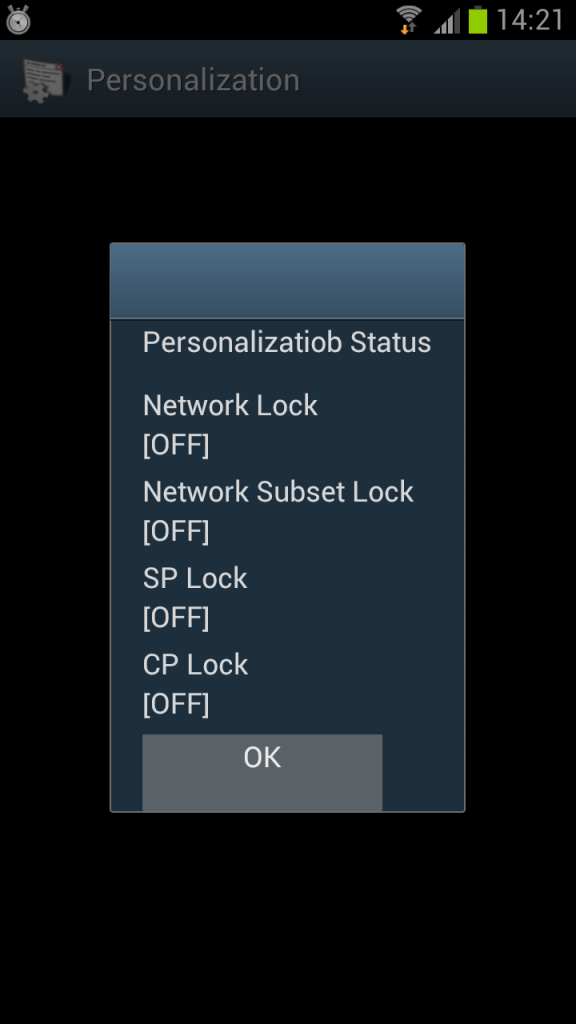

2012-06-03142136.png


Is your branded Galaxy SIII SIM locked?
 
How did you get it unlocked with Three? My one's network locked and when I asked them, they told me all of the units were locked and I needed to wait a couple of months to buy an unlock code off them.
 
I didn't do anything - it just came like that. Where did you buy your phone? I ordered mine online from the 3 website.
 
I got the same info on the screen as the pic u posted after I put the code, does that mean that my device is unlocked??? I got the phone from 3 too, and they told me that the device is locked to their network!
 
I got the same info on the screen as the pic u posted after I put the code, does that mean that my device is unlocked??? I got the phone from 3 too, and they told me that the device is locked to their network!

Yes, it means your phone is unlocked. Try another SIM in it. :)
 
I got the same info on the screen as the pic u posted after I put the code, does that mean that my device is unlocked??? I got the phone from 3 too, and they told me that the device is locked to their network!

Did you get it from a three store or online?
I got it from a store and it says locked :( And i hate that logo appearing when i switch on my phone.
 
Did you get it from a three store or online?
I got it from a store and it says locked :( And i hate that logo appearing when i switch on my phone.

I got it from store, and they told me that it's locked and that they don't know yet when they can get the unlocking codes. I've just now tried putting an international sim on my S3 and it worked just fine!! I guess I got lucky!
what does it say when you put the code into your device? Can you upload a screen shot just to see if it's different from the one I got.
By the way, I also have the 3 logo every time I boot up the device, it might worth trying putting a non- 3 sim in your device and see if it works.
 
Unlocked on Vodafone, as always. I'd also be grateful if someone could tell me what the icon in the top left of my phone means.

2012-06-04%2004.12.04.png

2012-06-04%2004.12.04.png
 
I got it from store, and they told me that it's locked and that they don't know yet when they can get the unlocking codes. I've just now tried putting an international sim on my S3 and it worked just fine!! I guess I got lucky!
what does it say when you put the code into your device? Can you upload a screen shot just to see if it's different from the one I got.
By the way, I also have the 3 logo every time I boot up the device, it might worth trying putting a non- 3 sim in your device and see if it works.

Hey,

It is the same pic as all the others here but obn network lock the option is ON :(
Although my previous phone (2 years ago) was unlocked and didnt have a logo anywhere
 
I was wondering guys, does anyone of you have an option in the settings that says "developer options" where you can test things such as cpu usage and showing touches inputs on the screen? I have these options and I'm starting to think that I might have got a developers phone, not a regular consumer phone (and that's why it's unlocked)
 
I was wondering guys, does anyone of you have an option in the settings that says "developer options" where you can test things such as cpu usage and showing touches inputs on the screen? I have these options and I'm starting to think that I might have got a developers phone, not a regular consumer phone (and that's why it's unlocked)

They all have this option
 
I tried the code from the first post and my phone is definitely unlocked.

Mine was bought in Vodafone shop but is running my old O2 sim perfectly at the moment due to the number port from O2 to Vodafone not happening until after the bank holiday weekend.
 
I get this icon on the top left corner when I turn the notifications off from the drop down menu, and it goes away when I turn the notifications back on.

Ah-haa! Thanks. That's sorted it. I assume that's why I wasn't getting any notification of new text and emails :o
 
I expect if you further expand your survey to ask which colour handsets are unlocked you will probably find it is the pearl blue in the majority!
I say that as I pre-ordered mine at launch but due to the delay I expect they just sent out the handsets unlocked on arrival rather than losing more time in their own warehouse carrying out network personalising and locking the handsets.
If I was anything to go by then they probably did not want the hassle of irate customers constantly calling and complaining which has worked out for me as the handset is network unlocked and no Three logo to be seen anywhere on or in the handset!! :-)
 
I enter the code and see the screen shown above but I do not see the [ON][OFF] status. Is this a bug or is there something I have to enable/disable first to read the status?
 
Back
Top Bottom