Killah1994
Android Expert
[THEME] -Green Earth - ICS Green Earth
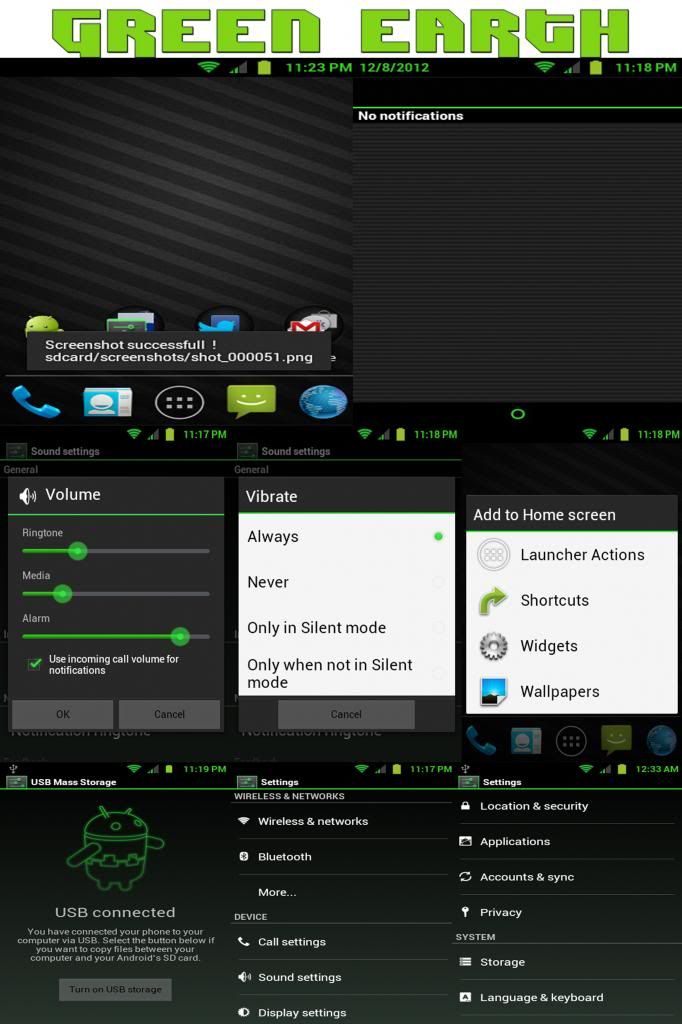
I made this especially for the official 2.3.6 update from samsung / metropcs
Please "DO NOT STEAL" - Took me a good month to put this and others together, Major headaches & a bloodshot in the left eye!

Features
* ICS Themed Framework-res
* ICS Themed Systemui
* ICS Lockscreen Pattern
* ICS Fonts
* ICS Settings
* ICS Mms
* ICS DeskClock
* ICS Camera
* ICS Easteregg (tap android version to see)

Changelog (10/15/2012)
* First Release
* [12/8/12] OP Updated & Zip Files

Follow My Instructions And Everything Should Go Without Errors!
1. Root with Kidallstar or PG's root method
2. Reboot Into Recovery
3. Format cache (mounts & storage)
4. Wipe Dalvik Cache (advanced)
5. Mount System
6. Install From Zip OriginalUOT-GE.zip - This is just to prep the Framework-res & Systemui, So that when you install the SettingsFixGE it will install successful.
7. Reboot System (Let the device boot up to the lockscreen)
8. Reboot Into Recovery
9. Mount System
10. Install From Zip SettingsFixGE.zip - Installing this would change & prep the settings.apk, So that when you install the GreenEarth-ICSSTYLE-7 the [ICS Settings, DeskClock,Mms,Camera] should install without errors.
11. Reboot System (Let the device boot up to the lockscreen)
12. Reboot Into Recovery
13. Mount System
14. Install From Zip GreenEarth-ICSSTYLE-7.zip - This is the final zip to install, This zip will overwrite and update the following Apk's : Settings.apk to ICS Style Settings.apk, Camera.apk to ICS Style Camera.apk, DeskClock.apk to ICS Style DeskClock.apk, Mms to ICS Style Mms.apk.


Make sure your on the MetroPCS Official 2.3.6 Update with *Root Access*
If you just installed the fresh batch of 2.3.6 Official Update Or Restored it
from a BackUp... Reboot recovery and let it head to the Homescreen then reboot back into recovery and install the theme (if not your phone will sit at the samsung logo)! What do i mean by this.... if you restored a 2.3.6 back up from recovery, your suppose to let the device boot up fully (meaning to boot all the way to the lockscreen) then from there you can go back into recovery and flash the theme... Please follow instructions given or you will have problems.

Downloads:
OriginalUOT-GE.zip
SettingsFixGE.zip
GreenEarth-ICSSTYLE-7.zip
Thanks To:
Stark_Raving (for helping me with major details)
KageBeast (helped me to minimize the progress bar & seek bar)
Any Problems Or Issues Pm Me...
I made this especially for the official 2.3.6 update from samsung / metropcs
Please "DO NOT STEAL" - Took me a good month to put this and others together, Major headaches & a bloodshot in the left eye!
Features
* ICS Themed Framework-res
* ICS Themed Systemui
* ICS Lockscreen Pattern
* ICS Fonts
* ICS Settings
* ICS Mms
* ICS DeskClock
* ICS Camera
* ICS Easteregg (tap android version to see)
Changelog (10/15/2012)
* First Release
* [12/8/12] OP Updated & Zip Files
Follow My Instructions And Everything Should Go Without Errors!
1. Root with Kidallstar or PG's root method
2. Reboot Into Recovery
3. Format cache (mounts & storage)
4. Wipe Dalvik Cache (advanced)
5. Mount System
6. Install From Zip OriginalUOT-GE.zip - This is just to prep the Framework-res & Systemui, So that when you install the SettingsFixGE it will install successful.
7. Reboot System (Let the device boot up to the lockscreen)
8. Reboot Into Recovery
9. Mount System
10. Install From Zip SettingsFixGE.zip - Installing this would change & prep the settings.apk, So that when you install the GreenEarth-ICSSTYLE-7 the [ICS Settings, DeskClock,Mms,Camera] should install without errors.
11. Reboot System (Let the device boot up to the lockscreen)
12. Reboot Into Recovery
13. Mount System
14. Install From Zip GreenEarth-ICSSTYLE-7.zip - This is the final zip to install, This zip will overwrite and update the following Apk's : Settings.apk to ICS Style Settings.apk, Camera.apk to ICS Style Camera.apk, DeskClock.apk to ICS Style DeskClock.apk, Mms to ICS Style Mms.apk.
Code:
Reboot Into Recovery
Wipe [Cache,Dalvik Cache]
Mount System
Install From Zip - OriginalUOT-GE
Reboot System (Let the device boot up to the lockscreen)
Reboot Into Recovery
Mount System
Install From Zip - SettingsFixGE
Reboot System (Let the device boot up to the lockscreen)
Reboot Into Recovery
Mount System
Install From Zip - GreenEarth-ICSSTYLE-7
Make sure your on the MetroPCS Official 2.3.6 Update with *Root Access*
If you just installed the fresh batch of 2.3.6 Official Update Or Restored it
from a BackUp... Reboot recovery and let it head to the Homescreen then reboot back into recovery and install the theme (if not your phone will sit at the samsung logo)! What do i mean by this.... if you restored a 2.3.6 back up from recovery, your suppose to let the device boot up fully (meaning to boot all the way to the lockscreen) then from there you can go back into recovery and flash the theme... Please follow instructions given or you will have problems.
Downloads:
OriginalUOT-GE.zip
SettingsFixGE.zip
GreenEarth-ICSSTYLE-7.zip
Thanks To:
Stark_Raving (for helping me with major details)
KageBeast (helped me to minimize the progress bar & seek bar)
Any Problems Or Issues Pm Me...