• After 15+ years, we've made a big change: Android Forums is now Early Bird Club. Learn more here.

Help Accuweather widget not updating for summer time

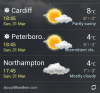
My phone has successfully realised overnight that we are now in British summer time, the time on the phone is correct, however the accuweather widget has stubbornly not changed to BST and is still on GMT, what can I do to get it to show the correct time on the widget as I like it!

 
It is doing this on mine which is very annoying!! I have disabled an then enabled the app, deleted the cache an the data, turned phone off an on. All gps an location services are on

Thanks
 
I was coming on here to ask the same question.
Weirdly mine is displaying the right time for other locations, just not my home one and my current location (currently the same place).
Have also tried restarting phone, clearing all data from the widget etc.
Anyone figured it out yet?
 
Enable wireless networks in location settings. Toggle off then toggle on weather widget in lockscreen options to manually refresh. Also check its update frequency.
 
Turn WiFi ON, turn GPS OFF, then refresh accuweather. That annoyance has now just disappeared for me!


I've tried the above method and it didn't work for me.
I presume I followed the instructions correctly. I always have wifi set to on and GPS set to on.
 
I have tried both the above methods without success. Silly thing is in the botom right hand corner of the widget next to the refresh button in small numbers it is showing the correct time. Its just the large display numbers still showing the incorrect time.
 
After messing around for ages my current location now displays time correctly, but now my two other UK locations that were previously correct have now reverted back to GMT!
 
Found a way to get it working but not great. Go in to the settings through widget and untick 'enable current location', then remove widget, clear cache and re-add widget using manual input. Now shows correct time but obviously won't update to where ever you are.
 
I find this widget to be pretty flakey most of the time. Will work fine for days then suddenly stop updating the weather report. If I turn my phone off or do a restart for any reason, the widget stops automatically updating and I have to uninstall and reinstall to make it work again. It updated to BST with no problem, but stopped doing hourly weather updates at 3am this morning.
 
Had the same peoblem. And tried all the above with no luck. I simply removed the city and added it back on and it updated.
 
Yea its driving me nuts now, been messing for hours. Cant get my head round why some of the solutions above are working for some not for all....also the correct time is showing on the locked screen & the clock has the same font as on the widget yet the time is still wrong on the home page.
 
Got this from Samsung:


Thank you for contacting Samsung Customer Support.

I’m sorry you are having issues with your Accuweather application on your phone. I can understand your frustration as it should have gone back for you.

Regarding your issue, there should be an update from Accuweather to fix this issue soon. Try connecting to a WIFI hotspot and it should update it for you.
 
Here is a fix that worked for me, my uncle and two friends:

1) Enable GPS
2) Tap on the Accuweather widget to bring it to full screen
3) Tap on the menu button (lines and bullet points in top right)
4) Tap the + in the top-right
5) Tap 'Find Current Location' (make sure you have at least one signal bar)
6) Tap the result
7) Return to main screen
8) Press refresh on the bottom-right of the widget (may take a few minutes to update accurately)

;)
 
It appears to depend on where you want the weather for...
 

Attachments

  • Screenshot_2013-03-31-18-45-56-12121899056.png
    Screenshot_2013-03-31-18-45-56-12121899056.png
    251.6 KB · Views: 230
Back
Top Bottom