
Whether I use headphones, car media streaming, or extension speakers I find a2dp bluetooth media streaming volume too low. I am not a blast em til their deaf guy. I just want reasonable volume. I have to turn volume up to full blast in my car just to hear over traffic if Windows are open. In the mall I can't even hear talk radio in my bluetooth earpiece. Is there any app or method to boost bluetooth streaming volume?
Install the app
How to install the app on iOS
Follow along with the video below to see how to install our site as a web app on your home screen.
Note: This feature may not be available in some browsers.
-
After 15+ years, we've made a big change: Android Forums is now Early Bird Club. Learn more here.
You are using an out of date browser. It may not display this or other websites correctly.
You should upgrade or use an alternative browser.
You should upgrade or use an alternative browser.
Help Why is a2dp bluetooth so soft?
- Thread starter recDNA
- Start date

drexappeal
Extreme Android User
Whether I use headphones, car media streaming, or extension speakers I find a2dp bluetooth media streaming volume too low. I am not a blast em til their deaf guy. I just want reasonable volume. I have to turn volume up to full blast in my car just to hear over traffic if Windows are open. In the mall I can't even hear talk radio in my bluetooth earpiece. Is there any app or method to boost bluetooth streaming volume?
There's a safety function on Samsung (maybe all android) phones, where the bluetooth volume jumps down to 1/2 volume, after connecting. For me, it's hit or miss. Sometimes it does it, sometimes it doesn't.
Anyhow, as a rule of thumb, once I've connected a bt device to my phone, I'll just start a song and then make sure that the BT volume is all the way up. From there, I just control the volume level from the bt device (e.g. headphones, car, etc...).
Unfortunately, Bluetooth volume on the phone isn't something you can access without having a bluetooth device connected.
drexappeal
Extreme Android User
I have tried turning up the volume from the phone. (repeatedly) It shows volume at 100%. I have only had the issue you describe on wired headphones and as you described it is easily fixed. No fix for bluetooth.
I see. Well, I never (well, rarely) use wired 3.5mm headsets connected to my devices, so my only experience with what you had mentioned was when the bt connects and the bt volume jumps down on the device.
Right now, I have my LG Tone+ headset connected to my Note 3 and they're actually too loud, so I have to turn the volume on the device down by 1/2.
What BT devices are you using, more specifically?
And, just to be sure, when you're checking the volume...you're definitely doing that while you have media playing, correct (Not just when the bt device is connected to the phone)? If you are already familiar with the difference between BT volume control and the main phone volume, then don't worry...but didn't want to assume you did know the difference.
Yes, I'm sure. Today I was steaming media (tune in radio) through the entune bluetooth connection of my Toyota. Car audio turned up full blast. It wasn't loud enough so I repeated tried turning up volume on phone while listening. I tried immediately then again 10 minutes later then again when I got home while still streaming tune in radio. Volume says bluetooth volume and is clearly at 100%, when I simultaneously had google navigation running (only for part of the trip) the Google tty directions blasted at at least double the volume of the a2dp media. No idea why.
I've had the same experience with my jawbone a2dp earpiece and Motorola bluetooth a2dp headphones and with bluetooth speakers I test tried at Best Buy. Notification sounds are always MUCH louder than music or any other media streaming.
I've had the same experience with my jawbone a2dp earpiece and Motorola bluetooth a2dp headphones and with bluetooth speakers I test tried at Best Buy. Notification sounds are always MUCH louder than music or any other media streaming.
drexappeal
Extreme Android User
Yes, I'm sure. Today I was steaming media (tune in radio) through the entune bluetooth connection of my Toyota. Car audio turned up full blast. It wasn't loud enough so I repeated tried turning up volume on phone while listening. I tried immediately then again 10 minutes later then again when I got home while still streaming tune in radio. Volume says bluetooth volume and is clearly at 100%, when I simultaneously had google navigation running (only for part of the trip) the Google tty directions blasted at at least double the volume of the a2dp media. No idea why.
I've had the same experience with my jawbone a2dp earpiece and Motorola bluetooth a2dp headphones and with bluetooth speakers I test tried at Best Buy. Notification sounds are always MUCH louder than music or any other media streaming.
Wish I could help. My bt volume experience has been the opposite (too loud at times). And the notification sounds via A2DP are on par. Only other thing I could think is that maybe it's an issue with your particular phone?

Bodycount
Android Enthusiast
Anybody know the app to disable to stop the "Too Loud" pop up from coming up?
I know my old motorola droid razr when it got the 4.2 update came with a similar feature which was an app running in the background which could be stopped, but auto started everytime you rebooted the phone.
I know my old motorola droid razr when it got the 4.2 update came with a similar feature which was an app running in the background which could be stopped, but auto started everytime you rebooted the phone.

Simon_Gardner
Android Expert
I see. Well, I never (well, rarely) use wired 3.5mm headsets connected to my devices, so my only experience with what you had mentioned was when the bt connects and the bt volume jumps down on the device.
Right now, I have my LG Tone+ headset connected to my Note 3 and they're actually too loud, so I have to turn the volume on the device down by 1/2.
Anyone tried these non-ear bone conduction type headphones?
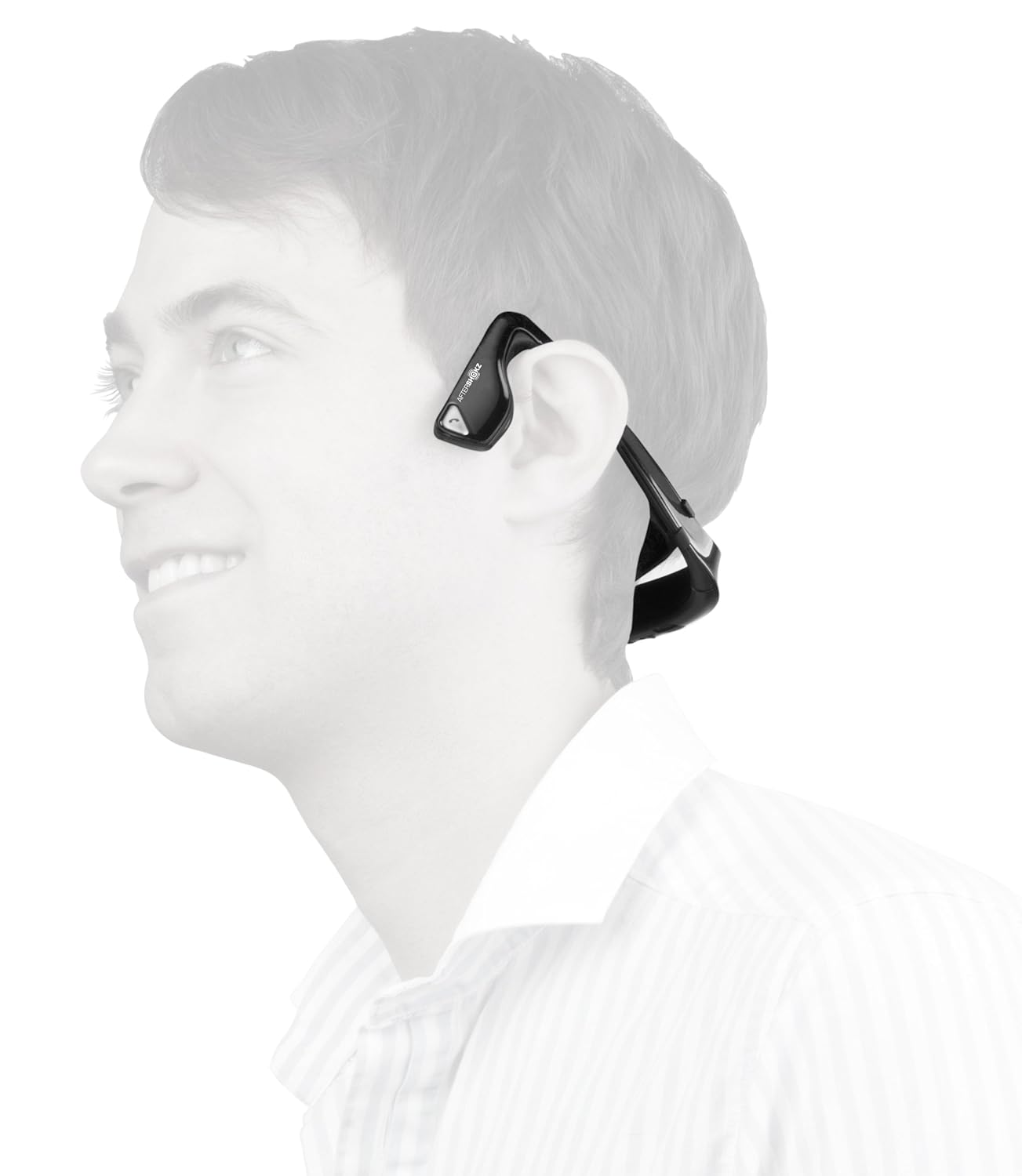

Hasn't happened to me either way. I get satisfactory volume levels whether I'm wired or using Bluetooth headphones. I haven'e connected to a vehicle via Bluetooth or wire, I don't have a car.
drexappeal
Extreme Android User
Didn't even realize those existed (well, stereo versions), until you posted. Seems like a cool concept. I personally am not a fan of the rigid behind the neck construction (similar to the Motorola bt stereo headphones and other manufacturers make), but the bone conduction part is something that I'm intrigued on how good the sound quality is.
Simon_Gardner
Android Expert
Didn't even realize those existed (well, stereo versions), until you posted. Seems like a cool concept. I personally am not a fan of the rigid behind the neck construction (similar to the Motorola bt stereo headphones and other manufacturers make), but the bone conduction part is something that I'm intrigued on how good the sound quality is.
I certainly am curious. I can't use in-ear headphones. Plus mostly I like to be in a position to hear what's going on/being said to me even if I am listening to something. I have no idea how well this works.
drexappeal
Extreme Android User
I certainly am curious. I can't use in-ear headphones. Plus mostly I like to be in a position to hear what's going on/being said to me even if I am listening to something. I have no idea how well this works.
It's definitely something I'm curious about as well. I don't mind using ear buds, but usually prefer the kind that also have hooks (ala Powerbeats)...but I also prefer bluetooth, so I use my powerbeats with the Sony MW1 bluetooth adapter.
Check out these videos
https://www.youtube.com/watch?v=0vLM84zJU9w
https://www.youtube.com/watch?v=qteEol4wE4E
https://www.youtube.com/watch?v=F0IIM7GjFxQ
Simon_Gardner
Android Expert
It's definitely something I'm curious about as well. I don't mind using ear buds, but usually prefer the kind that also have hooks (ala Powerbeats)...but I also prefer bluetooth, so I use my powerbeats with the Sony MW1 bluetooth adapter.
Check out these videos
https://www.youtube.com/watch?v=0vLM84zJU9w
https://www.youtube.com/watch?v=qteEol4wE4E
https://www.youtube.com/watch?v=F0IIM7GjFxQ
There's a bluetooth version of course as above. I'm also wondering where you were going with the middle link there.
I'm thinking how well does it work if you have reading glasses on?
Simon_Gardner
Android Expert
There's no intrinsic reason why this should be so.I get much louder signal on wired headphonenthan bluetooth. I went to Verizon store andtried their demo with my earpiece, bluetooth headphones, and wired headphones. wired headphones much louder just like my phone.
There's no intrinsic reason why this should be so.
tried 2 note 3. same result. I couldn't test my car with both but I did test with Jawbone earpiece, Motorola bluetooth headphones, and cheap wired headphones. The wired headphones are louder. I have noticed that if I use a built in wireless app in my car like Pandora or I Heart Radio that volume is normal (loud) but when streaming bluetooth something prevents comparable volume. Interestingly, tty is much louder than a2dp media streaming but I think that is true in wired headphones as well. If the solution is a different bluetooth earpiece that would be fine but none of the manufacturers list maximum volume as one of their specs. I was told my jawbone is about as loud as it gets. I am often in a noisy environment and need an earpiece capable of greater volume. I prefer an earpiece to headphones because sometimes I need to hear my surroundings.
drexappeal
Extreme Android User
tried 2 note 3. same result. I couldn't test my car with both but I did test with Jawbone earpiece, Motorola bluetooth headphones, and cheap wired headphones. The wired headphones are louder. I have noticed that if I use a built in wireless app in my car like Pandora or I Heart Radio that volume is normal (loud) but when streaming bluetooth something prevents comparable volume. Interestingly, tty is much louder than a2dp media streaming but I think that is true in wired headphones as well. If the solution is a different bluetooth earpiece that would be fine but none of the manufacturers list maximum volume as one of their specs. I was told my jawbone is about as loud as it gets. I am often in a noisy environment and need an earpiece capable of greater volume. I prefer an earpiece to headphones because sometimes I need to hear my surroundings.
For the Jawbone, there's a setting under Accessibility, that allows to switch from stereo to mono. Maybe that'll help concentrate the volume level towards that. When I had my Jawbone Era, I never listened to music with it.
There's also an adapt setting for the 3.5mm wired headphones. That's under the sound settings.
Have you attempted using any of those settings yet?
Wish I had a more definitive answer for you, but my experience has been fine, but just brainstorming in case these are things you haven't tried yet.
drexappeal
Extreme Android User
I listen to sports talk radio. my jawbone doesn't have setting other than just phone or phone & media
Settings i mentioned are in the phone settings, not the bluetooth settings.
Settings i mentioned are in the phone settings, not the bluetooth settings.
where
drexappeal
Extreme Android User
where
Really? You don't know how to get to accessibility?
Menu>Settings>DeviceTab>Accessibility>Scroll down under Hearing>Mono audio "Switch audio from stereo to mono fro when you are using one earpiece
Or in the same area Sound Balance "Control the sound balance of the media player for when you are using earphones"