Cactus73
Member
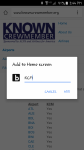
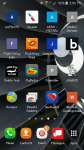
I'm not sure of some of the technical terms, so I'll just explain to the best of my ability. Chrome is my web browser. When I add a shortcut for a website to my home screen, I tap the three dots in the upper right corner, and then select "Add to Home screen". It allows you to rename the shortcut and it assigns a letter of the alphabet (usually the first letter of the web page that you are viewing), but sometimes the letter has nothing to do with the shortcut. In the screenshots below, you can see that one of my shortcuts is named KCM, but it was assigned the letter "b", which makes no sense at all. Is there a way to edit my shortcuts? Instead of a letter, I would rather use a logo to identify my shortcuts. Thanks!