
Hey all!
Last week I released a new app to the Android market, IceRemote:
A few examples of what you can do with IceRemote:
- Connect your mediacenter PC to your TV and use your mobile phone as remote.
- Watch movies on your PC and control them with your mobile phone.
- Give and take control of your presentations without touching your PC.
- Play games on your PC by controlling them with your mobile phone.
- Listen to music from your PC and control the media and volume with your phone.
- Shutdown and boot your PC everywhere in your house.
Screenshots
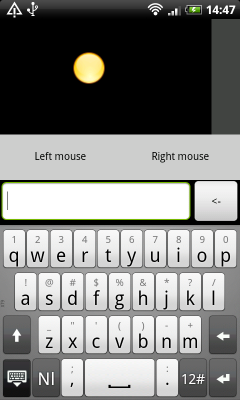
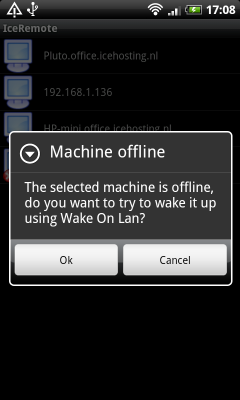
How it works:
Our application connects your mobile phone to your PC via the local area network. Everytime you move your finger on the phone, our application reads the movement and sends that movement via your local network to your PC. Our application on your PC receives the messages from your mobile phone and turns them into a cursor movement, on your PC. This whole action is done in a fraction of a second.Besides the movement we also added a
few extra options in the application. With these extra options it is possible to:
- Shutdown your PC
- Boot your PC (using Wake On Lan)
- CTRL keys
- F keys
What do I need:
You need a phone with the Android operation system and a computer. The following operating systems are supported:
- Microsoft Windows XP
- Microsoft Windows Vista
- Microsoft Windows 7
- Linux (any flavor) with kernel 2.6 or higher
Youtube video
‪IceRemote‬‏ - YouTube
Important links:
http://market.android.com/details?id=com.iceremote
IceRemote - Control your PC with your mobile!
Last week I released a new app to the Android market, IceRemote:
A few examples of what you can do with IceRemote:
- Connect your mediacenter PC to your TV and use your mobile phone as remote.
- Watch movies on your PC and control them with your mobile phone.
- Give and take control of your presentations without touching your PC.
- Play games on your PC by controlling them with your mobile phone.
- Listen to music from your PC and control the media and volume with your phone.
- Shutdown and boot your PC everywhere in your house.
Screenshots
How it works:
Our application connects your mobile phone to your PC via the local area network. Everytime you move your finger on the phone, our application reads the movement and sends that movement via your local network to your PC. Our application on your PC receives the messages from your mobile phone and turns them into a cursor movement, on your PC. This whole action is done in a fraction of a second.Besides the movement we also added a
few extra options in the application. With these extra options it is possible to:
- Shutdown your PC
- Boot your PC (using Wake On Lan)
- CTRL keys
- F keys
What do I need:
You need a phone with the Android operation system and a computer. The following operating systems are supported:
- Microsoft Windows XP
- Microsoft Windows Vista
- Microsoft Windows 7
- Linux (any flavor) with kernel 2.6 or higher
Youtube video
‪IceRemote‬‏ - YouTube
Important links:
http://market.android.com/details?id=com.iceremote
IceRemote - Control your PC with your mobile!