
SwitchApps, the next level of your multitasking experience on android operator device.
It will change your way of switching between apps easier and faster way.
Let’s forget about the old and various steps before you get to the other apps
Features:
========================
1. Quickly switch between apps
2. Swipe to close app
3. Closing all apps by just one click
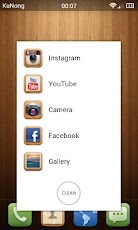
4. Double click icon to open favorite application menu and you can customize what you need.
5. Quickly settings menu - WiFi, Mobile network, Bluetooth, Sound, Airplane mode and Screen brightness.
6. Turn screen off.
Multitouch Features:
========================
1. Swipe left or right, quickly switch running applications.
2. Swipe down, quickly open SwitchApps settings.
3. Swipe up, quickly go home.
4. 2-finger long press, hide SwitchApps in notification bar.
Soft Buttons Feature:
========================
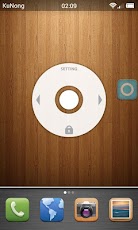
It's designed to replace multitouch features for easy to use in a single hand. So, if you enable this feature, all of multitouch features except 2-finger long press will be disabled.
(enable/disable Soft Buttons feature from SwitchApps Settings)
1. Long press on the icon to quickly go home.
2. Double click icon to show Soft Buttons.
3. Press left or right arrow to quickly switch running applications.
4. Press screen off icon to turn screen off.
5. Press setting to open SwitchApps settings.
6. Press middle circle to directly go home.
Requirements:
========================
1. Android 2.2+
How to uninstall?
========================
In case of you allow SwitchApps to turn screen off, you can't uninstall it with normal step.
Just uninstall it through SwitchApps settings.
Notes:
========================
Please Note… the purpose of this app is to make you access to many apps in the simple “switching” system.
Don’t worry about the complicated step, because SwitchApps is just too simple to use.



Video
http://www.youtube.com/watch?v=msOPRWlWqd0
Download
https://play.google.com/store/apps/details?id=kunong.android.switchapps
It will change your way of switching between apps easier and faster way.
Let’s forget about the old and various steps before you get to the other apps
Features:
========================
1. Quickly switch between apps
2. Swipe to close app
3. Closing all apps by just one click
4. Double click icon to open favorite application menu and you can customize what you need.
5. Quickly settings menu - WiFi, Mobile network, Bluetooth, Sound, Airplane mode and Screen brightness.
6. Turn screen off.
Multitouch Features:
========================
1. Swipe left or right, quickly switch running applications.
2. Swipe down, quickly open SwitchApps settings.
3. Swipe up, quickly go home.
4. 2-finger long press, hide SwitchApps in notification bar.
Soft Buttons Feature:
========================
It's designed to replace multitouch features for easy to use in a single hand. So, if you enable this feature, all of multitouch features except 2-finger long press will be disabled.
(enable/disable Soft Buttons feature from SwitchApps Settings)
1. Long press on the icon to quickly go home.
2. Double click icon to show Soft Buttons.
3. Press left or right arrow to quickly switch running applications.
4. Press screen off icon to turn screen off.
5. Press setting to open SwitchApps settings.
6. Press middle circle to directly go home.
Requirements:
========================
1. Android 2.2+
How to uninstall?
========================
In case of you allow SwitchApps to turn screen off, you can't uninstall it with normal step.
Just uninstall it through SwitchApps settings.
Notes:
========================
Please Note… the purpose of this app is to make you access to many apps in the simple “switching” system.
Don’t worry about the complicated step, because SwitchApps is just too simple to use.
Video
http://www.youtube.com/watch?v=msOPRWlWqd0
Download
https://play.google.com/store/apps/details?id=kunong.android.switchapps