
Install the app
How to install the app on iOS
Follow along with the video below to see how to install our site as a web app on your home screen.
Note: This feature may not be available in some browsers.
-
After 15+ years, we've made a big change: Android Forums is now Early Bird Club. Learn more here.
You are using an out of date browser. It may not display this or other websites correctly.
You should upgrade or use an alternative browser.
You should upgrade or use an alternative browser.
Help BROM ERROR : S_CHKSUM_ERROR (1041) with SP FLASH TOOL ALL VERSION
- Thread starter scratch7
- Start date

We need a bit more information to have a chance of helping. What device, what software version/ROM, root status, what are you trying to flash, that sort of thing.
Remember: we only know what you tell us, and it's best not to make assumptions because the problem could be in something you assumed was correct and didn't mention.
That said, "checksum error" sounds like the file you are trying to flash failed a verification test (either because it is corrupt or because it is unsigned and the tool is checking for a signature - I don't know this tool so can't do more than speculate).
Remember: we only know what you tell us, and it's best not to make assumptions because the problem could be in something you assumed was correct and didn't mention.
That said, "checksum error" sounds like the file you are trying to flash failed a verification test (either because it is corrupt or because it is unsigned and the tool is checking for a signature - I don't know this tool so can't do more than speculate).

scratch7
Lurker
Thank you for having responded earlier,
Lenovo S920 hardware memory of 8 GB
Android Kitkat S920I 220 410 722 ROW happen bootloop.
I had trouble installing (flashing) android.
1. Some of the tools in the SP version of Flash tool (9 versions) I already use, with some Stock ROM 4 each and Custom ROM.zip 5 call now.
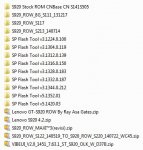
In the first step to use the stock ROM Flash tool SP Firmware Upgrade manner, Format ALL + Download, Download, (mark DA, DL, All with cheksum).
Battery apart when it is flashing.
I have done no progress. warning on SP Flash tool raises the following
BROM ERROR: S_CHKSUM_ERROR (1041),

2. In the ROM installation through ROM.zip SDCard using CWM v5.5.5.0.4 for Lenovo S920_ROW.
before I install previous ROM.zip msh no data backup, and I do a Restore, but get the following warning
Error while restoring / system!
> Install ROM.zip I've already done, according to existing procedures (dalvick wipe, data format + system + cache). but it can be a warning of the CWM
(status 7) couldn; t open directory
Please direction in a problem that occurs on the first item ..
thank you,
Lenovo S920 hardware memory of 8 GB
Android Kitkat S920I 220 410 722 ROW happen bootloop.
I had trouble installing (flashing) android.
1. Some of the tools in the SP version of Flash tool (9 versions) I already use, with some Stock ROM 4 each and Custom ROM.zip 5 call now.
In the first step to use the stock ROM Flash tool SP Firmware Upgrade manner, Format ALL + Download, Download, (mark DA, DL, All with cheksum).
Battery apart when it is flashing.
I have done no progress. warning on SP Flash tool raises the following
BROM ERROR: S_CHKSUM_ERROR (1041),
2. In the ROM installation through ROM.zip SDCard using CWM v5.5.5.0.4 for Lenovo S920_ROW.
before I install previous ROM.zip msh no data backup, and I do a Restore, but get the following warning
Error while restoring / system!
> Install ROM.zip I've already done, according to existing procedures (dalvick wipe, data format + system + cache). but it can be a warning of the CWM
(status 7) couldn; t open directory
Please direction in a problem that occurs on the first item ..
thank you,
daultimate
Lurker
i have the same problem..did u find any solution to it?Thank you for having responded earlier,
Lenovo S920 hardware memory of 8 GB
Android Kitkat S920I 220 410 722 ROW happen bootloop.
I had trouble installing (flashing) android.
1. Some of the tools in the SP version of Flash tool (9 versions) I already use, with some Stock ROM 4 each and Custom ROM.zip 5 call now.
View attachment 79649
In the first step to use the stock ROM Flash tool SP Firmware Upgrade manner, Format ALL + Download, Download, (mark DA, DL, All with cheksum).
Battery apart when it is flashing.
I have done no progress. warning on SP Flash tool raises the following
BROM ERROR: S_CHKSUM_ERROR (1041),
View attachment 79650
2. In the ROM installation through ROM.zip SDCard using CWM v5.5.5.0.4 for Lenovo S920_ROW.
before I install previous ROM.zip msh no data backup, and I do a Restore, but get the following warning
Error while restoring / system!
> Install ROM.zip I've already done, according to existing procedures (dalvick wipe, data format + system + cache). but it can be a warning of the CWM
(status 7) couldn; t open directory
Please direction in a problem that occurs on the first item ..
thank you,

Get copy of the rom that is not corrupted.
Usual cause of corruption is a bad download of the rom.
Usual cause of corruption is a bad download of the rom.
Dave Vincent Kilaton
Lurker
any had solved this problem? please help

Where are you obtaining the ROM from? As it's a checksum error. See if there's an MD5 hash for the ROM file on the download site, if so run an MD5 on what you've downloaded and check if the hash you get matches what's on the download site.

any had solved this problem? please help
Welcome to our AndroidForums, Dave.
It's hard to tell what the problem and/or eventual solution is since none of the posters indicated if re-downloading the file / ROM solved their issue...(i.e., due to an incomplete and/or corrupted download).
Although we might infer that given no further responses, that might have been the solution.

Yogesh1969
Newbie
I get the same problem even after deleting that file. In other sites, one mentions that in the ".ini " file change the switch from "1" to "0". For me that too didn't work.
I tried 3 ROM files, and all can't be corrupt.
I tried 3 ROM files, and all can't be corrupt.
vin_SADPACIFIC
Lurker
unmark DA, DL, All with cheksum, will success to flash and completed the progress, ive tried, but my phone still cant reboot, hard brick!!

Albdroid
Newbie
Delete the chksum file from the rom You downloadedThank you for having responded earlier,
Lenovo S920 hardware memory of 8 GB
Android Kitkat S920I 220 410 722 ROW happen bootloop.
I had trouble installing (flashing) android.
1. Some of the tools in the SP version of Flash tool (9 versions) I already use, with some Stock ROM 4 each and Custom ROM.zip 5 call now.
View attachment 79649
In the first step to use the stock ROM Flash tool SP Firmware Upgrade manner, Format ALL + Download, Download, (mark DA, DL, All with cheksum).
Battery apart when it is flashing.
I have done no progress. warning on SP Flash tool raises the following
BROM ERROR: S_CHKSUM_ERROR (1041),
View attachment 79650
2. In the ROM installation through ROM.zip SDCard using CWM v5.5.5.0.4 for Lenovo S920_ROW.
before I install previous ROM.zip msh no data backup, and I do a Restore, but get the following warning
Error while restoring / system!
> Install ROM.zip I've already done, according to existing procedures (dalvick wipe, data format + system + cache). but it can be a warning of the CWM
(status 7) couldn; t open directory
Please direction in a problem that occurs on the first item ..
thank you,

Just FYI, you're responding to a four year old post.Delete the chksum file from the rom You downloaded

Albdroid
Newbie
Really.. . Hehehhe... SorryJust FYI, you're responding to a four year old post.
No need to be sorry! I think we've all been there, done that.Really.. . Hehehhe... Sorry
