• After 15+ years, we've made a big change: Android Forums is now Early Bird Club. Learn more here.

Changing UI sounds

Hi,

I'd like to change a UI sound, specifically the key 'click' on my wife's N4.

I have the replacement .ogg file ready and renamed, but when I try to replace the file in
/system/media/audio/UI using ES file explorer, I can't, being told it is a read-only file system.

Can any one help?
 
Hi

In ES under the Tools tab on the left menu, have you enabled Root explorer. By default its off so that you cant accidently mess things up. I assume you are rooted else you wont be able to modify that folder.

Roger
 
Hi, thanks for the reply. The root explorer (which I didn't know existed!) is toggled on. And yes, the handset is rooted.

I can see the file I want to overwrite, effect_tick.ogg but it won't allow me to. Or delete it.
ES file explorer tells me the file it's both readable and writable, so I shouldn't have any problem changing it should I?


I'll continue to fiddle about and post if I have any success. In the meantime I am still very much open to suggestions!
 
Try renaming the file to "effect_tick.ogg-OLD", than put the new file in it's place.

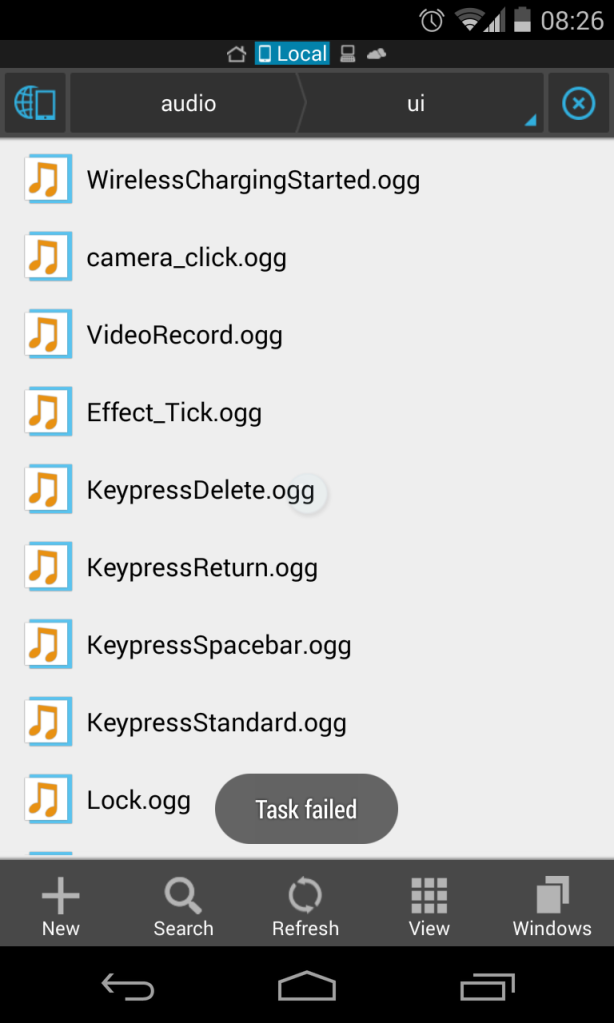
Tried this, thanks but just got "task failed"

Screenshot_2014-03-29-08-26-41.png
 
Hi

Have you checked that ES had root access allowed by supersu (or superuser)? It would seem that ES is not getting root user permissions.

Roger
 
Done it!

I've managed to copy the replacement file into the UI folder by using TWRP, mounting the system partition and copying whilst still in recovery

Thanks for all the suggestions
 
Back
Top Bottom