
Recently purchased Galaxy J3. Tried to open a new article on facebook and the phone tells me there are too many tabs open. The warning states to "Tap the tabs icons on the toolbar at the bottom of the screen" But I don't see any tabs at the bottom of the screen. I had just gone to the menu tab on the device not the screen and made sure all other tabs were closed. But it still tells me that the maximum number are open. So what the heck are they talking about??
Install the app
How to install the app on iOS
Follow along with the video below to see how to install our site as a web app on your home screen.
Note: This feature may not be available in some browsers.
-
After 15+ years, we've made a big change: Android Forums is now Early Bird Club. Learn more here.
You are using an out of date browser. It may not display this or other websites correctly.
You should upgrade or use an alternative browser.
You should upgrade or use an alternative browser.
Help Close tabs Where??!!
- Thread starter AK in PA
- Start date

If you are using the web to access FB and not the app, and you are using Chrome as your browser, with Chrome open swipe down on the screen from the top of the screen and you can tap on the menu (three dots) and choose close all tabs.
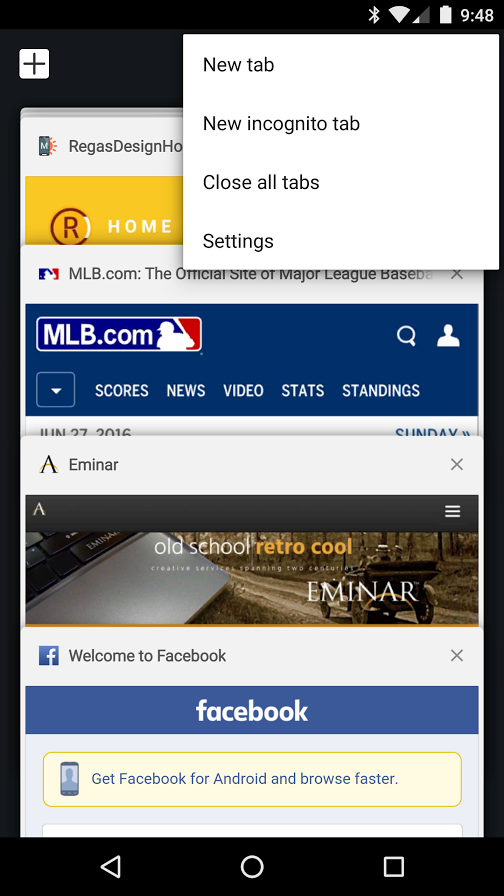
Be careful when you swipe ... too close to the top and you pull down the notification bar, and to far down and it just refreshes the current page.
Be careful when you swipe ... too close to the top and you pull down the notification bar, and to far down and it just refreshes the current page.
Sorry, I'm not seeing what your displaying. What you are displaying is what I get when I tap the menu button on the bottom left of the device. That I had made sure had only one screen open. How would I know if I'm using "Chrome" and if I'm using the "app"? Sorry, I 'm not that knowledgeable about these things.
Parayilhussain
Android Enthusiast
Hi,
Double tap on the center button below the screen. and see the tabs.
Double tap on the center button below the screen. and see the tabs.
The button you tap on the lower left that looks like two overlapping squares is your recently used apps. This isn't the same thing I'm showing. Tap on the icon that says internet and then swipe down and see if it shows you a menu of three dots in the upper right. If not, open your app drawer (icon that says 'apps') and find Chrome and open that. Then swipe down and see if that's where all your tabs are.
I would guess you are using the Facebook app, but every time you open a link in opens it in a new browser tab and never closes them so you end up with too many tabs open.
I would guess you are using the Facebook app, but every time you open a link in opens it in a new browser tab and never closes them so you end up with too many tabs open.
OK, first suggestion did not do anything. Second suggestion, opening Chrome, found the three dots and tapped. Did find only 3 tabs, closed all which also closed chrome. The little square with the number in I've deduced means the number of tabs open does not show 16 like the warning on FB. Have to go work now, will check back later. Thanks.
Okay, fair enough. I would guess then that you use the default browser and there is some way to view/close tabs, but I don't have a Samsung phone here to check how that would be done. If I come across someone in the office with a Galaxy S4 or above, I'll take a peek and post back.