• After 15+ years, we've made a big change: Android Forums is now Early Bird Club. Learn more here.

Cloud wars, messaging

matttye

Android Expert
Being the proud owner of a Galaxy S2 and an iPad, I've used the cloud features of both platforms extensively.

Google cloud services lack the syncing and integration options that iOS devices do, for example, they don't have anything like iCloud where when you take a picture, buy a song etc, they're automatically transferred to all of your other devices.. But photos that are uploaded to Google+ do have the benefit of being available on any device with an internet connection. Android also needs an iMessage-type app, where you can continue the same conversation across multiple devices, and of course use your data allowance instead of your text message plan.

iOS on the other hand has the opposite problem. Everything is synced across *supported* devices, which means that Android phones don't get a look in when it comes to iCloud. There's no way to access your iCloud content using just a web browser, like you can with Google stuff.

I'd love to bang these two companies' heads together and have all of these services be compatible with each other!

Does anyone think Google may eventually bring stuff like what I've mentioned above to Andoid?

Discuss.

 
1. For the synced content across all devices like iCloud, like pictures, use Sugarsync. It does what iCloud does before there even was an iCloud. After I take a picture, its synced to the servers and it is downloaded to my PC automatically. And if you set it up, it can also be downloaded to other devices. It also maxes out at 38GB for free. Sugarsync is available for both iOS and Android, so if you set up a sync folder on your iPad, it will also sync to your Android phone.

2. For the message that can be continued on any device, I think Google has this with the Google+ messenger.
 
1. For the synced content across all devices like iCloud, like pictures, use Sugarsync. It does what iCloud does before there even was an iCloud. After I take a picture, its synced to the servers and it is downloaded to my PC automatically. And if you set it up, it can also be downloaded to other devices. It also maxes out at 38GB for free. Sugarsync is available for both iOS and Android, so if you set up a sync folder on your iPad, it will also sync to your Android phone.

2. For the message that can be continued on any device, I think Google has this with the Google+ messenger.

1) thanks for that, I'll look into it.

2) that's not the same thing for several reasons:

- iMessage works for anyone with an apple id, whereas with Google+ you have to have (and use) a Google+ account. Nearly everyone who has an iOS device will have an apple account, but not everyone who has an android device will have a Google+ account. Hardly any of my friends have Google+.

- Google+ is not available offline.
 
iMessage uses XMPP aka jabber.

Try IMO, free in the Market, and set up your iMessage account as a Jabber account. I haven't tried it, but it might work.

Gtalk (Talk on Android) is also a Jabber service, and I've read various things about google supporting iMessage connections, but I don't know where that stands and you'd be switching to a google account, something you're trying to avoid.

Obtw,

iMessage Bug Traps Android Converters’ Personal Conversations… But There’s A Fix! | TechCrunch

The great thing about iMessage is that Apple convinced people that their implementation was a good idea. I am going to rant about this - getting locked into a platform specific IM is never a good idea. At least when people did that with BlackBerry, they got additional services integrated in a way unique when it conceived and implemented. So I don't see the issue as Apple vs Google vs BB - I see it as educating consumers to communicate by relying on vendor-independent apps. The protocols are out there.

Finally, I think that you have some requirement that I don't follow - you want to IM while offline??

PS - to get to friends on iChat, use IMO and set your Mobile Me address as an AIM account. As I say, the protocols are out there. ;)

PPS - If jabber on IMO doesn't get you there, try Xabber (also free) and select account type as XMPP.

Also - from what I'm reading - if you're not online, iMessage will send your message as an SMS - is that correct? In Android, IM apps tend to work just fine over 3G, so, no wifi required.

iMessage uses XMPP (the standards version of Jabber).
 
iMessage uses XMPP aka jabber.

Try IMO, free in the Market, and set up your iMessage account as a Jabber account. I haven't tried it, but it might work.

Gtalk (Talk on Android) is also a Jabber service, and I've read various things about google supporting iMessage connections, but I don't know where that stands and you'd be switching to a google account, something you're trying to avoid.

Obtw,

iMessage Bug Traps Android Converters
 
Nope, if iMessage is following the XMPP protocol as claimed, you use an app here using that same protocol, log in with your Apple credentials, and you're done, no other requirements on the iPhone end.

Very common for different messaging apps using the same protocol to talk to each other. See my note above about an AIM client working just fine with iChat for example. When I use that, no one can tell if I am at my desktop with iChat or on Android with IMO.

In a similar way, see if I'm right about IMO/Jabber or Xabber or if they are simply lying about how iMessage works.

All Apple is doing is putting window dressing on an existing protocol and convincing people that they have done something new in personal communications. This is exactly the same thing that they did with iChat on the Mac. I have no doubt that the iMessage client is slick and works very well. Again, like iChat before it. And like iChat, you can use buddy IDs or phone numbers. iMessage is simply using a better protocol (XMPP) than the default (of the several supported) for iChat.

What Apple has really innovated on there is lock-in. And mindshare.
 
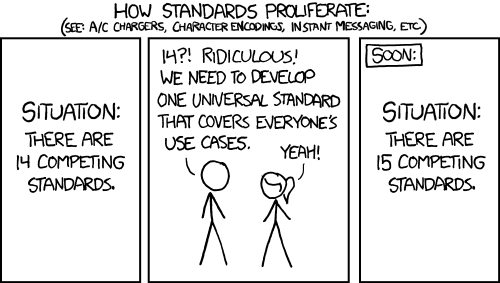
standards.png
 
Nope, if iMessage is following the XMPP protocol as claimed, you use an app here using that same protocol, log in with your Apple credentials, and you're done, no other requirements on the iPhone end.

Very common for different messaging apps using the same protocol to talk to each other. See my note above about an AIM client working just fine with iChat for example. When I use that, no one can tell if I am at my desktop with iChat or on Android with IMO.

In a similar way, see if I'm right about IMO/Jabber or Xabber or if they are simply lying about how iMessage works.

All Apple is doing is putting window dressing on an existing protocol and convincing people that they have done something new in personal communications. This is exactly the same thing that they did with iChat on the Mac. I have no doubt that the iMessage client is slick and works very well. Again, like iChat before it. And like iChat, you can use buddy IDs or phone numbers. iMessage is simply using a better protocol (XMPP) than the default (of the several supported) for iChat.

What Apple has really innovated on there is lock-in. And mindshare.

I'm talking about conversing with other android users. Being able to chat to people who use iMessage is great, but to chat to other people on android using xmpp they'd have to have a client installed.

IMessage on iOS and bbm on blackberry are very successful because they're well integrated and everyone who owns devices with either platform has the clients installed. Android needs something similar!
 
I'm talking about conversing with other android users. Being able to chat to people who use iMessage is great, but to chat to other people on android using xmpp they'd have to have a client installed.

IMessage on iOS and bbm on blackberry are very successful because they're well integrated and everyone who owns devices with either platform has the clients installed. Android needs something similar!

On Android, that's Talk, it's a standard part of the Android OS, and it converses with anyone with Android, and anyone with Gtalk, aka Google Talk (either desktop client or web interface (or iPhone or BlackBerry app)), and anyone using a Jabber account.

When you set up your Google credentials when you activated your phone, your Talk client was initialized. It's ready to use, right away.
 
Back
Top Bottom