
Richard MacLeod
Lurker
Hi, I´m trying to reference the main layout in a project but I always get a null reference.
Help is appreciated. Thanks !
This is the xml of main activity:
<?xml version="1.0" encoding="utf-8"?>
<RelativeLayout
xmlns:android="http://schemas.android.com/apk/res/android"
xmlns:tools="http://schemas.android.com/tools"
xmlns:app="http://schemas.android.com/apk/res-auto"
android:layout_width="wrap_content"
android:layout_height="match_parent"
android: paddingLeft="@dimen/activity_horizontal_margin"
android: paddingRight="@dimen/activity_horizontal_margin"
android: paddingTop="@dimen/activity_vertical_margin"
android: paddingBottom="@dimen/activity_vertical_margin"
app:layout_behavior="@String/appbar_scrolling_view_behavior"
tools:showIn="@layout/activity_main"
tools:context=".MainActivity"
android:background="#12a9db"
android:id="@+id/LayPrin">
...
I'm trying to make reference to the main RelativeLayout in the MainActivity java code but always returns null.
public class MainActivity extends AppCompatActivity {
importandroid.widget.RelativeLayout;
@override
protected void onCreate(Bundle savedInstanceState) {
Log.i(Mi_Tag,"onCreate");
super.onCreate(savedInstanceState);
setContentView(R.layout.activity_main);
Toolbar toolbar = (Toolbar) findViewById(R.id.toolbar);
setSupportActionBar(toolbar);
}
@override
public boolean onCreateOptionsMenu(Menu menu) {
// Inflate the menu; this adds items to the action bar if it is present.
getMenuInflater().inflate(R.menu.menu_main, menu);
return true;
}
...
public void cambiaRojo(View view) {
RelativeLayout fondoprin = (RelativeLayout)findViewById(R.id.LayPrin);
}
}
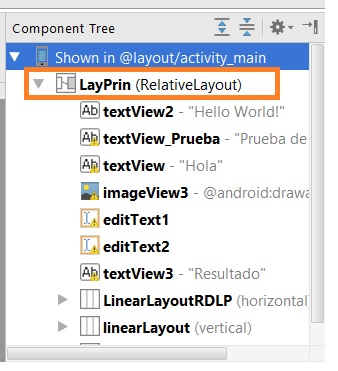
This is the manifest
<?xml version="1.0" encoding="utf-8"?>
<manifest xmlns:android="http://schemas.android.com/apk/res/android"
package="com.example.ricardo.myfirstapp" >
<application
android:allowBackup="true"
android:icon="@Mipmap/ic_launcher"
android:label="@String/app_name"
android:supportsRtl="true"
android:theme="@Style/AppTheme" >
<activity
android:name=".MainActivity"
android:label="@String/app_name"
android:theme="@Style/AppTheme.NoActionBar" >
<intent-filter>
<action android:name="android.intent.action.MAIN" />
<category android:name="android.intent.category.LAUNCHER" />
</intent-filter>
</activity>
<activity
android:name=".About"
android:label="@String/title_activity_about"
android:theme="@Style/AppTheme.NoActionBar" >
</activity>
</application>
</manifest>
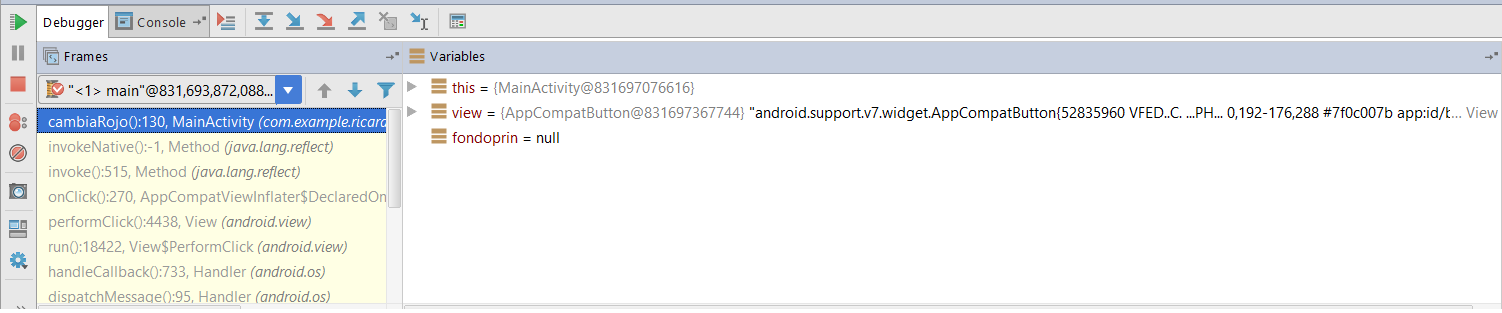
Help is appreciated. Thanks !
This is the xml of main activity:
<?xml version="1.0" encoding="utf-8"?>
<RelativeLayout
xmlns:android="http://schemas.android.com/apk/res/android"
xmlns:tools="http://schemas.android.com/tools"
xmlns:app="http://schemas.android.com/apk/res-auto"
android:layout_width="wrap_content"
android:layout_height="match_parent"
android: paddingLeft="@dimen/activity_horizontal_margin"
android: paddingRight="@dimen/activity_horizontal_margin"
android: paddingTop="@dimen/activity_vertical_margin"
android: paddingBottom="@dimen/activity_vertical_margin"
app:layout_behavior="@String/appbar_scrolling_view_behavior"
tools:showIn="@layout/activity_main"
tools:context=".MainActivity"
android:background="#12a9db"
android:id="@+id/LayPrin">
...
I'm trying to make reference to the main RelativeLayout in the MainActivity java code but always returns null.
public class MainActivity extends AppCompatActivity {
importandroid.widget.RelativeLayout;
@override
protected void onCreate(Bundle savedInstanceState) {
Log.i(Mi_Tag,"onCreate");
super.onCreate(savedInstanceState);
setContentView(R.layout.activity_main);
Toolbar toolbar = (Toolbar) findViewById(R.id.toolbar);
setSupportActionBar(toolbar);
}
@override
public boolean onCreateOptionsMenu(Menu menu) {
// Inflate the menu; this adds items to the action bar if it is present.
getMenuInflater().inflate(R.menu.menu_main, menu);
return true;
}
...
public void cambiaRojo(View view) {
RelativeLayout fondoprin = (RelativeLayout)findViewById(R.id.LayPrin);
}
}
This is the manifest
<?xml version="1.0" encoding="utf-8"?>
<manifest xmlns:android="http://schemas.android.com/apk/res/android"
package="com.example.ricardo.myfirstapp" >
<application
android:allowBackup="true"
android:icon="@Mipmap/ic_launcher"
android:label="@String/app_name"
android:supportsRtl="true"
android:theme="@Style/AppTheme" >
<activity
android:name=".MainActivity"
android:label="@String/app_name"
android:theme="@Style/AppTheme.NoActionBar" >
<intent-filter>
<action android:name="android.intent.action.MAIN" />
<category android:name="android.intent.category.LAUNCHER" />
</intent-filter>
</activity>
<activity
android:name=".About"
android:label="@String/title_activity_about"
android:theme="@Style/AppTheme.NoActionBar" >
</activity>
</application>
</manifest>
 nClick="cambiaRojo"/>