
HoboMedjai
Lurker
Hi,
I'm aware there are multiple topics like these but mine seems to be a bit special...
My SGS is unable to connect to Kies in Kies mode, however it's able to connect to my computer in Mass storage device mode and Music player mode (Kies and Internet mode seem to be the problem...).
I have a Galaxy S I-9000 (European) and run Windows Vista SP2.
Firmware: 2.1-update1
Baseband: I9000XXJM4
Kernel: 2.6.29 root@SE-S603#2
Build: ECLAIR.XWJM8
Kies: 2.0.0.11011_16
I do have Windows Mobile Device and have formatted my SD card in the hope of just having a malfunctioning name somewhere.
When I first connected it after the reformat Windows took ages finding the driver and then said it was done but Kies didn't see the phone (making me think the phone wasn't correctly installed once more...).
When disconnecting and reconnecting the phone it starts flashing in between a black window and the MTP-application window.
In the internet mode the cellphone is actually recognized as a Samsung_Android device however it finds no driver.
I have asked Kies to install the drivers but got after a little wait I got this message:
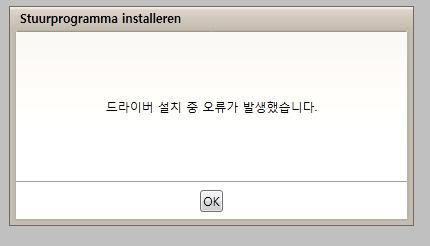
As my Korean (I guess...) is non-existent I'm quite confused...
Does anyone have an idea how to get this little problem out of the way?
Or if not how I could load a correct form of Froyo onto the SGS without bricking it?
I'm pretty new to all of this and thus a bit scared of going all out.
Anyway, any help would be appreciated.
I'm aware there are multiple topics like these but mine seems to be a bit special...
My SGS is unable to connect to Kies in Kies mode, however it's able to connect to my computer in Mass storage device mode and Music player mode (Kies and Internet mode seem to be the problem...).
I have a Galaxy S I-9000 (European) and run Windows Vista SP2.
Firmware: 2.1-update1
Baseband: I9000XXJM4
Kernel: 2.6.29 root@SE-S603#2
Build: ECLAIR.XWJM8
Kies: 2.0.0.11011_16
I do have Windows Mobile Device and have formatted my SD card in the hope of just having a malfunctioning name somewhere.
When I first connected it after the reformat Windows took ages finding the driver and then said it was done but Kies didn't see the phone (making me think the phone wasn't correctly installed once more...).
When disconnecting and reconnecting the phone it starts flashing in between a black window and the MTP-application window.
In the internet mode the cellphone is actually recognized as a Samsung_Android device however it finds no driver.
I have asked Kies to install the drivers but got after a little wait I got this message:
As my Korean (I guess...) is non-existent I'm quite confused...
Does anyone have an idea how to get this little problem out of the way?
Or if not how I could load a correct form of Froyo onto the SGS without bricking it?
I'm pretty new to all of this and thus a bit scared of going all out.
Anyway, any help would be appreciated.