
dollerprod
Newbie
I am trying to use a USB Digital Microscope (Carson Zorb)
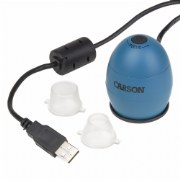
Phone is Samsung Galaxy S6.
Bought an OTG cable. When I plug the camera/OTG cable into the phone, the microscopes LED lights up, but I have not been able to view it on my phone screen. I have the app "USB Camera Trial", not sure if that is what I should be using.
I also downloaded "USB Host Diagnostics". Supposedly this will tell me if my phone allows me to do this?
The results read:
Phone is Samsung Galaxy S6.
Bought an OTG cable. When I plug the camera/OTG cable into the phone, the microscopes LED lights up, but I have not been able to view it on my phone screen. I have the app "USB Camera Trial", not sure if that is what I should be using.
I also downloaded "USB Host Diagnostics". Supposedly this will tell me if my phone allows me to do this?
The results read:
KERNEL
Claims support: Yes
Device detected: Yes
VERDICT
OS support: Yes
3rd party apps:
Claims support: Yes
Device detected: Yes
VERDICT
OS support: Yes
3rd party apps:

