• After 15+ years, we've made a big change: Android Forums is now Early Bird Club. Learn more here.

Considering an Android!

Hey all,

Currently have an iPhone and considering switching over with the Note 2 but I have a few questions...

1. Is it easy to organize things in folders like I do on my iPhone?
2. The note 2 should have something similar to Siri correct?
3.Is there lots of photography apps like on my iPhone from the app store?
4. Os ot easy to sync notes to my gmail like I do via notes on my iPhone?
 
Im new to Android as well and find the iphones a little easier to get used to.

I know a lot of people use the "apple is for people who dont know how to use things" argument but I am just speaking from my experience. I like to play with new tech and its good but I have done a lot of researching and have asked a few things on here that I wasnt sure of.

Even though Im new there are things I like with Android and things I like with Apple. Im not devoted to either system.

I find the apps store a little easier to navigate with apple, not sure why, maybe its a visual thing.

Depends on what phone you are going to get but I was waiting for the iphone 5 to get and have found it to be a huge disappoinment so my money went to samsung.

I think apple makes it easier to update to the latest version of software too.

I know I may cop some heat as this post seems to be pro apple and anti android. Its not I am using android now, these are just my thoughts on the transition.

In all honesty I like both systems, Im sure you will be happy with both.
 
1. You can get an app like ES File Manager to help you with that
2. It is similar to Siri but needs some serious tuning up. Nothing compared to the Siri experience
3. Tons of apps for photos, and even a lot more customization in the Stock Camera app than there is in the iPhone one
4. Very Easy, and probably more flawlessly :)

Hope this helps!
 
1. Is it easy to organize things in folders like I do on my iPhone?
Just drag and drop icons on your homescreen on top of each other and it creates a folder. And you can name each folder.

2. The note 2 should have something similar to Siri correct?
Google voice search is better than Siri in my opinion. There are many conmparison videos online. So, take a look for yourself. Here is one:
http://mashable.com/2012/06/29/google-voice-search-siri/

3.Is there lots of photography apps like on my iPhone from the app store?
There are lots of apps for photography. I can't compare it to apple photography though - as I have not used any of that.

4. Os ot easy to sync notes to my gmail like I do via notes on my iPhone?
Extremely well integrated with ALL of google's services. You should really like this part of Android
 
human nature to fight change and be more comfortable with what you learn FIRST!

i you use iphone first... then you will find things harder on android
if you use android first... then you will find things harder on iphone

once you get over the initial hump of dumping .. the old ways.. it will get very easy and intuitive.

to answer the OP.. YES, once you un-learn the iphone way. this normally takes about a week.
 
1. There are a multitude of launchers and file manager apps to organize to your hearts content...you aren't stuck with the same dock like you are in iOS (and you can put icons where YOU want in any grid configuration, unlike with Apple)

2. Alice Pro and Jeannie both do a lot of what Siri can do if not far more...there is even a KITT app for Knight Rider fans with voice control features.

3. Tons of free photo apps

4. Gmail and all google services are part of Android.

Android can be anything you want it to be. It's the nature of Linux and open source (Android is a Linux distro) if you like, you can make Android look and act exactly like iOS with a theme, launcher, and a notification badge plugin. Or you can make it work like Windows phone, BlackBerry, and whatever.

EDIT: here are some examples of what you can make Android look like:

iOS:

ad6914b0a0caf6ed8d0334b9834abc49.jpg


BlackBerry:

48baa5487709590bfeeaa7d2f33c2854.jpg
 
Thank you all!

1. Can you tell the google voice to make reminders like Siri can? Does it have reminders at all?

2. It looks like the samsung Note 2 I want to buy doesn't come with visual voicemail built in? I might to download an app for that?

Thanks!
 
1. Can you tell the google voice to make reminders like Siri can? Does it have reminders at all?
Thanks!
I don't get too into reminders, but anything apple can do android can do ten ways to Sunday. Notifications via apps like Tasker and Lightflow can change your settings or notifications based on what cell tower you are located nearest to (tasker) or your LED can blink at different rates at different colors for different people (lightflow).

2. It looks like the samsung Note 2 I want to buy doesn't come with visual voicemail built in? I might to download an app for that?

Thanks!
Google Voice is visual voicemail. You can access it on your phone via the app or on the web via a browser or have it email you an mp3 or send you text message transcript (never 100% accurate) or all of the above. And since it is a free google product, it will be very well integrated with a Note2
 
This app called Alice Pro is the closest to Siri IMO. the default female voice in Android sounds better and more real however.

screen5.jpg


comes in a free and paid version. the free version just has a small ad banner at the bottom. she can set reminders just like Siri fashion. the only drawback is that this is launched as an app, you can't hold down the home screen button and have her pop up the way Siri can--Android has yet to accomplish that.
 
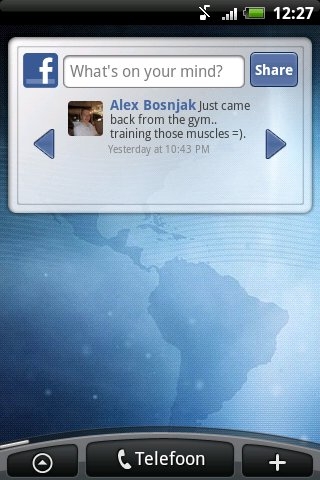
Can you post to Facebook and twitter quick via the notification bar like iOS? Thanks

You can create a widget on your homescreens that would allow you to immediately see updates on twitter or facebook to allow you to quickly post a response back to whoever is messaging you :)

This picture might not be the most up to date, but since you have never dealt with widgets i thought i would give you some visuals:

android-facebook-widget.jpg
 
Hey all,

Currently have an iPhone and considering switching over with the Note 2 but I have a few questions...

1. Is it easy to organize things in folders like I do on my iPhone?
2. The note 2 should have something similar to Siri correct?
3.Is there lots of photography apps like on my iPhone from the app store?
4. Os ot easy to sync notes to my gmail like I do via notes on my iPhone?

1. For organizing, you can only do that on the home screen and not the menu. But, you can rearrange app icons easily on the menu. There is a button somewhere around the corner that will activate the rearranging thingy.
2. Yes! Note 2 have something called S Voice! It is similar to the Siri in iPhone 4S and 5.
3. For that, I am not too sure but the Play Store have a category for that!
4. Very easy!
 
Having spent 2-1/2 years on an HTC Incredible (that I mostly liked), I went to an iPhone 4S about 2 mos. ago when my HTC started getting flaky.

I gave up a time/temp app on the home screen as well as widgets. I miss widgets, but other then that I find that the Apple and the associated apps tends to work more reliably then in Android. I also use a Samsung Galaxy 7.0 Plus tablet running Ice Cream Sandwich (which I also like) and which uses Chrome as my primary browser, yet on the Samsung as well as the HTC, I experience(d) regular crashes in Chrome, on a Google OS, no less. I don't have that problem on the iPhone. Part of the reason is I think that Apple apps tend to be less buggy and I find that true across all the apps, as well as the general operatng functionality of the apps is consistent across the range, something that is not the case in Android. I had regular oddities in Biz Calender as example on the HTC, yet my add-on calender app on the iPhone is rock solid.

Since I was heavy into Google, mail, contacts, calender, Chrome, Drive, etc... I found it simple to get all this functional on the iPhone. Granted that Apple Maps currently sucks, but MotionX GPS is far superior to Google Maps in any event, so I'm not missing Google Maps much.

And then there was music. I had to use 2 different programs to port my iTunes music over to Android, one for purchased and one for all else. Then I purchased an SD card and got the music onto the HTC only to discover that the sound quality just sucked. So a lot of effort for zip, plus the cost of the SD card which I never ever needed for anything else.

So in general I find the iPhone phone a better phone as well as a replacement for my ancient iPod. Plus battery life is much better on the iPhone then with the longer life battery I had on the Incredible.

But you indicated web browsing as being important. That somewhat dictates a preference for a larger screen size then what is found on either the iPhone 4S or 5. That being a factor I would recommend an Android with a screen in size as found on the Galaxy S3 or something similar. But check 2 things, one being the physical size of the device, how it fits in a pocket and in hand when it's against your ear. Then check the sound quality when making a phone call (it's a PHONE after all) as I found the iPhone superior to my HTC and that was a deal breaker.

 
If you're looking for an alternative to Siri, keep an eye on the new Dragon Mobile Assistant by Nuance. It's beta, but if anyone can make a true Siri competitor on Android, they can.

Also, welcome to Android. It will be a learning process to switch, but I think you'll find it very rewarding.
 
Back
Top Bottom