• After 15+ years, we've made a big change: Android Forums is now Early Bird Club. Learn more here.

CSA91 TV Box - Android TV app on tablet does not connect

Ron Baxter

Lurker
Hi, I am new here . My TV box is called CSA91 pictured below. It works but I am still getting to know it and working out how to make it easy to use to get to favorite channels. I had hoped I could use the Android TV app from Google on my tablet as a remote. But it does not connect. Typically the CSA91 is on 192.168.2.100 (wired connection) and the tablet is on 192.168.2.101 (wireless connection). I have also paired the Bluetooth of these devices. But the app on the tablet says no connection. I have also tried another app from Innovation Lab - same result. Any hints?


632667_157e0097-edfe-4477-a6d2-58d16534d5a7.jpg
 
Typically the CSA91 is on 192.168.2.100 (wired connection) and the tablet is on 192.168.2.101 (wireless connection).

You've answered your own question! :)

Switch the Android TV box to WiFi and try again.


You've answered your own question! :)

Switch the Android TV box to WiFi and try again.

Thanks for the suggestion. I turned off the wired connection n the TV box, it then connected by wifi, but still no connection from the Android TV app on the tablet. I powered everything off then on and also tried another android phone. No luck.
If there are any other suggestions I will try them, but if not I will give up for now on trying to use the Android app as a remote and look for other approaches that may make the TV box more user friendly.
 
OK, try this...

The two devices connect using WiFi direct (or Miracast.)
To connect in this way the WiFi Direct has to be enabled and activated on the TV box...

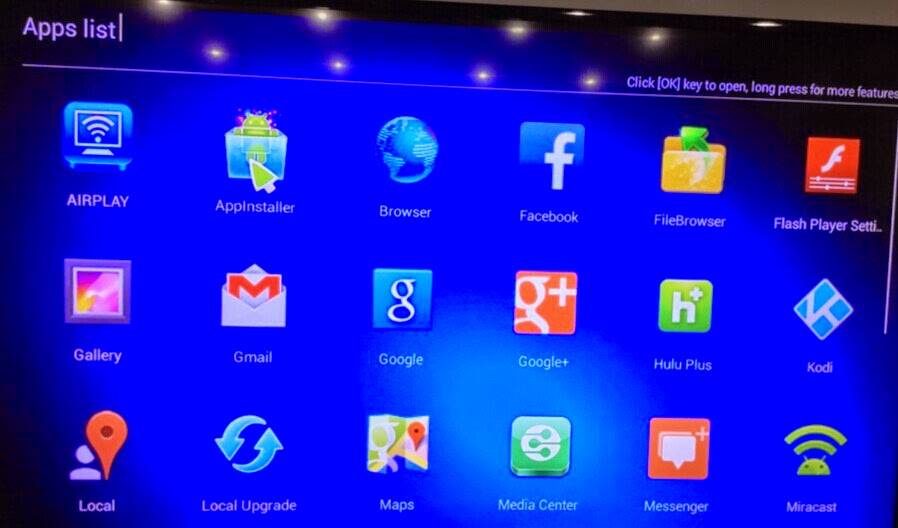
QQ%E5%9B%BE%E7%89%8720141225171523.jpg


Look for an icon like the one in the above image. (Bottom right.)
(Both devices have to be on the same wireless network, of course.)


Not quite sure why you would want to use the remote app unless your real remote is broken.
Wouldn't it be easier to just add a USB wireless mouse and/or keyboard?
 
OK, try this...

The two devices connect using WiFi direct (or Miracast.)
To connect in this way the WiFi Direct has to be enabled and activated on the TV box...
Look for an icon like the one in the above image. (Bottom right.)
(Both devices have to be on the same wireless network, of course.)


Not quite sure why you would want to use the remote app unless your real remote is broken.
Wouldn't it be easier to just add a USB wireless mouse and/or keyboard?

OK, you give me some food for thought and I have spent some time playing with options.

Why have I been trying the remote app? Because, using the real remote is a pain. It has 2 mouse modes - one where you use the cursor buttons to move the highlight around the grid of icons - but in many situations you cannot highlight what you want - such as status bar. The second so-called mouse mode - the arrow appears on the screen and you move it around with the cursors - this way you can achieve anything but it is slow and laborious. As outlined in my original request I cannot get the remote app to detect the Android TV and I suspect the implementation of Android on this TV box may have limitations.

Miracast? I have found this interesting to explore and have downloaded several Miracast apps, some for the "casting" (sending) and some for the "sinking" (receiving). Some don't owrk for me, others seem to connect at least. But I don't think it offers a solution for my problem. What I want is to quickly and easily display content, for example from YouTube, on the TV. I can do this with the real remote but it is slow and clumsy. I can easily display YouTube on my Andriod phone or tablet, so if I could Miracast it to the Android TV it would seem like one possible solution - although a drawback would be that the phone/tablet is tied up for your entire TV session. However, so far I have not made this work. I can establish a Miracast connection but this seems to switch off the normal wifi connection to the phone while Miracast is casting - so I cannot get YouTube running on the phone (unless there was a fast cellphone data connection)

My experimentation will continue and hopefully I will discover some way to make the viewing experience simple enough.
 
The YouTube add-on for KODI works great...

As for your other issues... bite the bullet and get a cheap USB mouse and a hardback mousepad.
(Make sure it's a cheap one because they work better than the faster, more sensitive expensive ones.)
 
Back
Top Bottom