• After 15+ years, we've made a big change: Android Forums is now Early Bird Club. Learn more here.

Root CUSTOM ROM MICROMAX A25[Vision V1.0]Custom Rom For Micromax A25[MF LINKS]

Finaly the wait is over
First Custom rom for micromax a25 is hear

Made by tepu chaudry


DESCRIPTION :
After working of around 20 days I am able to release the first custom rom for micromax a25 on 04th April 2013 . This is a initial version of vision, many features will be added in V2.0.Lets talk about its features

FEATURES :


  • Pre-Rooted
  • Based on latest stock rom
  • Zip Alligned
  • Deodex
  • 1% Battery mod
  • Bravia Engine
  • xLoud
  • Beats Audio
  • Custom Framework Animation
  • Modified Setting App
  • Performance Tweaks
  • Holo Launcher
  • init.d script support
  • Custom Status Bar
  • Network Tweak for Faster Internet
  • Long Battery Life
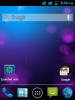
  • Looks like ICS
  • And many more
 

Attachments

  • 2013.04.03-20.46.25.png
    2013.04.03-20.46.25.png
    72.9 KB · Views: 257
HOW TO FLASH THIS CUSTOM ROM :
  • Download Vision_v1_droidtricksqvga.zip from below (MF password : droidtricksqvga.blogspot.in)
  • Copy and paste it to SD card
  • Now Open CWM recovery
  • Go to wipe data/factory reset and wipe data
  • Then go to wipe cache partion and wipe cache
  • Now go to mount and storage and format system
  • Now Intall Vision_v1_droidtricksqvga.zip from sd card by going to "install zip from sd card"
  • It will take a few times
  • While rebooting click fix root
  • You have flashed this rom successfully
Credit For Visoin v1.0 :
Tipu Choudhury

Vision_v1_droidtricksqvga.zip
 
it is gud ,i would suggest u to increase resolution,decrease ram usage,add some more internet tweaks to speed it up,change original keyboard with ICS NEW keyboard or any other gud 1,add task manager like samsung phones,etc , ... and thanks again for VISION V1 enjoying it very much! :) ;)
 
Great work! really liked it ..downloading and installing
keep it up! this is my thanks from my heart :P

have a gap between version 1 and version 2 for your rom so it gets high appreciation
^imba cool^

vaibhav waiting for your ROM too...try your best :D
 
I don't know how to proceed this step ->"go to mount and storage and format system"
pls help me how to do this...
I don't have this option in my CWM Recovery Mode
 
HOW TO FLASH THIS CUSTOM ROM :
  • Download Vision_v1_droidtricksqvga.zip from below (MF password : droidtricksqvga.blogspot.in)
  • Copy and paste it to SD card
  • Now Open CWM recovery
  • Go to wipe data/factory reset and wipe data
  • Then go to wipe cache partion and wipe cache
  • Now go to mount and storage and format system
  • Now Intall Vision_v1_droidtricksqvga.zip from sd card by going to "install zip from sd card"
  • It will take a few times
  • While rebooting click fix root
  • You have flashed this rom successfully
Credit For Visoin v1.0 :
Tipu Choudhury

Vision_v1_droidtricksqvga.zip
the link is missing probably
 
Back
Top Bottom