
• After 15+ years, we've made a big change: Android Forums is now Early Bird Club. Learn more here.

Docking Station?

affenzeit

Newbie
Forgive me if this is common knowledge, but if isn't, then voila!

I was really want to grab the docking station from Amazon, but $40 is a little steep for a glorified charger. So, I did some poking around and found out that the docking station activates various modes via magnets. I got some fridge magnets and tinkered around. This is what I found:

If you hold two small magnets around the side or back of the volume keys, this screen automatically appears:
xLuWP.png


If you hold two magnets to the back up just directly to the left of the camera, this happens:
Sb3jR.png


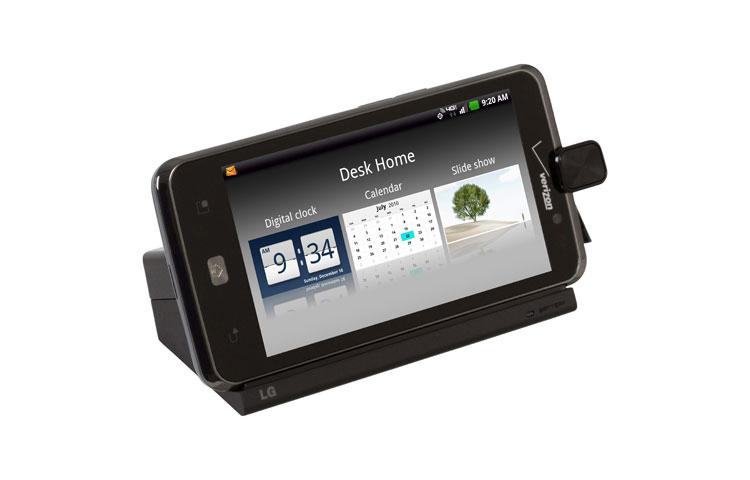
I'm trying to figure out how to launch this screen:
large03.jpg


But, so far I can't find the points for this screen. Basically my point in all of this is to build my own docking station.
 
I'd love to see a custom desktop docking station! Post pictures of your progress and completed dock when you succeed!

My guess is that the magnets are along the side(bottom) edge, near the camera/charge port, or a combo of both. Maybe the accelerometer has something to do with it?
Check out the Revolution's docking stations; desktop/media or vehicle for comparison.

Here's the Spectrum's desktop/media dock for a reference, too. I wish there was an official Spectrum vehicle mount! Maybe I'll get inspired in a few weeks and make my own.

There are more images for all three accessories if you click the right arrow on the pictures bar. You can even see the magnets on the Revolution's vehicle mount.

Cheers.
 
Thanks- I believe there is a Spectrum car mount, but you could just take an ordinary mount and glue on some magnets to the left of the camera to have a car mount that puts your phone in car mode.

I'm not having success with activating desk mode. I'm beginning to wonder if there might be more than a magnet involved. What I mean is- when OEM's flash phones, they often use special cables that generate certain charges to automatically put the phone in download mode. I had a bricked Samsung Captivate that I could only revive by taking three resistors and touching certain points to spark the current needed to force it into download mode. My point in all this is, I'm wondering if LG has made a special current for launching Desk Mode. If so, I could re-wire a usb cable with specific resistors to get it. I want to completely rule out the magnet theory first, but I may be pulling out my trusty Samsung jig to see what I can generate. (obviously, with great caution)
 
Thanks Affenzeit, I've been trying to figure out why the pocket clock pops up for no reason. It's because i put it down on the magnets for my tablet case.
 
i saw that post earlier, and wish i had seen it before i spend the $25 for a case from verizon, but i was out of town and almost sat on my 2 day old phone 4 times. lol
 
So, I spoke with an engineer from LG who claims that the docking station activates the clock mode with an electrical frequency. So, this got a little tougher...
 
Back
Top Bottom