
Install the app
How to install the app on iOS
Follow along with the video below to see how to install our site as a web app on your home screen.
Note: This feature may not be available in some browsers.
-
After 15+ years, we've made a big change: Android Forums is now Early Bird Club. Learn more here.
You are using an out of date browser. It may not display this or other websites correctly.
You should upgrade or use an alternative browser.
You should upgrade or use an alternative browser.
Email Retention
- Thread starter Eldogg
- Start date

Raistlin1158
Well-Known Member
Go to SETTINGS
Then to APPLICATION MANAGER
Then scroll top menu across to the left until you get to ALL
Then scroll down to EMAIL and click on it
Then go to the STORAGE area and press CLEAR DATA
Exit out and return to EMAIL on home screen
Open EMAIL app, and it should be ready to set up again as you did initially when you bought the phone.
If you had a Gmail acct in your EMAIL app as well as your two AOL accounts, you will have to re-add it as "OTHER" so that you can toggle between the 3 accounts in your one EMAIL app.
Then to APPLICATION MANAGER
Then scroll top menu across to the left until you get to ALL
Then scroll down to EMAIL and click on it
Then go to the STORAGE area and press CLEAR DATA
Exit out and return to EMAIL on home screen
Open EMAIL app, and it should be ready to set up again as you did initially when you bought the phone.
If you had a Gmail acct in your EMAIL app as well as your two AOL accounts, you will have to re-add it as "OTHER" so that you can toggle between the 3 accounts in your one EMAIL app.
Thank you for your reply. I'm not sure I understand how "clearing my email out" (which means I lose all my emails currently in my phone) will resolve the issue. The issue is it won't store more than one week's worth of emails. Can you help me understand how clearing and resetting to factory defaults ... and then basically going back to the same settings again ... will resolve this issue? Thanks.Go to SETTINGS
Then to APPLICATION MANAGER
Then scroll top menu across to the left until you get to ALL
Then scroll down to EMAIL and click on it
Then go to the STORAGE area and press CLEAR DATA
Exit out and return to EMAIL on home screen
Open EMAIL app, and it should be ready to set up again as you did initially when you bought the phone.
If you had a Gmail acct in your EMAIL app as well as your two AOL accounts, you will have to re-add it as "OTHER" so that you can toggle between the 3 accounts in your one EMAIL app.
Raistlin1158
Well-Known Member
The emails are still on the server of your mail provider , clean the phone then they will download again
OK, I get that. But why wouldn't they have downloaded to begin with? I suspect that they ARE downloading properly, and that the phone is only holding 7 days worth.The emails are still on the server of your mail provider , clean the phone then they will download again
Raistlin1158
Well-Known Member
Lets start from scratch...
Click on email, then settings.
Choose your email i.e. MSN, then period to sync Email, select All.
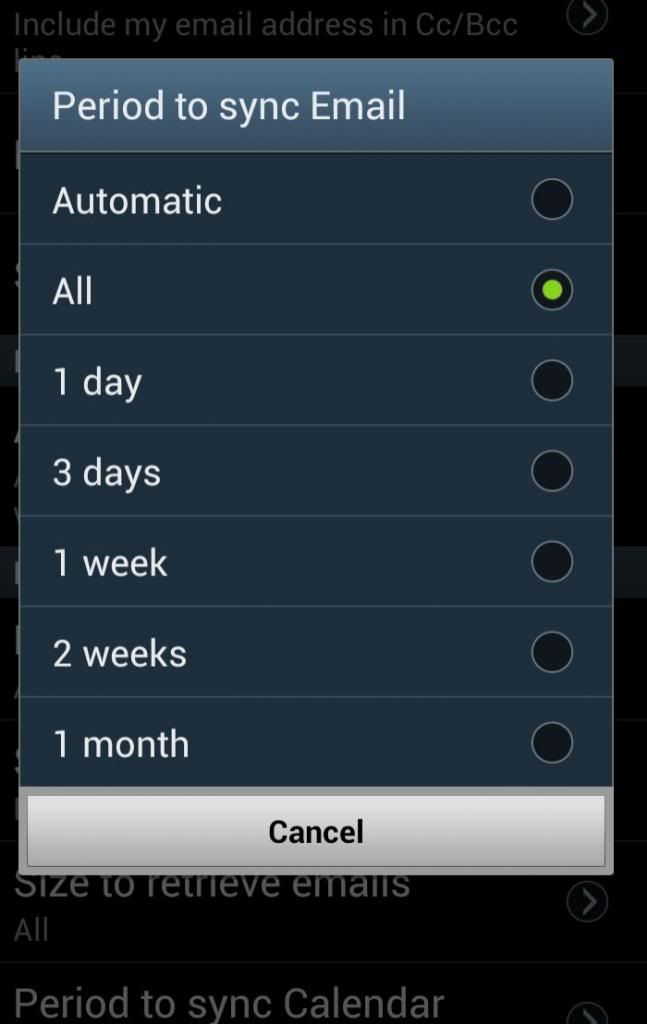
http://s187.photobucket.com/user/al...shot_2013-12-03-16-44-34_zps378fb3b3.jpg.html
Set for each Email you have and all should be working.
Click on email, then settings.
Choose your email i.e. MSN, then period to sync Email, select All.

http://s187.photobucket.com/user/al...shot_2013-12-03-16-44-34_zps378fb3b3.jpg.html
Set for each Email you have and all should be working.