• After 15+ years, we've made a big change: Android Forums is now Early Bird Club. Learn more here.

Erase "recent sites visited" from Google search widget?

Justin359

Lurker
*Note: another person posted this same question here back in 2013 but he was never given a satisfactory answers. I apologize if this was in fact answered somewhere else since then*

I use a Samsung Galaxy S6 with the Google Now search bar widget installed. I've figured out how to erase "search history", but I'm struggling to find a way to delete the "recent sites visited" suggestions that continue to populate the second I type anything into the search bar widget.

There are tons of explanations to erase the search history, but not the recently visited sites - these are two different things.

Just to be clear I'm not using Google Chrome as a browser, so any explanation involving opening Google Chrome (or any other browser alternative) won't suffice, I'm specifically looking at how to get rid of the "recent SITES visited" results that populate specifically in the Google search widget.

I've gone into my Google account settings to unselect certain "tracked activities", but again you can only choose to not track search history. There is no option to specifically untrack/erase recently visited sites.

Any help would be great. Thank you.

 
To clear browsing data tap on the meatball bar on the right, scroll down to Settings, Tap on Privacy then at the bottom of that list choose clear browsing data. You also might chose to turn on Do not track but I never have.
 
To clear browsing data tap on the meatball bar on the right, scroll down to Settings, Tap on Privacy then at the bottom of that list choose clear browsing data. You also might chose to turn on Do not track but I never have.

What "meatball bar" are you referring to? When either viewing the widget search bar from the phone's layout or after having clicked inside it thus opening the widget, there is no meatball bar. Only the micriphone icon on the right to use voice search.

And if I do go into Settings through a different way, then into Accounts and Privacy (there is no singular 'privacy' option), there is no "clear browsing data" option at all.
 
I don't use the actual Google Chrome app, just the "Google search" widget, which seems to operate separately from the Chrome app itself, because when I do go and open the Google Chrome app it has a different layout then the Google widget.
 
Oh, all righty then. I don't use that. Sorry for wasting your time. I like having it on my home screen and all (looks cool) but I use Chrome browser kind of reflexively to do a search. Comes from using Netscape in my early internet life I think.
 
Ah no worries, thanks anyways. I just like the convenience of having that search bar displayed right on the home screen.

Hopefully someone else has some thoughts.
 
Google widget:
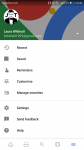
click the three bar icon right beside the Google name, go to settings, then accounts and privacy, next choose google activity controls, then web and app activity, click manage activity. there is a search web and app toolbar, click the 3 dot icon on the left of the toolbar, and pick delete activity by.

hope this works.
 
*Note: another person posted this same question here back in 2013 but he was never given a satisfactory answers. I apologize if this was in fact answered somewhere else since then*

I use a Samsung Galaxy S6 with the Google Now search bar widget installed. I've figured out how to erase "search history", but I'm struggling to find a way to delete the "recent sites visited" suggestions that continue to populate the second I type anything into the search bar widget.

There are tons of explanations to erase the search history, but not the recently visited sites - these are two different things.

Just to be clear I'm not using Google Chrome as a browser, so any explanation involving opening Google Chrome (or any other browser alternative) won't suffice, I'm specifically looking at how to get rid of the "recent SITES visited" results that populate specifically in the Google search widget.

I've gone into my Google account settings to unselect certain "tracked activities", but again you can only choose to not track search history. There is no option to specifically untrack/erase recently visited sites.

Any help would be great. Thank you.

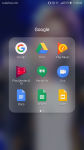
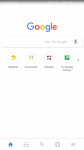
I have had the same issue and have FINALLY FOUND A SOLUTION. Go to the google search widget app (the one that comes preinstalled on the phone) and go to the three lined icon along the bottom (the area where they normally display cards etc). Click settings and then scroll down and click on the heading that says 'personal' and untick all the boxes. Then return to search wiget (maybe after closing and reopening) , and problem solved.
 

Attachments

  • Screenshot_20180117-104512.png
    Screenshot_20180117-104512.png
    637 KB · Views: 467
  • Screenshot_20180117-104555.png
    Screenshot_20180117-104555.png
    76.7 KB · Views: 516
  • Screenshot_20180117-104610.png
    Screenshot_20180117-104610.png
    191.8 KB · Views: 474
Back
Top Bottom