
Install the app
How to install the app on iOS
Follow along with the video below to see how to install our site as a web app on your home screen.
Note: This feature may not be available in some browsers.
-
After 15+ years, we've made a big change: Android Forums is now Early Bird Club. Learn more here.
You are using an out of date browser. It may not display this or other websites correctly.
You should upgrade or use an alternative browser.
You should upgrade or use an alternative browser.
Fail to ping hotspot ip
- Thread starter lye85
- Start date
RazzMaTazz
Android Expert
What does "ips" mean?
Does your friend's PC show that it's connected to the hotspot? To the Internet?
Does your friend's PC show that it's connected to the hotspot? To the Internet?
What does "ips" mean?
Does your friend's PC show that it's connected to the hotspot? To the Internet?
sorry is internet service provider isp
my friend connect to other internet network, but fail to ping the ips ip from hotspot
RazzMaTazz
Android Expert
What other network? Which IP address. I don't understand. Please be very specific.sorry is internet service provider isp
my friend connect to other internet network, but fail to ping the ips ip from hotspot
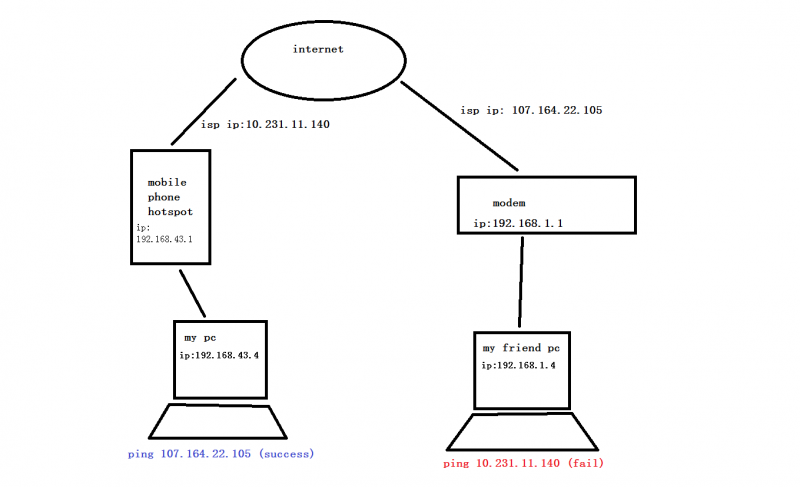
RazzMaTazz
Android Expert
Your phone's hotspot software apparently does not have ping responses enabled.
Most consumer & enterprise routers (WiFi or wired) have the ability to respond to pings, and most of them allow users to optionally turn on/off ping responses because automated ping response can make that network more vulnerable. Most routers have ping-response turned on by default, so you probably assume that all routers (including your phone's router) should respond to pings. But typically the hotspot (WiFi router) software on phones is very small with very limited functionality (due to development cost, support cost, memory constraints, and lack of consumer-demand for extensive functionality) and therefore most phone hotspots lack features like ping-response, DMZ, NAT, QOS, etc. They also lack the ability for the user to change any default router settings.
It is also possible that your cellular ISP is not allowing pings, but I doubt it. You could test that by pinging the cell phone from within the LAN.
Most consumer & enterprise routers (WiFi or wired) have the ability to respond to pings, and most of them allow users to optionally turn on/off ping responses because automated ping response can make that network more vulnerable. Most routers have ping-response turned on by default, so you probably assume that all routers (including your phone's router) should respond to pings. But typically the hotspot (WiFi router) software on phones is very small with very limited functionality (due to development cost, support cost, memory constraints, and lack of consumer-demand for extensive functionality) and therefore most phone hotspots lack features like ping-response, DMZ, NAT, QOS, etc. They also lack the ability for the user to change any default router settings.
It is also possible that your cellular ISP is not allowing pings, but I doubt it. You could test that by pinging the cell phone from within the LAN.
It is also possible that your cellular ISP is not allowing pings, but I doubt it. You could test that by pinging the cell phone from within the LAN.
i use my pc (ip:192.168.43.4) ping 10.231.11.140, it success, eventually i need to port forwarding using app (port forwarder) to my pc, any expert can advise me on this?

hstroph
Android Expert
i use my pc (ip:192.168.43.4) ping 10.231.11.140, it success, eventually i need to port forwarding using app (port forwarder) to my pc, any expert can advise me on this?
In your diagram on the left, reserved addresses 192.168/16 is a private subnet of 10/8, both of which are reserved, publicly-unroutable address spaces (see https://en.wikipedia.org/wiki/Private_network ). The 192.168/16 on the right is a private, publicly-unroutable subnet of that provider, .
Your friend on a different private sub-network cannot traverse the public Internet to ping a private machine on your private space, despite the similarity in address numbering.
Ask your friend to ping the IP address that results from *your* visit to your IP address
That's the public side of your 192.168/16 and 10/8 subnet that allows to to connect to the Internet. Ask your friend to visit that same link and report the results to you; if your personal firewalls, network interface configurations and ISPs allow such traffic, you should then be able to ping each others private networks (but not machines) freely.
Please read https://en.wikipedia.org/wiki/Private_network with especial attention to the "NAT" (network address translation) link for a primer on address space on the Internet. It will begin to answer your questions completely.
RazzMaTazz
Android Expert
Perhaps I was unclear. If you want to determine if your phone has ping-response capability then ping it from your LAN. (I.e. Ping from your PC 192.168.43.4 to your phone 192.168.43.1). If you get a response then your phone can respond to pings. If not, then your phone can't respond to pings.i use my pc (ip:192.168.43.4) ping 10.231.11.140, it success, eventually i need to port forwarding using app (port forwarder) to my pc, any expert can advise me on this?
I'm not sure that understand what you're trying to accomplish but if you're trying to make your hotspot-connected PC accessible from the Internet, then you may need to use a WiFi repeater, like a Peplink Surf or (even better) a DD-WRT-based WiFi router (set to repeater mode). I own the Peplink Surf 200, the Peplink Surf 200AP, and a few DD-WRT routers. They can all do port-forwarding. I can't guarantee that they can port-forward through your phone and your ISP, but it seems very likely.
Depending on what you're trying to do, if your ISP provides a dynamic IP address, you may also want to look at setting up dynamic DNS.