

• After 15+ years, we've made a big change: Android Forums is now Early Bird Club. Learn more here.

Flipping Tiles Updates / Releases

predalpha

Newbie


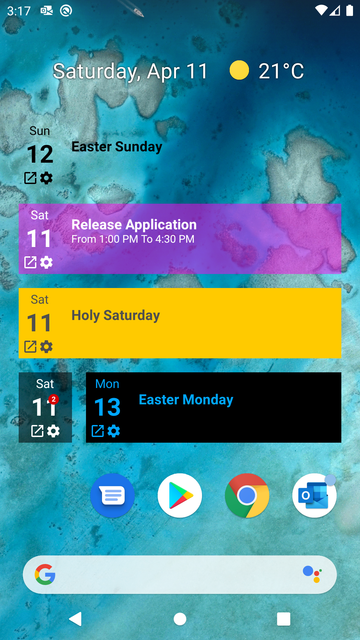
Flipping Tiles allows you to create dynamic tiles widgets for your Calendar, Email, ... applications.

Generate your widgets on your home pages to see at a glance your latest unread emails or your upcoming events in a Windows Mobile live tiles way.

Supported Calendars:
- Google Calendar (Android native)
- Microsoft Calendar

Supported mailboxes:
- Gmail (requires a Gmail email account associated with your phone)
- Microsoft Outlook

Play Store : https://play.google.com/store/apps/details?id=com.predalpha.flippingtiles
Website : https://sites.google.com/view/flippingtiles/home


Flipping Tiles application is free and has been released few days ago. I look forward to your feedbacks and ideas as i'm alone to develop this project.
Outlook Widget application is definitively abandonned as Flipping Tile is its renewal.
 
Update Version : 1.1.0

This release makes your previous FT widgets deprecated. Please remove them and recreate them. If you encounter any issues please restart your phone.


What's New ?

Flipping Tiles widgets are now responsive and supports multiple layout sizes.
One column size widget may display a badge if you have unread messages or scheduled events for the current day.
A summary tile is included for bigger widgets.

A small cache system has been implemented so that you'll always see informations. No connections modes will display a small icon at the bottom of the widget. That way you know the datas are not sync.

Tiles performances and internationalization improvements.

Some Huawei devices encountered an animation issue which makes scroll the entire screen when a widget is flipping : solved
 
Update Version : 1.2.0

What's New ?

Flipping Tiles widgets are now customizable.You can edit background color of your tiles and badges and text color as well.
You can set your widget from the widget setting button or by recreating a new widget.

Screenshot-1586611074.png


Others

I'm still looking for testers in order to improve the application. Your ideas and feedbacks will be very well appreciated.
 
Update Version : 1.3.0

What's New ?


Photo tile is now available. Select your favorites pictures directories and see your last pics in a homescreen flipping tile.


Screenshot-1587900315.png


Bug Fix

For device under API 27, tiles were not working -> Fix
 
Update Version : 1.4.0

What's New ?


Contact tile is now available. Select your favorites contacts and display them on your homescreen. If the contact has a photo, the tile will animate.
Clicking on the contact will open the android contact form.

General layouts improvements.

Following screen is about Evangelion theme, hope you'll appreciate ;)


Bug Fix

Huawei devices can now pin widget from the Flipping Tiles application.
 
Update Version : 1.5.0
Flipping Tiles

What's new ?

The application shortcut tile appears. Create live tiles for all your favorite apps and view their related notifications in real time.

Be imaginative and generate widgets for your applications Outlook, Gmail, WhatsApp, Telephone, Sms, ...

I need your feedbacks on this feature because it was not easy to set up. I hope you'll enjoy using it ;)

Below 2 printscreens to give you an idea.

Screenshot-1590011177.png
Screenshot-1590011181.png


The update is currently reviewed by Google and will be available within a few hours.
 
Hi everyone,

I made a new promotional video about the application.
This will give you a better overview of the features offered by the Flipping Tiles application


A new update will also be available in a few hours.

Update Version : 1.5.1
Google Playstore App = https://play.google.com/store/apps/details?id=com.predalpha.flippingtiles

What's new ?

Editing an Application Shortcut tile no longer removes related notifications.

Clicking on an Application Shortcut tile opens the application even if you have not granted the right to listen to notifications by the application.

Fixed Application Shortcut tiles to display content in addition to the title for some applications.

Added buttons to share and evaluate the Flipping Tiles app.

Added button allowing to update the application if an update is available.

Your feedbacks are always welcome
wink.png
 
Back
Top Bottom