• After 15+ years, we've made a big change: Android Forums is now Early Bird Club. Learn more here.

Help Galaxy S3 Not Recognized By Computer Properly

joshm662

Member
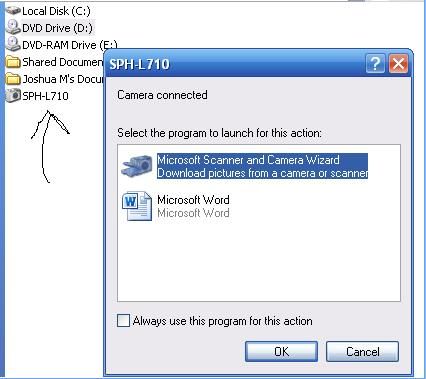
GUYS HELP! How can I put music onto my Galaxy S3? On my dads computer it works just fine, plug my phone into the USB port and it's that simple. This is the FIRST time I've EVER had this problem with a phone on my personal computer... every SINGLE time I plug my S3 into this computer it shows up as Camera mode or whatever... even though on my phone I choose Media mode, it STILL shows up as Camera... look:


So, how can I fix this? How do I put things on my phone's SD card again? When I plug my phone into any other computer it doesn't have this problem... this is the FIRST phone to ever give me this problem on my own personal computer.... please HELP!
 
it keeps loading it as a DAMN camera! ARGHHHHHHHHHHHH!!!!!!!!!! I cant put ANYTHING on my phone!!!

"unable to find software on your PC that can recognize your device."

SERIOUSLY?!?!!? WTF!?!??! I've NEVER had this problem with ANY other phone EVER!!!
 
Are you setting it to Media mode by connecting to the computer, then pulling down the main screen, selecting "touch for other usb options", and selecting MPT mode?
 
Are you setting it to Media mode by connecting to the computer, then pulling down the main screen, selecting "touch for other usb options", and selecting MPT mode?

of course! when I plug my phone into my computer it IMMEDIATELY recognizes it as a camera though. When I go to the screen you're talking about, it's already on MTP mode! Ive tried clicking camera mode and then media mode again, but it never works.. it ALWAYS stays on camera mode no matter WHAT i do! then i plug in my old Samsung Victory and my computer recognizes it immediately in MTP mode and I can put music on that one no problem... this one always automatically puts it on camera mode and wont let me get out of it in order to see my SD card.

HELP! How else can I put stuff on my SD card on my phone since this wont work?
 
Try this is worked for me with S2 and S3 on windows 7

In regedit goto

System, CurrentControlSet, Control, Class, eec5ad98-8080-425f-922a-dabf3de3f69a

Delete UPPERFILTER
 
im using windows XP tho... how do i do that?!?!? i get to that in REGEDIT but there is nothing that says UPPERFILTER anywhere!!


OH and when I plug it into the BACK USB port it still loads it as a camera!!
 
I feel your pain. I've been having similar issues. My problem though is that I can't get my laptop (w/ Windows 8) to recognize my S3. When I plug in the cable, it charges, but never registers as a usb device. On my previous laptop (w/ Windows XP... which has a fried motherboard, hence new laptop) I could get it into MTP mode and do what I wanted. On the new laptop, the phone shows up in Device Manager, but not in Windows Explorer. I've tried 6 different data cables, registry hacks, various apps, sacrificing chickens under a full moon, everything. I've even had a couple very knowledgeable S3 owners and forum mods try helping and they've all had to give up (very much appreciated their efforts though).

I want to root the phone, but if I can't hook it up to my laptop... I'm dead in the water. At least from a rooting standpoint anyway. At least the phone otherwise functions perfectly.

Hope you have better luck than I.
 
I feel your pain. I've been having similar issues. My problem though is that I can't get my laptop (w/ Windows 8) to recognize my S3. When I plug in the cable, it charges, but never registers as a usb device. On my previous laptop (w/ Windows XP... which has a fried motherboard, hence new laptop) I could get it into MTP mode and do what I wanted. On the new laptop, the phone shows up in Device Manager, but not in Windows Explorer. I've tried 6 different data cables, registry hacks, various apps, sacrificing chickens under a full moon, everything. I've even had a couple very knowledgeable S3 owners and forum mods try helping and they've all had to give up (very much appreciated their efforts though).

I want to root the phone, but if I can't hook it up to my laptop... I'm dead in the water. At least from a rooting standpoint anyway. At least the phone otherwise functions perfectly.

Hope you have better luck than I.

What's up...

You know I had the same problem, and I looked everywhere but could not find an answer.

I did three things and it actually worked, now I am connected to windows 8.

First I downloaded the kies 3. Then, I used an option that says update USB driver...
This didn't work.

Second, I follow this directions from another forum.

this is just to help anyone searching for the way to have your s3 not connect as installer every time.

i searched and searched for the way to do this for the better part of 2 weeks and finally found what i needed on 3 different forums / threads so i am just putting it all in one spot for everyone to see.

open your dialer.

enter *#22745927 and enable the hidden menu.

close dialer.

open dialer.

enter *#7284# and tap "Qualcomm USB Settings".

choose either mtp or mtp+adb and hit ok.

connect usb and be pleased with yourself in your accomplishment

I TRIED THIS AND IT DID NOT WORK EITHER!


Third, newer computers have the usb 3.0 as default and they say it is back compatible with usb 2.0, however in my computer (satellite p75-a7200), I connected it to three USB ports out of four and still have the same problem. HOWEVER, one of those USB ports I connect the phone and it works immediately.
Now I can transfer files and music back and forth using the USB cable...

I really don't know if it were the combination of the three of them, or one in particular, but the thing is that it works.

Try it out it might work.

 
Back
Top Bottom