• After 15+ years, we've made a big change: Android Forums is now Early Bird Club. Learn more here.

HELP Cant compose a SMS with mutilple contacts?

Hiya guys/Gals i have a new Sony Ericsson Xperia x10 (Not Pro) i have just installed the Handcent SMS app and when i try to compose a text to multiple contacts just to let them all know this is my new number i seem to of hit a dead end??

I can get to the screen using the Handcent app where i click on the contacts i want to include/Receive the text BUT then what? once ive higlighted/clicked on the contacts there is no other command? ive scrolled up/down the screen i have no idea what next to do??

PLEASE can anyone help? this is really frustrating there is no videos on Youtube and no info the the Handcent site.??

Thanks so much..

 
On the field where you put the numbers, just click it until a cursor shows up so that you can type. Just type in you contacts name and select the contact you want from the autocomplete list. This is the fastest method IMO

On the add contact list where you apparently are, after checking all the contacts you want, press the menu button and choose "End Select".
 
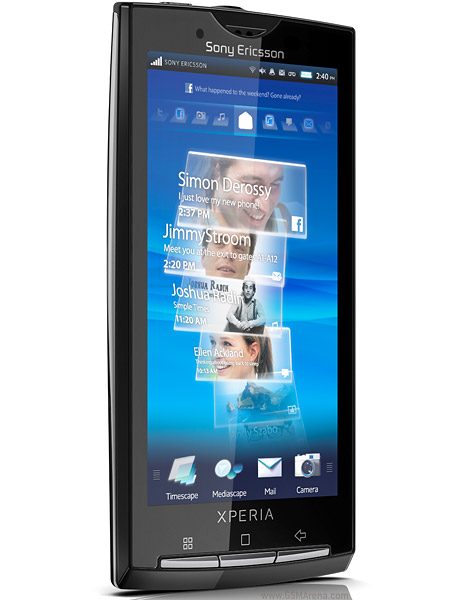
As I said in the second paragraph, press the menu button. Its one of the three buttons on the phone outside the screen, on your phone its the button with the icon that looks like 4 squares. You use the same button to get to the settings on the homescreen. Basically you press it to get to the settings menu on any app. press than and select end selection. I have handcent on my phone too.
 
its not on the screen. Its on your phone itself. You have three buttons right? A back button, a home button and a menu button.

se-xperia-x10-new-1.jpg


Here, on this picture. You see three silver buttons at the bottom of the phone.

1. A menu button. It's the leftmost button with an icon that looks like four squares
2. A home button. It's the middle button, and above it is an icon that looks like a square
3. A back button. It's the rightmost button, and the icon is an arrow.

I guess you are new to android. That button accesses the options menu for ALL apps that you install.

EDIT: here, I encircled it for you.

Untitled-1.jpg
 
chanchan05,

That beautiful app that is on the screen, what is it? Is that only available on the Sony Ericsson?
 
Back
Top Bottom