• After 15+ years, we've made a big change: Android Forums is now Early Bird Club. Learn more here.

Help- I keep pressing buttons while on a call!

doublezz

Lurker
Hello! I have a samsung vibrant, which I love, EXCEPT I KEEP pressing mute, or hanging up on people while on calls when my face hits buttons on the screen. Is there a workaround for this? I try to hit the button on the right of the phone to turn off the screen but it doesn't seem to work.

Thank you!
 
Seems to me your infrared eye is not working on the left of the earpiece speaker (You can see it in bright light or in sunlight). This sensor shuts the display off when it senses your face (or any object) over the earpiece speaker. As of now I don't know how to enable/disable this. I will research it for you!
 
easy fix is to lock the screen when you answer the call... but if it is the infrared eye that is a flaw that shouldn't be overlooked.
 
easy fix is to lock the screen when you answer the call... but if it is the infrared eye that is a flaw that shouldn't be overlooked.

If there is a problem with it then T-Mobile needs to fix it or get you a replacement phone. I would be super upset if mine started doing it to me! Call and report it and maybe they will know a quick fix or take care of you!
 
Hello! I have a samsung vibrant, which I love, EXCEPT I KEEP pressing mute, or hanging up on people while on calls when my face hits buttons on the screen. Is there a workaround for this? I try to hit the button on the right of the phone to turn off the screen but it doesn't seem to work.

Thank you!

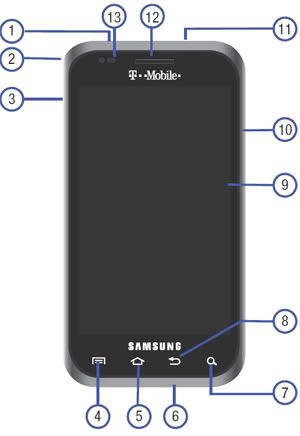
First of all, please make sure that nothing is covering the proximity sensor which is shown as #13 in the image below:
proximity-sensor.jpg


Since there is no way to disable the proximity sensor in your settings, and assuming it is not covered by a case, etc., then it must be defective.

Yes, there is a workaround you could tap thepower button to shut the screen off during a call but you should not have to resort to a workaround.

Tmobile will exchange your phone under warranty if you are outside of the buyer's remorse period. If you are within the buyer's remorse period, even better.

Typically, the way the proximity sensor is supposed to work is as follows:
1) You place or receive a call and use your handset.
2) As you move your phone to within approximately an inch of your face the screen shuts off.
3) If during the call you need to look at the screen for whatever reason you remove the handset from your ear and the screen should come back on.

If your phone is not operating like this and you have nothing covering the proximity sensor then I would suggest you have Tmobile replace the defective phone.

 
First of all, please make sure that nothing is covering the proximity sensor which is shown as #13 in the image below:
proximity-sensor.jpg


Since there is no way to disable the proximity sensor in your settings, and assuming it is not covered by a case, etc., then it must be defective.

Yes, there is a workaround you could tap thepower button to shut the screen off during a call but you should not have to resort to a workaround.

Tmobile will exchange your phone under warranty if you are outside of the buyer's remorse period. If you are within the buyer's remorse period, even better.

Typically, the way the proximity sensor is supposed to work is as follows:
1) You place or receive a call and use your handset.
2) As you move your phone to within approximately an inch of your face the screen shuts off.
3) If during the call you need to look at the screen for whatever reason you remove the handset from your ear and the screen should come back on.

If your phone is not operating like this and you have nothing covering the proximity sensor then I would suggest you have Tmobile replace the defective phone.

DoubleZZ...

Exactly! He couldn't have said it any better! Definately follow robo21's advice!
 
Back
Top Bottom