• After 15+ years, we've made a big change: Android Forums is now Early Bird Club. Learn more here.

Help identify battery use icon "10201"

Drambuie

Newbie
Hi All,
I've been losing ~40% battery life overnight while my phone is not in use.

I posted in the battery life thread and people suggested uninstalling Facebook which was my #1 battery draw at 43%.

After uninstalling FB, I now see this strange "10201" icon as my main battery draw at 93%.

Has anyone seen this before?
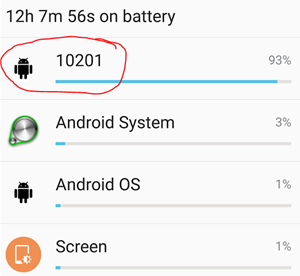
upload_2016-6-8_20-23-25.png
 
Thanks!
You were correct, once charged the icon disappeared.
My battery still lost 25% overnight which I think is too much but I also have a very weak signal at home which might be contributing to battery drain.
 
Yes it will be, that's the #1 cause of battery drain, as the phone is constantly hunting for a better signal.
 
U can check if is GSM signal. Put the phone in airplane mode and after this set WIFI to on. And check how much battery is wasted overnight.
Not sure if u uninstall or just disable Facebook, i can not uninstal. So I disabled too, but not very effective in battery draining. Still about 20% overnight, wich is too much I think. Please consider to disable another two application related to facebook, named com.facebook.*. One is showed up just if u check "show system app"
Disabling this two app modify my battery drain overnight from 20% to 8%.
 

Attachments

  • Screenshot.jpg
    Screenshot.jpg
    257.9 KB · Views: 185
Back
Top Bottom