Wolfpuppy
Lurker
So, I've decided to start learning the basics of Java in hopes of at some point create my first Android App.
I've looked into many tutorials and guides and they all start the same - creating a class that should output the phrase "Hello World!"
I'm trying to do just that, following all the steps from installing the right programs and setting everything up, but when I've reached the point of running my first class, I get this error.
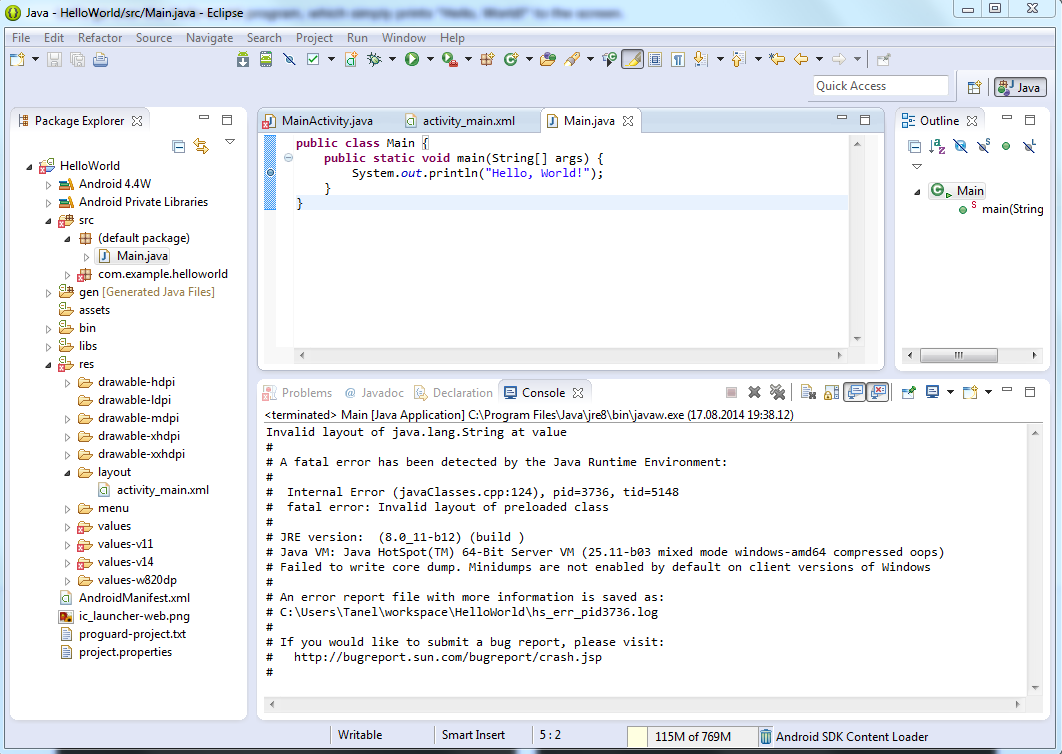
I don't even want to continue the tutorial, if I can't even get the first chapter done right. So here I am, requesting assistance
What should I do?
Wolfie
I've looked into many tutorials and guides and they all start the same - creating a class that should output the phrase "Hello World!"
I'm trying to do just that, following all the steps from installing the right programs and setting everything up, but when I've reached the point of running my first class, I get this error.
I don't even want to continue the tutorial, if I can't even get the first chapter done right. So here I am, requesting assistance
What should I do?
Wolfie