

aldi12
Lurker
here, i want to give a tutorial how to check OTG Support on your android device using an aplication, lets started.
1. Download and install "USB OTG Checker" From playstore
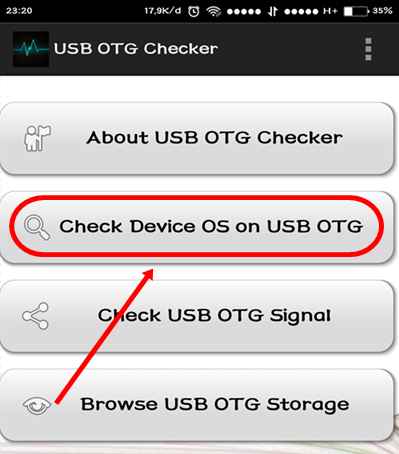
2. Open the aplication and choose “Check Device OS on USB OTG” see screenshot below
3. after that, there is a notification like Screenshot below
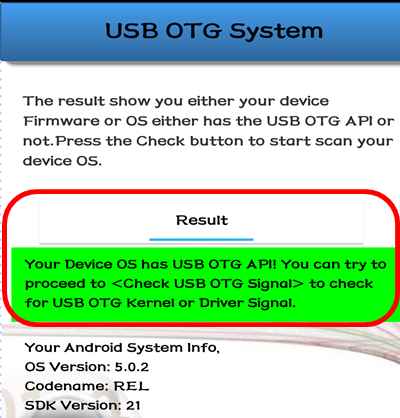
If notification with green colour, congrats your android support OTG. but if the notif colour is red it mean your androd don't support OTG.
may be if you have other way to check USB OTG on android, feel free to discuss on comment below. i hope this tutorial helpful, if there a question feel free to comment below let's discuss. Source of this tutroial and Pictures are from Hpsaja.com/Usb-OTG and i have tested this tutorial on my xiaomi redmi note 2 prime and work fine.
1. Download and install "USB OTG Checker" From playstore
2. Open the aplication and choose “Check Device OS on USB OTG” see screenshot below
3. after that, there is a notification like Screenshot below
If notification with green colour, congrats your android support OTG. but if the notif colour is red it mean your androd don't support OTG.
may be if you have other way to check USB OTG on android, feel free to discuss on comment below. i hope this tutorial helpful, if there a question feel free to comment below let's discuss. Source of this tutroial and Pictures are from Hpsaja.com/Usb-OTG and i have tested this tutorial on my xiaomi redmi note 2 prime and work fine.
Last edited: