
THANKS FOR THE POST. ANY LUCK BoiledEggs32?
Install the app
How to install the app on iOS
Follow along with the video below to see how to install our site as a web app on your home screen.
Note: This feature may not be available in some browsers.
-
After 15+ years, we've made a big change: Android Forums is now Early Bird Club. Learn more here.
You are using an out of date browser. It may not display this or other websites correctly.
You should upgrade or use an alternative browser.
You should upgrade or use an alternative browser.
Help How to move email from combined inbox to folders
- Thread starter GraemePSmith
- Start date
-
- Tags
- lg g2
BoiledEggs32
Lurker
Nothing yet. We may be stuck waiting for Android version 5, before this can be added by the devs.
joseluis7696
Lurker
Hi! I have been struggling with Email clients for Android for a while.
I have found Profimail. This app is free, but for only single user/account. For multiple accounts one must pay a moderate subscription. I think there is a cheaper montly subscription helpful to test it thoroughly.
They say there is an "Import message" feature that allows to import messages from one folder in the SD or anyware else into another folder in Profimail.
This should solve your problem, I think; you create folders in Profimail -say "jobs"- and then import messages from other accounts into this folder.
So far, good in theory; my problem is that it does not work for me. But probably I am doing something wrong with Xplore, the file administration app that Profimail works with by default. I am quite new to Android and have lots of problems in understanding its peculiar logic.
My case is somewhat more complicated as I am trying to import messages from my deskmail client (Eudora) into my 4.2.1 Android device. (Hisense HS 980)
If anybody can help in this particular case I would be grateful indeed.
I have found Profimail. This app is free, but for only single user/account. For multiple accounts one must pay a moderate subscription. I think there is a cheaper montly subscription helpful to test it thoroughly.
They say there is an "Import message" feature that allows to import messages from one folder in the SD or anyware else into another folder in Profimail.
This should solve your problem, I think; you create folders in Profimail -say "jobs"- and then import messages from other accounts into this folder.
So far, good in theory; my problem is that it does not work for me. But probably I am doing something wrong with Xplore, the file administration app that Profimail works with by default. I am quite new to Android and have lots of problems in understanding its peculiar logic.
My case is somewhat more complicated as I am trying to import messages from my deskmail client (Eudora) into my 4.2.1 Android device. (Hisense HS 980)
If anybody can help in this particular case I would be grateful indeed.
Alewminati
Lurker
Long-time Android fan here. I have also run into this problem. Very annoyed that I can't find any email client apps on PlayStore or anywhere that support moving emails between accounts (via filters or whatever else). Would be so convenient and streamlined. Doesn't make sense to me why this is available on iOS and all desktop clients but not on the Android Clients. IF ANYONE FINDS A SOLUTION TO THIS, PLEASE LET ME KNOW.

doxiegirl
Lurker
I'm not very techy but I was looking to do the same thing: move emails from one acount to another like on my iPhone. I had an archive folder in my I cloud account where I would park confirmations until I was done with whatever they pertained to so they were accessible from one place on my phone if needed. Just convenient and declutteting the inboxes.
So today after reading this thread I was determined to at least be able to move them into the "saved" folder that would appear if I hit "show all folders" because I have to travel next week and my hotel and rental car info is going to be useful.
I opened the first email and tried using the arrows at the bottom to forward to a folder I created on my SD card. No go. Then I noticed that at the top of the body of the email, by the address info, there are the three dots for settings. They are in gray, not blue, directly below the three dots in the blue border. If you click those dots, you can select move, and you can choose any folder in any mailbox.
Not nearly as easy as moving groups at a time, but at least it CAN be done.
So today after reading this thread I was determined to at least be able to move them into the "saved" folder that would appear if I hit "show all folders" because I have to travel next week and my hotel and rental car info is going to be useful.
I opened the first email and tried using the arrows at the bottom to forward to a folder I created on my SD card. No go. Then I noticed that at the top of the body of the email, by the address info, there are the three dots for settings. They are in gray, not blue, directly below the three dots in the blue border. If you click those dots, you can select move, and you can choose any folder in any mailbox.
Not nearly as easy as moving groups at a time, but at least it CAN be done.
I'm not very techy but I was looking to do the same thing: move emails from one acount to another like on my iPhone. I had an archive folder in my I cloud account where I would park confirmations until I was done with whatever they pertained to so they were accessible from one place on my phone if needed. Just convenient and declutteting the inboxes.
So today after reading this thread I was determined to at least be able to move them into the "saved" folder that would appear if I hit "show all folders" because I have to travel next week and my hotel and rental car info is going to be useful.
I opened the first email and tried using the arrows at the bottom to forward to a folder I created on my SD card. No go. Then I noticed that at the top of the body of the email, by the address info, there are the three dots for settings. They are in gray, not blue, directly below the three dots in the blue border. If you click those dots, you can select move, and you can choose any folder in any mailbox.
Not nearly as easy as moving groups at a time, but at least it CAN be done.
No, it can NOT be done. You are merely moving to a different directory on the same account. You cannot move emails.from.one account (say an exchange account) to a different ACCOUNT (like a Gmail or inappropriate or pop account). Sorry. You've missed the point.
doxiegirl
Lurker
Actually, I did NOT miss the point. I moved an email from the inbox of one account to the archive folder in a different account. In fact, they are not even two similar accounts (like two different gmail accounts.) I might not be techy, but I'm not that stupid. I completely understood what you were trying to do, because I did it all the time on my iphone. I had a folder in a certain email account that I used to KEEP emails that I wanted out of the inbox on my phone, but not off the server (one of my accounts could only be set up as an exchange). I wanted to do the same on my new phone, and did so. In fact, I just checked again because it was 1:30 a.m. when I figured it out.
Last edited:
Actually, I did NOT miss the point. I moved an email from the inbox of one account to the archive folder in a different account. In fact, they are not even two similar accounts (like two different gmail accounts.) I might not be techy, but I'm not that stupid. I completely understood what you were trying to do, because I did it all the time on my iphone. I had a folder in a certain email account that I used to KEEP emails that I wanted out of the inbox on my phone, but not off the server (one of my accounts could only be set up as an exchange). I wanted to do the same on my new phone, and did so. In fact, I just checked again because it was 1:30 a.m. when I figured it out.
Relax. No one called you stupid.
Can you tell us what client you are using? I've got KitKat and the normal email client also has the three dot menu at the top right of the email view (Mark unread, Move to, Save as task, Print, Collapse). There are no other action menus that I can see. The "Move to" in that menu will only open folers on the same account.
Can you be more specific about what kind of accounts you are trying to move from and to (say, a gmail to an exchange, or an imap to a pop, etc.? You talk about a "saved" folder you then talk about "show all folders." These folders (on the clients we've seen) are all still on the same account. The discription you are giving still seems to talk about the same "server" - for instance you say... "I wanted out of the inbox on my phone, but not off the server." If it's on the same server, it's likely the same account.
Three requests for clarification:
1. What client are you using and if android native in, which version of Android?
2. Can you give specific info about what type of accounts you are moving from and to (not personal details, just the typee - imap, pop, gmail, outlook, exchange, etc.).
3. Can you possibly take a screen shot of this menu you see? Forgive me if I'm still skeptical
 but it's a bit hard to believe only one person (and this has gone around many android forums) using android has found a magical "move" menu.
  Perhaps it's a different client or some kind of update we would like to know about, so I'm not saying it's impossible (or you are stupid!), just trying to get details to make sense. Right now I can't see or do what you are describing.
doxiegirl
Lurker
Sorry, I got a bit offended when you said I missed the point, as if I didn't understand the problem, because I was looking for he same solution as everyone here. I have a galaxy s5, which I just got, so it's kitkat. I have another update pending as of this morning, and I updated it once just after activation on Wednesday.
I have moved two emails from the same inbox on a pop account (comcast) to the same folder that is named "archive" in my icloud account, which is imap. I am using the email app that comes on the phone, and all the accounts except one was auto setup by the app. The one I had to fight with and manually install is not one of the accounts to or from which I'm moving emails.
I don't like exchange accounts or use Outlook because I tend to clear things off my phone to unclutter the inbox, but I don't want them permanently moved or deleted. I will sort them again from my laptop if I need to print one or keep it in the inbox to remember to bill for it. And I don't download through outlook so they stay on the server and I can see the same stuff on either the home or office computer.
In the email, when I click the menu dots, it opens this:
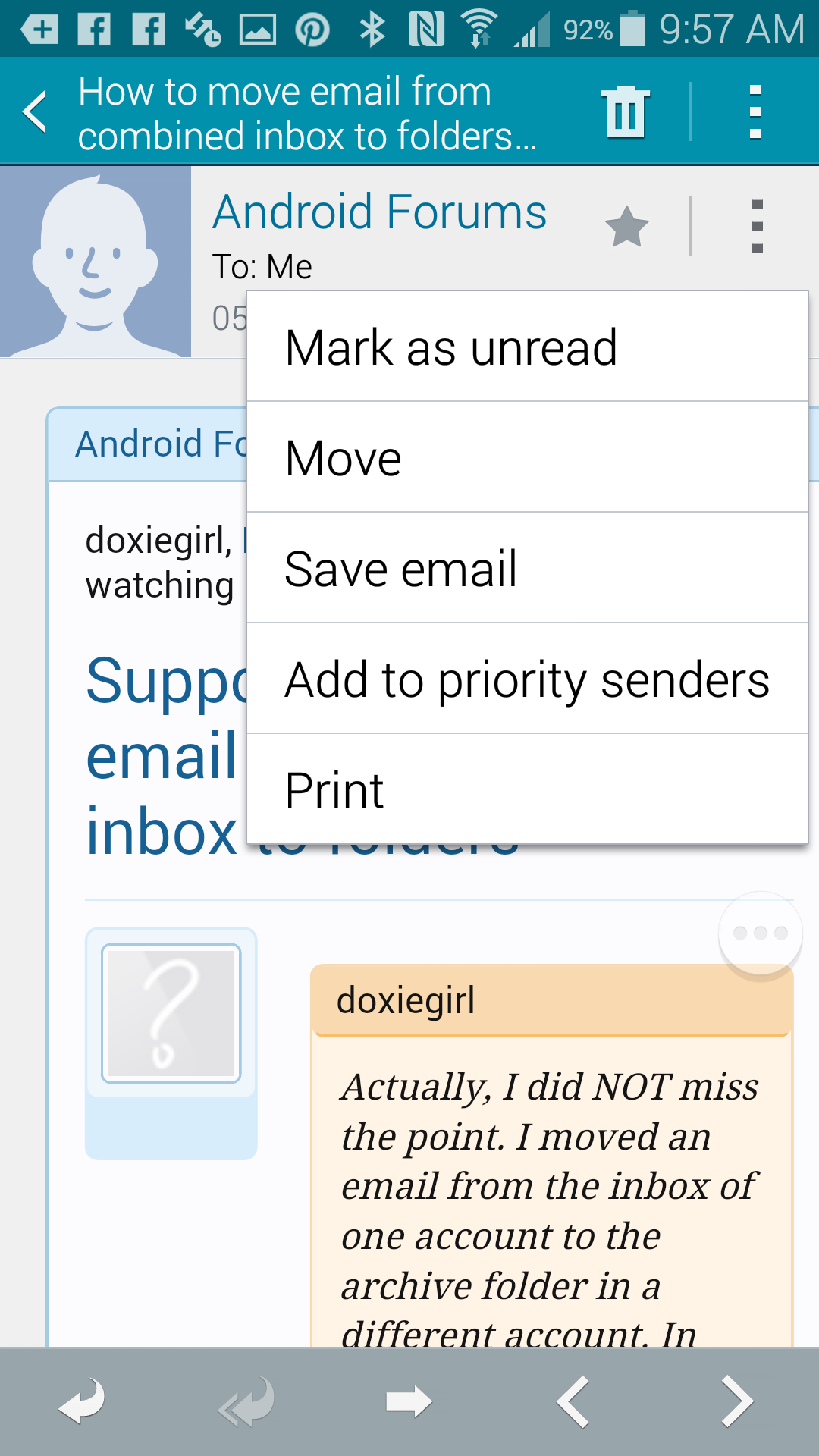
Then when I select "move", it opens a box that lists all five of my email accounts, and they are expandable to show their folders. I have one account that was treated as an exchange account on iPhone that is no longer treated that way on the galaxy (I didn't set it up like that on either platform but when I deleted or moved emails in thar account, from my phone, they were moved from the server). The folders that I created on that particular account do not all show up, and didn't on my iPhone either, and I have a file named "saved" on it as well, where I would keep important emails, but couldn't from that phone, and would instead put them in the archive folder of my icloud email account. But that is a free jimdo account which might explain that issue. It's a problem to set up on both phones, so there's something different about it.
When i select "move," the menu looks like this (just my icloud folders in this shot so it doesn't show my email addresses):
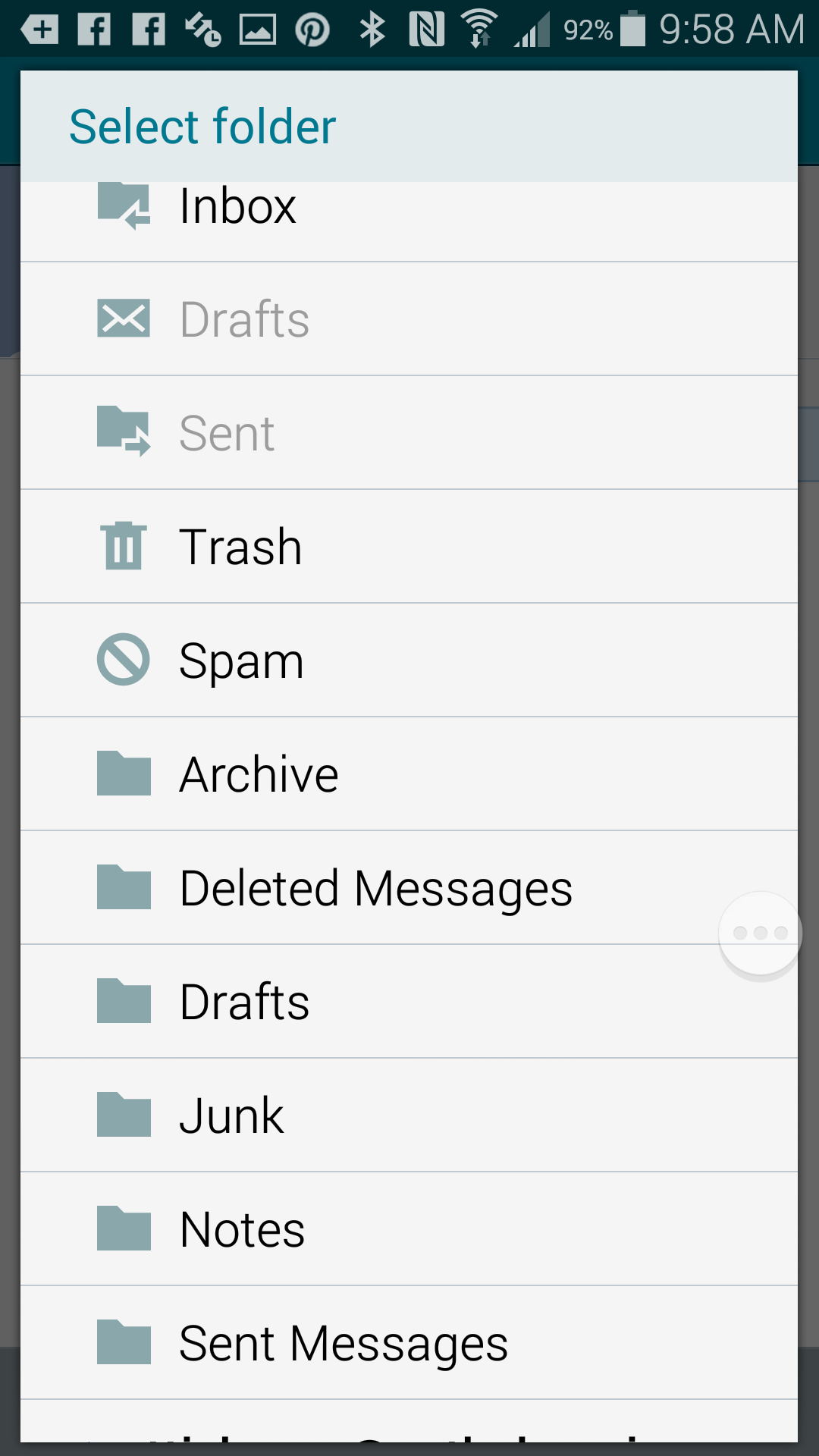
When I select the folder, the email is moved. It takes a few minutes for it to show up, but eventually, it works.
I don't know how or why I have this option. If I select "save email" instead of "move," it goes to the folder in the combined inbox named "saved emails," which will also work for my purposes, but not every one else's. I'm only keeping emails in this folder on my phone that I might need when I can't get to my computer to get them: car rental and hotel confirmstions, emailed coupons, etc.
I hope someone else can duplicate this. Again, it's from within the email, so not as convenient if there's more than one or two, but hopefully doable by someone besides me.
I have moved two emails from the same inbox on a pop account (comcast) to the same folder that is named "archive" in my icloud account, which is imap. I am using the email app that comes on the phone, and all the accounts except one was auto setup by the app. The one I had to fight with and manually install is not one of the accounts to or from which I'm moving emails.
I don't like exchange accounts or use Outlook because I tend to clear things off my phone to unclutter the inbox, but I don't want them permanently moved or deleted. I will sort them again from my laptop if I need to print one or keep it in the inbox to remember to bill for it. And I don't download through outlook so they stay on the server and I can see the same stuff on either the home or office computer.
In the email, when I click the menu dots, it opens this:
Then when I select "move", it opens a box that lists all five of my email accounts, and they are expandable to show their folders. I have one account that was treated as an exchange account on iPhone that is no longer treated that way on the galaxy (I didn't set it up like that on either platform but when I deleted or moved emails in thar account, from my phone, they were moved from the server). The folders that I created on that particular account do not all show up, and didn't on my iPhone either, and I have a file named "saved" on it as well, where I would keep important emails, but couldn't from that phone, and would instead put them in the archive folder of my icloud email account. But that is a free jimdo account which might explain that issue. It's a problem to set up on both phones, so there's something different about it.
When i select "move," the menu looks like this (just my icloud folders in this shot so it doesn't show my email addresses):
When I select the folder, the email is moved. It takes a few minutes for it to show up, but eventually, it works.
I don't know how or why I have this option. If I select "save email" instead of "move," it goes to the folder in the combined inbox named "saved emails," which will also work for my purposes, but not every one else's. I'm only keeping emails in this folder on my phone that I might need when I can't get to my computer to get them: car rental and hotel confirmstions, emailed coupons, etc.
I hope someone else can duplicate this. Again, it's from within the email, so not as convenient if there's more than one or two, but hopefully doable by someone besides me.
Sorry it took a while for me to reply.
Well, that's interesting. That menu (three dots) next to the adress doesn't seem to appear on any other email client I've checked. I even have a Samsung Tab S and it isn't there on their email client - Kitkat or now Lolipop. I've looked at almost a dozen people's devices and their clients - there is no menu at that spot that allows selecting accounts.
Is there any way you could find out what version or name they've given that email client? I realize that they don't usually place and "about" menu for these apps, but maybe something in the phone's identity section of the settings??
I'd be interested in getting it and testing it if it's available for anything other than the S5. As of right now, you have an unusual email client to say the least. Even a friends S5 doesn't have that. Hm, wondering if there's an obtuse setting somewhere for email that adds that menu. If you have any ideas, let us know.
Thanks!
Well, that's interesting. That menu (three dots) next to the adress doesn't seem to appear on any other email client I've checked. I even have a Samsung Tab S and it isn't there on their email client - Kitkat or now Lolipop. I've looked at almost a dozen people's devices and their clients - there is no menu at that spot that allows selecting accounts.
Is there any way you could find out what version or name they've given that email client? I realize that they don't usually place and "about" menu for these apps, but maybe something in the phone's identity section of the settings??
I'd be interested in getting it and testing it if it's available for anything other than the S5. As of right now, you have an unusual email client to say the least. Even a friends S5 doesn't have that. Hm, wondering if there's an obtuse setting somewhere for email that adds that menu. If you have any ideas, let us know.
Thanks!