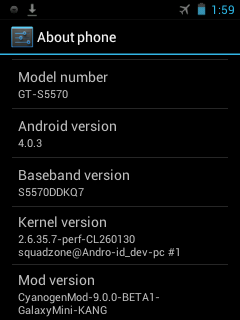
No reply since last day!
But no problem i got partially-stable cyanogen 9
{Beta} for GALaxy pOp
What's NOT Working :
USB Storage
Tethering
Camera and Gallery
Hardware Acceleration
Not great but better than that i found on XDA

You can have it too
~
Download Cyanogen Mod 9 BETA 1
Password to unlock the file is :
squadzone
Download Cyanogen Mod 9 BETA 2
This is just a beta release and thus, it is sure to have bugs, errors and stability issues.
TRY IT AT YOUR OWN RISK.
1. Upgrade your firmware to Gingerbread 2.3.4/2.3.6 using Odin Multidownloader v4.38.
2. Install Clock Work Mod Recovery v4.0.0.5 using Odin. Please install v4.0.0.5 as said since there is some problem flashing with CWM recovery v5.0.2.6. [Flashing with CWM recovery v5.0.2.6 worked fine for me.]
3. Copy the rom file, update-cm-9.0.0-BETA1-GalaxyMini-KANG-signed.zip, you downloaded from above to (the root directory of) your sd-card.
4. Reboot your device to Clock Work Mod Recovery (Press Home + Power Button).
5. [Optional but, Recommended] Do a Nandroid Backup of your current rom.
6. Choose Install Zip From Sd Card>>Choose Zip From SD Card option and then select the update-cm-9.0.0-BETA1-GalaxyMini-KANG-signed.zip file you downloaded from above.
7. After it finishes falshing go to CWM recovery Main Menu.
8. Select Wipe Data and Wipe Cache options.
9. Reboot your device from CWM Recovery main menu.
Please, note that it's take some time for the first boot so, wait patiently for 5-10 minutes during the first boot.
That's it. You have successfully flashed
CM9 on your device. Since, it's in beta version you are sure to find bugs
LoOks Like This -