• After 15+ years, we've made a big change: Android Forums is now Early Bird Club. Learn more here.

Root [International Tegra 3] Please help my one x :(

There's no fixed time for how long it should hang on the white HTC logo, but it shouldn't take more than a minute. If it doesn't go past it, then you most likely did not flash the boot.img or at least did not do it correctly. If it gets stuck in the "animation boot" afterwards, then you may be using an older HBOOT version than required (it's supposed to be 1.31 or higher, if I remember correctly) and I wouldn't recommend upgrading your HBOOT unless you REALLY want to use ARHD 17.1 as the lower the HBOOT is, the more chances you have of finding a suitable RUU and of reverting back to stock at any time.

You can also give Team Venom's ViperX ROM a shot later, just make sure you do a Nandroid backup (using Clockwork Recovery) beforehand so you can switch between the two if you want.

 
Please guys urgent help, man i have bad luck with this.
flashed twrp lastest v. flashed boot img n installed arhd 17.1
Cleared cached n wat not
hangs on htc "beats audio" screen
please help
 
So Viper X 2.6 will be ok for my hboot?

Yeah, mate, ViperX should work with any HBOOT and it's a great custom ROM. I'm using it at the moment and have ARHD 17 in a Nandroid backup in case I want to go back to it at any time. Just download ViperX, place it in the SD, flash the boot.img, install the ROM, and you're good to go.
 
yea guess it was the hboot for arhd. viper works great.

And to Rupe, thanks for the tip but that didnt work.pc doesnt pick up the phone in fastboot.

How hard is it to upgrade hboot
 
It's fairly easy if you follow the steps, but as I mentioned above, it might be more of a hassle since a Jelly Bean update will require a certain HBOOT that you may go above, and unless your device is S-OFF you'll not be able to revert back to an older HBOOT. You can find out if your device is S-OFF or S-ON when you boot into bootloader (the white screen with text on it), it should say it on the top under "BOOTLOADER LOCKED/UNLOCKED".

IF you decide that the custom route is the best for you, then here's how you upgrade your HBOOT:

How To change Hboot + Install Jelly Bean on Your HTC One X - JB on HOX - YouTube

Follow the steps exactly, and don't hesitate from watching the instructions a couple of times before actually attempting them.

This is where you get the latest HBOOT (Firmware) file for your device:

http://forum.xda-developers.com/showthread.php?t=1957376

Flow Wolf - Blog:: Youtube Article Support for description on HTC One X Help

Good luck. If it were me, though, I'd stick to ViperX for a while and see where it goes from there. It's a great ROM that doesn't require an HBOOT upgrade, can't get any better than that! Haha
 
so ive been reading thru this again. are you currently unlocked?

if youre unlocked,what if we:
-did the charge trick until the fastboot warning went away
-installed a "mini ruu" that just contained a new recovery,and your stock boot and system images via an external sd and OTG cable?

the images would need packed up as a PJ46IMG,with an appropriate android info.txt document,containing a corrrect main version(same as your current or higher),wich should not be too hard if you know what build you were on prior to unlocking.

another option,if you are "locked" would be
-charge trick
-install full signed ruu as PJ46IMG(by extracting rom.zip)

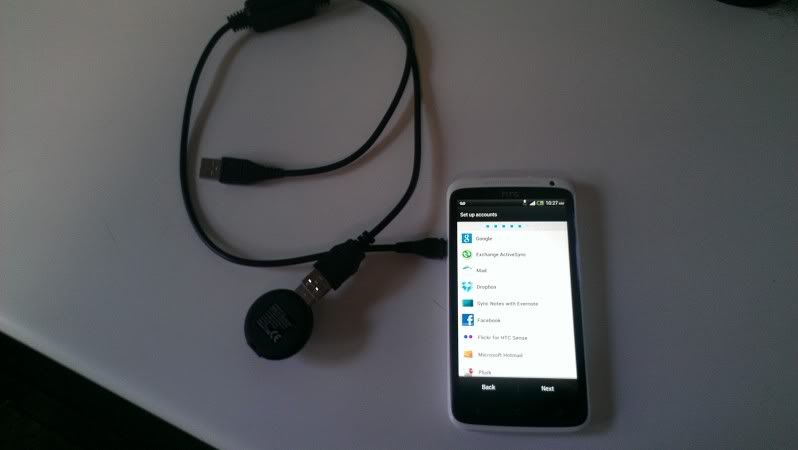
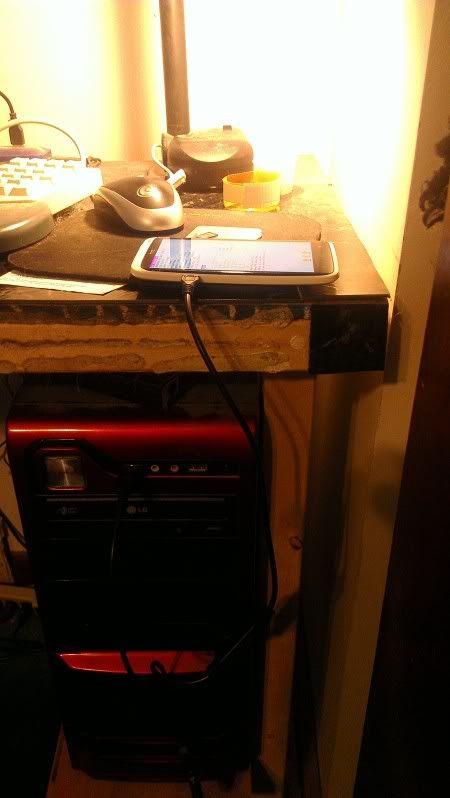
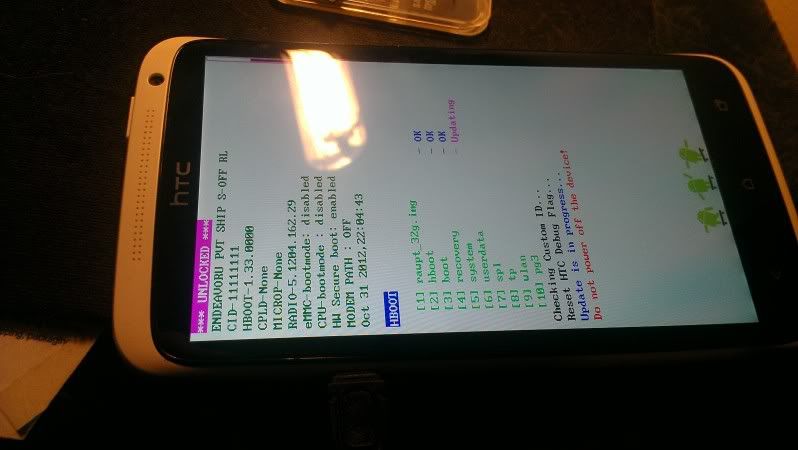
xmoo showed this being done with a single,non powered cable on xda(link) but not having one of those cables,i got it to work with a Y configured,powerd cable.

youll need either a simmilar Y cable,or possibly a non powered single cable(mini usb male to usb female),a FAT32 formatted sd card,and a usb sd card reader. in the second pic,the Y is plugged into the PC(for power) the phone,and the sd card reader. reboot the phone to bootloader,and hopefully it will find the files and update them(third pic)

IMAG0357.jpg


IMAG0355.jpg


IMAG0354.jpg


the main thing that worries me,is that its possible that unsigned files may not be allowed in this configuration. with htcdev unlock on normal,sd equipped devices,its possible to install unsigned boot/system/recovery images as PxxxIMG files from the sd,so maybe a properly configured PJ46IMG file would be allowed to update those partitions OTG

if you want to try id be happy to put the "mini ruu" together for you,if you need that.

something else we can try,anyway,i refuse to believe this phone is not savable ;)
 
so ive been reading thru this again. are you currently unlocked?

if youre unlocked,what if we:
-did the charge trick until the fastboot warning went away
-installed a "mini ruu" that just contained a new recovery,and your stock boot and system images via an external sd and OTG cable?

the images would need packed up as a PJ46IMG,with an appropriate android info.txt document,containing a corrrect main version(same as your current or higher),wich should not be too hard if you know what build you were on prior to unlocking.

another option,if you are "locked" would be
-charge trick
-install full signed ruu as PJ46IMG(by extracting rom.zip)

xmoo showed this being done with a single,non powered cable on xda(link) but not having one of those cables,i got it to work with a Y configured,powerd cable.

youll need either a simmilar Y cable,or possibly a non powered single cable(mini usb male to usb female),a FAT32 formatted sd card,and a usb sd card reader. in the second pic,the Y is plugged into the PC(for power) the phone,and the sd card reader. reboot the phone to bootloader,and hopefully it will find the files and update them(third pic)

IMAG0357.jpg


IMAG0355.jpg


IMAG0354.jpg


the main thing that worries me,is that its possible that unsigned files may not be allowed in this configuration. with htcdev unlock on normal,sd equipped devices,its possible to install unsigned boot/system/recovery images as PxxxIMG files from the sd,so maybe a properly configured PJ46IMG file would be allowed to update those partitions OTG

if you want to try id be happy to put the "mini ruu" together for you,if you need that.

something else we can try,anyway,i refuse to believe this phone is not savable ;)

Hey Scotty,

the phone was unlocked, but when ever charge trick till the warning went away i still couldnt fastboot to the phone, pc wouldnt pick it up at all. I know its not my pc since my new one x has no issues.

Eitherway, i tried changing the battery with my friends damage one xl, and for some reason the phone wouldnt turn on, just got the red led on. At the moment the phone is still in pieces, and im not sure what condition it will be in once i put it back together lol. Thanks for your help anyways man.

At the moment id really like to get my new one x onto jellybean. I dont think there's a hboot upgrade for mine yet, which sux. Anyone know another way?
 
Hey Scotty,

the phone was unlocked, but when ever charge trick till the warning went away i still couldnt fastboot to the phone, pc wouldnt pick it up at all. I know its not my pc since my new one x has no issues.

Eitherway, i tried changing the battery with my friends damage one xl, and for some reason the phone wouldnt turn on, just got the red led on. At the moment the phone is still in pieces, and im not sure what condition it will be in once i put it back together lol. Thanks for your help anyways man.

At the moment id really like to get my new one x onto jellybean. I dont think there's a hboot upgrade for mine yet, which sux. Anyone know another way?

That's the reason I suggested it... It's updating from the se card,so it doesn't matter if fastboot sees the phone or not. If you want to try it afteer you get it back together,it may work.

As for the new one x,what is the cid?
 
Hmm you might be right... I see hboot 1.36 for several voda cids,but that one isn't specifically listed :(

I'm sure you've seen this thread? http://forum.xda-developers.com/showthread.php?t=1957376
 
Yea. ive come across that.

my one x (the one thats currently in peices is hboot 1.36. Was thinking this would of happpened with the stock rom ota jelly bean update.

If i install someone's stock one x rom, will that then update to jellybean OTA and upgrade the hboot at the same time?
 
Lol, why do i always have hassles trying to do shit to my phone.

Downloaded the hboot firmware....did as i was told

installd arhd 17.1, cleared the dalvik cahce
relocked bootloader
tried to flash the recovery and hboot images
and i get an error error: cannot load [img filename]

Files are in the fastboot folder

tried multiple times, even unlocked boot loader and tried, same shiz.

Rekon its the files themselves? or the sercuity warning i get when i re-lock the bootloader. Either way got stuck so restored the viper back up.

I really want jellybean, anyone know wazzup with this?
 
Figured it out. ive been using command fastbooot flash boot boot.img when it should be fastboot flash boot c:\"directory if boot img"/

I thought putting in fastboot folder is all that is required.
 
Figured it out. ive been using command fastbooot flash boot boot.img when it should be fastboot flash boot c:\"directory if boot img"/

I thought putting in fastboot folder is all that is required.

Tarek, do you know how to upgrade the hboot? i got this firmware.zip file that contains the new hboot for my cid. How do i flash it?
 
When you're s on,you can only upgrade hboot(or any firmware) by flashing a signed firmware package(or a full,signed ruu). The firmware must pass the following checks for the phone to allow it:
- HTC signiture
- android info text document must contain your cid
- main version of the new firmware must be higher than current
- bootloader must be locked or relocked

I've found that some firmwares will only flash overtop of others. For example,1.36 may flash over 1.31,but not over older ics hboots. This is a new situation for me,so I'm still figuring it out ;)

Easiest way to flash PxxxIMG files is via fsstboot,with the phone in ruu mode:
fastboot erase cache
fastboot OEM rebootRUU
fastboot flash zip filename.zip

Just keep in mind,with s on,you can't go back to older firmware.. your stuck on the newer,untill newer ones come out. :eek:
 
Scotty is right on. My device is S-ON and about a month ago I updated the HBOOT from 1.28 to 1.31 with no problems whatsoever, I just followed the guide. What is your current HBOOT version and which one are you supposedly updating to? I am assuming you want the latest one so you can run Android Revolution HD, right? You can get the correct firmware package for your device (CID dependant) from a link in the ARHD thread. Let me fetch it for you.

EDIT:

Here you go: http://forum.xda-developers.com/showthread.php?t=1957376
 

thats defaintely a signed firmware package. the android info text document info is:

modelid: PJ4611000
cidnum: VODAP021
mainver: 3.14.862.27
btype:1
aareport:1
hbootpreupdate:12
RadioVer: 5.1204.162.29
erasebcid: 1

youll need to relock to install it. looks like it should pass your cid check,double check your firmware build and radio... you may need to be on that build and using that radio in order foe the firmware to flash on an s on phone. if you find your radio to be different,you may need to find and run the ruu for 3.14.862.27 before you can install the new firmware.

also,be aware that the firmware contains the stock recovery,rcdata,and a new boot image. installing the firmware will leave the phone in an unbootable state due to the jb boot image.

youll need to:
-make backups. veryify build and radio
-relock bootloader
-flash firmware
-re-unlock bootloader
-reinstall your custom recovery
-flash a jb rom

hope that helps :)
 
Back
Top Bottom