• After 15+ years, we've made a big change: Android Forums is now Early Bird Club. Learn more here.

KitKat Upgrade - New thread

I just updated to 4.4. The weather on the home screen no longer updates unless you have Location (formerly called GPS) turned on. That's annoying, as I hardly ever have Location/GPS on unless I'm accessing Maps.


Is this actually a Kit Kat thing, or just an update to the widget. I'm still running 4.1.2 but ever since the weekend I can only get the weather to update if I have my GPS turned on.
 
I have sprint too, and updated last Saturday.
I do not like the location button now, but will deal with it.

I have noticed fast battery drain....might be my phone, any suggestions on apps you use to help with the battery drain>??
 
I would start by downloading GSAM, which will give you a better idea on what exactly is causing the battery drain. Once you have identified the offending app (if it is an app) we can work on resolving the issue with you :)

Keep in mind there are other factors that can effect battery life, including the strength of the cell signal in your area. A weak signal will force your phone to use more power to stay connected to the towers. Another cause of fast battery drain is background syncing. If you have a lot of apps constantly refreshing content your battery will drain pretty fast.
 
I've had the update for about two weeks now. There is definitely a bad battery drain from the update. For me its the Android System that has been draining it. I hope they fix this problem.
 
Surprisingly, I haven't had an increase in battery drain. Just the lag issue.
I was running my phone with no micro sd but purchased one and placed it in today: BOOM less lag.
Perhaps that was causing lag? Or perhaps due to powering down a few times periodically through the past few days with battery removal to make sure the phone is completely off. Either way the lag has been significantly lessened.
 
I've had the update for about two weeks now. There is definitely a bad battery drain from the update. For me its the Android System that has been draining it. I hope they fix this problem.

Is this based off of information from GSAM, or the internal android battery monitor? We would love to help you out and GSAM provides detailed information so we can help you isolate the issue
 
Is this based off of information from GSAM, or the internal android battery monitor? We would love to help you out and GSAM provides detailed information so we can help you isolate the issue

This is based on the internal android battery monitor. If you can help me out in any way, I would definitely appreciate it.
 
Got the update from Sprint this morning to 4.4.2; Aside from the location button changing and quicker camera focusing what else should i be finding?
 
Open up GSAM, take a screenshot and post it. Then please press the icon at the bottom left (kinda looks like a vacuum cleaner) and take a screenshot of that and post it, then we can go from there to see what is using all of your battery! You can take screen shots by holding the power button down and then pressing the home key :)

 
Open up GSAM, take a screenshot and post it. Then please press the icon at the bottom left (kinda looks like a vacuum cleaner) and take a screenshot of that and post it, then we can go from there to see what is using all of your battery! You can take screen shots by holding the power button down and then pressing the home key :)

I found out I have some bad batteries. I am going to have to order a few more and we will see what happens from there. I still its more than just the batteries, but I will have to wait and see for sure.
 
Open up GSAM, take a screenshot and post it. Then please press the icon at the bottom left (kinda looks like a vacuum cleaner) and take a screenshot of that and post it, then we can go from there to see what is using all of your battery! You can take screen shots by holding the power button down and then pressing the home key :)

I found out I have some bad batteries. I am going to have to order a few more and we will see what happens from there. I still its more than just the batteries, but I will have to wait and see for sure.
 
Got the update from Sprint this morning to 4.4.2; Aside from the location button changing and quicker camera focusing what else should i be finding?

I have an AT&T GS3 (rooted 4.3) and a stock Nexus 7 (stock 4.4.2).

I can tell you from using the Nexus 7, the battery saving mode for Bluetooth and Location actually work. Memory usage is considerably less running KitKat as well (the OS has less of a footprint).

I'm waiting as well...BUT...once the stock update for KitKat is out...I'll be waiting for a root exploit too...so I'll be patient. :) I'm keeping my GS3 for a bit longer regardless.
 
What carrier are you on? I asked bell today when I will get KitKat for S3, they said that it should already be out and if it isn't they don't do software updates anymore or something and you have to buy it from samsung or Google, sounds like BS cause on their site it says s4 and note 3 already have KitKat...

Sprint.
 
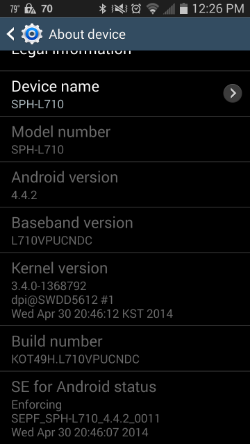
I received the Android KitKat 4.4.2 update this morning to my Virgin Mobile SPH-L710 Samsung Galaxy S3. It was just a standard OTA type update. No update yet for a family member with the same phone/carrier though.
 
I received the Android KitKat 4.4.2 update this morning to my Virgin Mobile SPH-L710 Samsung Galaxy S3. It was just a standard OTA type update. No update yet for a family member with the same phone/carrier though.

Is the build number KOT49H.L710VPUCNDC? Screenshots?
 
Is the build number KOT49H.L710VPUCNDC? Screenshots?

Yes, that is the build number. Before I post the screenshot, is there any personal identifying information that I should remove from the screenshot before posting? I'm not sure what all of the information is that is shown.

Edit: Nevermind, here it is. Nothing looks like a unique identifier to me

098cdf7c-49d2-4fcb-8e9b-eae6c6a37e8c_zps5063192f.png
 
Back
Top Bottom