• After 15+ years, we've made a big change: Android Forums is now Early Bird Club. Learn more here.

Root Let's Get CM Onto Avant!

I can't seem to make my recents button work at all.
Open the settings app and select "buttons." The option to reassign hardware key actions IS there. If you haven't found it then you aren't looking hard enough.
EDIT: Tap on menu button short press action, then select the option that says recents or recent apps or recents panel. I can't tell you exactly what it says because I'm back on the stock ROM again but you will know it when you see it.
 
Last edited:

Is WiFi hotspot possible with this ROM? I'm able to enable it but I keep getting a proxy error on Firefox on my laptop.

I wasn't able to get the hotspot working on the factory ROM either. It would just keep cutting itself off

Tried foxfi and same result :(

Please don't make me have to go back to the LG F6 and its 0.000023 bytes of internal memory as the hotspot is very critical for my needs!

PM me if you can help in a manner not needed to be spoken here or email mattswad@gmail.com

Look at my Post #1069
But if you want to tether on Stock Rom. Then you need to buy these two Apps, that cost under $10 for both of them. They worked okay. Not as good as this Rom's tether.
'Clockwork tether'
'Wifi Tether Router'
 
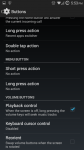
This is what mine looks like. I don't have the recent tab. Please help.
Wait, just to be sure, you have the Avant right?? I don't know why your settings have a "menu button" section, the Avant doesn't have a hardware menu buton.
 
Open the settings app and select "buttons." The option to reassign hardware key actions IS there. If you haven't found it then you aren't looking hard enough.

This is what mine looks like. I don't have the recent tab. Please help.

EDIT: Tap on menu button short press action, then select the option that says recents or recent apps or recents panel. I can't tell you exactly what it says because I'm back on the stock ROM again but you will know it when you see it.
 
I have this. I'll try it though
 

Attachments

  • Screenshot_2015-05-09-17-53-26.png
    Screenshot_2015-05-09-17-53-26.png
    120.4 KB · Views: 166
Wait, just to be sure, you have the Avant right?? I don't know why your settings have a "menu button" section, the Avant doesn't have a hardware menu buton.
I'm not sure. I have the Samsung Galaxy Avant from MetroPcs. Did I do something wrong? o_O
 
So is there a fix for me to get my recents button working? All it says is "Menu" and even if I try to do it through "Menu" and change the "Short press action" setting to "Recent apps switcher" it doesn't work.
 
Last edited:
I have Mac address filtering on my router. That was why my phone wouldn't connect. WHY IS THE MAC ADDRESS SPOOFED? HOW CAN I FIX THIS???!!! :mad:
 
They did a great job, but I just flashed back to stock that lock screen lag was too much for me to handle, excellant work though guys, this ROM is progressing well.
 
That's correct, nonexistent in the stock rom and it was a nuisance at first but I've learned to live with it...
 
Can someone post a summary of what is not yet working or issues when using cm11 so far?

By the way grrrrreat work to those working on this and providing support to this device. Appreciate it.
 
Can someone post a summary of what is not yet working or issues when using cm11 so far?

By the way grrrrreat work to those working on this and providing support to this device. Appreciate it.
Known issues are the back camera (picture taking only, videos work), the proximity sensor, and a noticable lag from the time your press a button and the time the screen turns on. There might be other small bugs but these are the major ones.
 
No nothing wrong, that's what I have as well. Just wasn't sure why it says menu button instead of what mine says.
So is there a fix for me to get my recents button working? All it says is "Menu" and even if I try to do it through "Menu" and change the "Short press action" setting to "Recent apps switcher" it doesn't work.
 
So is there a fix for me to get my recents button working? All it says is "Menu" and even if I try to do it through "Menu" and change the "Short press action" setting to "Recent apps switcher" it doesn't work.
To be honest I wouldn't really know HOW, but if I were you I would reflash...
 
To be honest I wouldn't really know HOW, but if I were you I would reflash...
Can you give me the correct download links so I can download them through my phone, move them to SD card, and then flash them through TWRP? Just trying to be sure I get everything correct.
 
Last edited:
Can you give me the correct download links so I can download them through my phone, move them to SD card, and then flash them through TWRP? Just trying to be sure I get everything correct.
I recommend a clean flash so factory reset in TWRP and then do these in order:
The ROM itself is this: Let's Get CM Onto Avant!
after that flash the correct adreno drivers here: Let's Get CM Onto Avant!
and lastly flash GApps.....use the ones I uploaded if you want, or any other KK GApps.
 

Attachments

Back
Top Bottom