• After 15+ years, we've made a big change: Android Forums is now Early Bird Club. Learn more here.

Lock screen customizations

thaKing

Android Enthusiast
Here's what I'm looking to do with my lock screen, I'm running 4.2.1 and rooted:
1) lock it to landscape
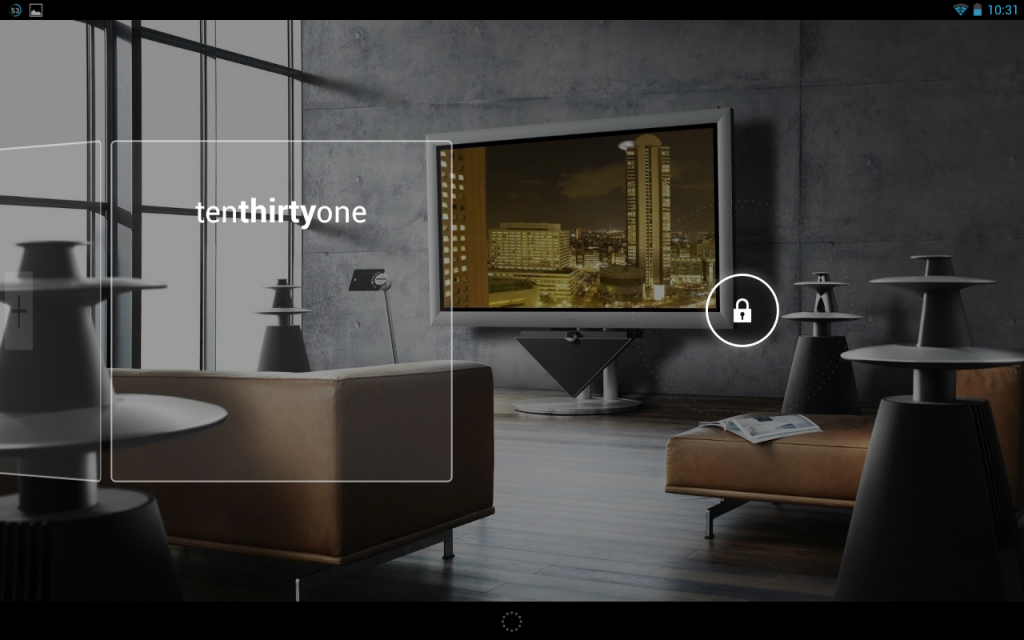
2) when I first wake the system and the lock screen appears, I only have the clock. It displays a white box around the clock and a box on another screen where I can add another widget. I only want the clock widget and would prefer to not see these white boxes.

Thoughts?

 
holo is out - use Nova prime with a Hubs layout. Widget locker - will that remove the white boxes? I don't want to spend $3 just to lock it in landscape.
 
well widget locker allows you to add more widgets to your screen so I dont know if you want that. look at some videos on youtube to see what else it features.

* you might need to use the password when using widget locker because you can unlock the device with the home button.
 
Well, I don't want *more* - just the clock I have. I simply wanna remove those white boxes around the widget, and landscape.
 
Sure, I could try, but I'm asking if anyone *knows* for sure if any of these actually accomplish what I'm after. Especially since they are paid apps.
 
Sorry for the delay in my response....yes, if I should've posted in another section, please move. Thanks! :)
 
Maybe I'll ask in the widgetlocker thread. Basically, with 4.2.1 on the N7 lock screen, you have the option to add multiple widgets. I have one widget - a clock. That's all I need. However, when you wake the N7, it shows a white border around the widget and shows that you can scroll to add more. I'd like to hide that - just the clock and lock/unlock icon. Here's a screenshot:

Screenshot_2013-01-17-22-31-16_zps329fce04.png
 
Back
Top Bottom