1- Download & Install [QPST] and [HTC Diag Drivers / Post with pics for diag driver install*] ( SPECIAL THANKS TO Duir FOR THE LINKS )
2- Get your own SPC Number
3- Got to Start-->All Programs-->QPST-->QPST Configuration.
4- Select your phone from the list (the phone should be in Debug Mode).
5- If you don't see your phone Click on "Add New Port" uncheck "Show
Serial" and select the port and add it.
6- With your phone dial " ##3424# " to Start Clients-->Service Programing. Select the phone and click OK. (YOU NEED TO INSTALL EPST.APK TO GET PORT..)
7-Click on "Read from Phone" you will be asked for your SPC number to unlock the phone and get its information.
8- Go to M.IP tab and select profile 0 and edit your user name remove the "aaak." , and set DMU Plublic Key ID to "41".
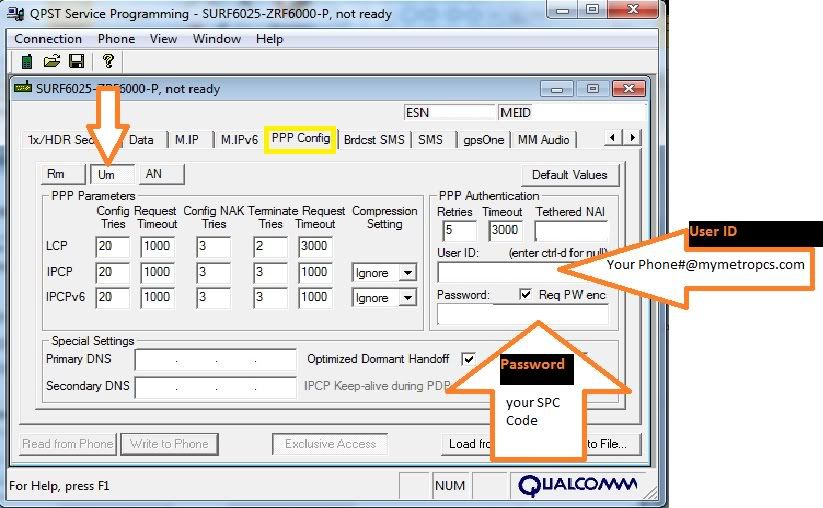
9- Go to PPP Config-->Um change the user name (Your Phone#@mymetropcs.com) and insert your SPC as the password
10- Go to PPP Config-->An change the user name (Your Phone#@mymetropcs.com) and insert your SPC as the password
11- Write to Phone (the phone should restart by itself)
>>>> USE SETTINGS FROM PICTURES <<<<<<<<<



12- Download de.mangelow.network-1.apk and install it.
13- Turn off your WiFi.
14- Run the App and in the "Set preferred network type:" Select CDMA auto (PRL). Tap Turn off radio wait about 5 seconds and turn radio ON.
15- Make Sure Toggle DNS check is "Allowed".
>>>> YOU NEED TO INPUT APN SETTINGS <<<<
The apn settings for metropcs
APN: internet
Proxy: wap.metropcs.net:3128
Port: 3128
Username: 10digitphone#@mymetropcs.com
Password: metropcs
Server: wap.metropcs.net
MMSC: http://mms.metropcs.net:3128/mmsc
MMS Proxy: wap.metropcs.net
MMS Port: 3128
MCC: 310
MNC: 004
APN Type: MMS
2- Get your own SPC Number
3- Got to Start-->All Programs-->QPST-->QPST Configuration.
4- Select your phone from the list (the phone should be in Debug Mode).
5- If you don't see your phone Click on "Add New Port" uncheck "Show
Serial" and select the port and add it.
6- With your phone dial " ##3424# " to Start Clients-->Service Programing. Select the phone and click OK. (YOU NEED TO INSTALL EPST.APK TO GET PORT..)
7-Click on "Read from Phone" you will be asked for your SPC number to unlock the phone and get its information.
8- Go to M.IP tab and select profile 0 and edit your user name remove the "aaak." , and set DMU Plublic Key ID to "41".
9- Go to PPP Config-->Um change the user name (Your Phone#@mymetropcs.com) and insert your SPC as the password
10- Go to PPP Config-->An change the user name (Your Phone#@mymetropcs.com) and insert your SPC as the password
11- Write to Phone (the phone should restart by itself)
>>>> USE SETTINGS FROM PICTURES <<<<<<<<<
12- Download de.mangelow.network-1.apk and install it.
13- Turn off your WiFi.
14- Run the App and in the "Set preferred network type:" Select CDMA auto (PRL). Tap Turn off radio wait about 5 seconds and turn radio ON.
15- Make Sure Toggle DNS check is "Allowed".
>>>> YOU NEED TO INPUT APN SETTINGS <<<<
The apn settings for metropcs
APN: internet
Proxy: wap.metropcs.net:3128
Port: 3128
Username: 10digitphone#@mymetropcs.com
Password: metropcs
Server: wap.metropcs.net
MMSC: http://mms.metropcs.net:3128/mmsc
MMS Proxy: wap.metropcs.net
MMS Port: 3128
MCC: 310
MNC: 004
APN Type: MMS