• After 15+ years, we've made a big change: Android Forums is now Early Bird Club. Learn more here.

Help Moving an app's data path from internal to ExtSDcard

peterh337

Android Enthusiast
I have a Sony app (Action Cam) which is hard coded to transfer data from their FDR-1000V camera over WIFI to use only internal device storage
/storage/emulated/0/DCIM/From Action Cam
and this cannot be changed in the app.

On most devices the internal storage is too small and in this case I want to transfer up to 128GB.

It is running on a T705 tablet, 4.4.2 (there is no 6.x version of the app and it refuses to install on my S7) which has an external SD card, or it could have a USB stick connected via an OTG cable.

I found this
https://play.google.com/store/apps/details?id=com.buak.Link2SD&hl=en
which seems to be intended for moving apps to the ext SD card, but in this case I just want to create what I think is called a symlink.

On a rooted device (the T705 is rooted) this app may work to re-map the above path to say

/storage/extSdCard/DCIM/Camera

Does anyone know how to do this?

The developer is unresponsive.

I believe some custom firmware has this feature built-in but I don't want to load CFW in this case.

Many thanks for any pointers.
 
Hi

I think you need the app called "Foldermount" from playstore. It does exactly what you are looking for. I have not used it for a few years so dont know how it behaves on newish devices.
 
My S6 (droid v5.x) uses something similar to the S7.

However Android provides numerous paths which all lead to the same place. It's very confusing to find the same data in about 5 different ways (especially on a rooted phone on which the various paths can be seen correctly with e.g. Root Explorer) but was reportedly done to enable dodgy apps (with hard coded paths) to run correctly.

I have discovered that Link2SD has an explicit option for moving an app's data path, so I will try that first.
 
Last edited:
Link2SD, is one of my go to apps. It will automatically place newly installed applications and data onto you're sdcard. Either via a second partition or with the native Android function. It takes stress of off the data partition which is separate from storage. However, that being said, after placing one of my photo editing apps completely on my SDcard, apk and data, it still put the finished photos in internal storage[emoji19].
 
You are absolutely right. Moving the app to the SD card doesn't change where it puts the downloaded data - still into storage/emulated/0/DCIM/From Action Cam
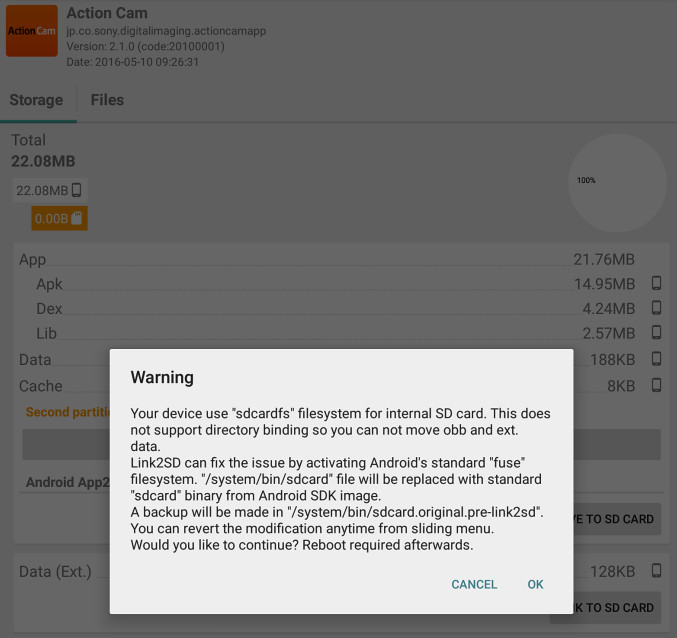
If I try to use Link2SD's Move Data feature, I get this message which I don't know what it means and I don't want to destroy my tablet...

2016-05-10-092948.jpg


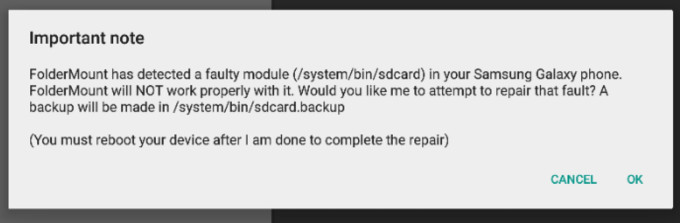
I installed Foldermount also and it gives me this error message (which may be the same as the one above)

2016-05-10-093237.jpg
 
I think the message means that Samsung have used their own filesystem internally rather than do what Android normally does. Nothing unusual there, I'm afraid.

Whether you trust Link2SD to reformat your internal storage to a different filesystem without causing other problems is your call (last time I used it, which was a few years ago, I always felt it was slightly flakey, but it may be better now).
 
There should be other symlink apps which don't need to hack the file system.

For example, there have been apps which intercept the API call to get the IMEI. This was done to fake the IMEI, to enable IMEI-locked apps to run. One reason is piracy but a legitimate reason is that the app vendor has gone bust and you need to change the phone and you can't get a new key...

It should be possible to intercept the file system API, look for the specific path, and replace the path.

I don't really want to trash this tablet. It cost me 350 quid and there is an awful lot of config on it.

I have emailed the URL to this thread to the Link2SD developer...
 
Well, it didn't trash my 4.4.2 T705 tablet. I did read his dev log on his website and it's really obvious that he did work on it after 4.4.2 and somehow tested it on Samsung devices. So it seemed safe.

The file system modification took a fraction of a second, then the required reboot, and the tablet still works.

When I then went into Link2SD, I was able to move the app's data to the external SD card, and it shows "Linked to SD card".

But the Sony Action Cam app still places the .mp4 files into the same place as before, in internal storage. It displays the same path but then of course it would do! It won't know it's path is being redirected.

Maybe there is one more vital step that's needed? Link2SD doesn't give a clue to the new path on the SD card, but in any case if I look at the old path I still see the same mp4 files there, and from the amount of free space it's obvious that one is looking at the internal storage.

I even created the same path under DCIM on the SD card i.e. DCIM/From Action Cam. Makes no difference.

Is the format of the SD card important? In any case, how can I check it from within Android 4.4.2 or reformat it?
 
Last edited:
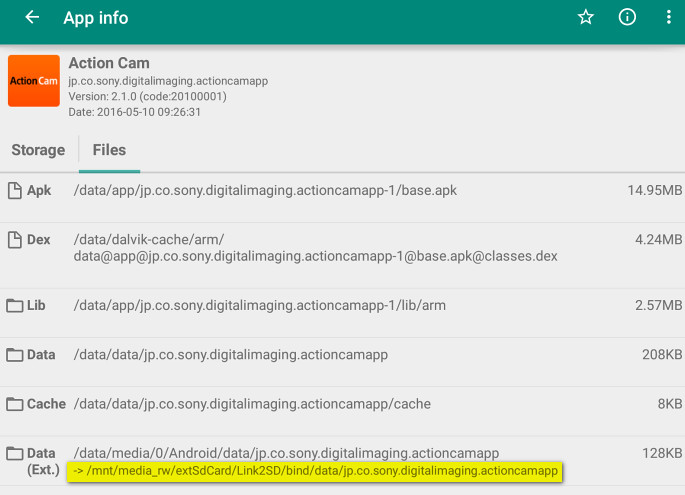
Link2SD has created a link to the SD card but the Sony app ignores it and still puts the movies in
/storage/emulated/0/DCIM/From Action Cam

2016-05-11-071623.jpg


Maybe one needs to use Link2SD to create a general (non app specific) link within the operating system, but how?
 
WTG. Glad you got it sorted. In Android right now, especially in the power user arena, there is much speculation on which file system will prevail. Sounds almost like you did a Virtual Re-Partition. Emulated so to speak. I would be sure to be aware that the extSdCard cannot be removed normally. Be sure not to place any critical system apps there. If you ever run into trouble and have a factory reset those links will be severed and a Bootloop may be the result. I'm speaking from experience on that one.
Cheers
 
I don't think I moved any critical system apps to the SD card. I just went through the list and moved what were apparently user apps, bigger than about 10MB. That freed up about 1GB; not much.

The main thing was that Apps2SD was able to remap the Sony app's data path to the SD card.

The only thing I plan to do sometime is to replace the 64GB SD card with a 128GB one. I am not sure if the T705 will support that (4.4.2) and would need to make sure everything gets copied correctly to the new card. What is the best way to do that? Could one just copy one to the other under Windows? That's how I have always done it.
 
I don't have much experience with cards that big, but there are a couple of ways to transfer. You could just connect the tablet to the computer and load the card in the SD slot and just transfer straight through. I move data between devices similarly. Just make sure to link your apps and data back into internal before removing. Have you found the sdext2 folder in the data partition? I always like to be able to see what's taking place. With the native apps 2 SD function all you can see is a file .ANDROID_SECURE. I haven't asked but assumed that you're rooted. Is your Bootloader still locked? Or do you have a custom recovery in place?
 
I was not suggesting powering up the T705 without the SD card. Obviously that is a no-no if you have apps on it.

I was going to do the card copy with the T705 turned off, and use a PC for it.

Or, one could attach the new SD card via a USB OTG cable and copy the old one to it. I don't think there are any inaccessible files on the source card.

Yes, rooted, of course :)

I have only one partition on the SD card, exFAT formatted.
 
Sounds like you're set. Sorry my last post was a little scatters brained wasn't it. What I was thinking towards us this would be a lot easier if you were running custom ROM. I had a Samsung S4. It was rooted but the Bootloader is permanently locked. I bricked that thing more than I can remember. Without custom recovery I had to flash to factory with Odin repeatedly. Just don't want that to happen to you. Usually messed something up while removing pre-installed apps. That was lollipop though, I think kit-kat is a little more forgiving. Have fun with your new set-up. I enjoyed chatting.
 
I guess what I was getting at is whether android v6 creates any files on the SD card which a normal file copy process would not correctly copy across.

The two copy processes I might use would be

- connecting the new SD card via an OTG cable connected reader and drag/dropping the stuff onto it

- while the phone is OFF, copying the old card to the new card under Windows (XP) Windows Explorer drag/drop
 
I guess what I was getting at is whether android v6 creates any files on the SD cardhub ich a normal file copy process would not correctly copy across.

The two copy processes I might use would be

- connecting the new SD card via an OTG cable connected reader and drag/dropping the stuff onto it

- while the phone is OFF, copying the old card to the new card under Windows (XP) Windows Explorer drag/drop


Hello again. It seems that the issue is not related to the write protection. That problem seems to be solved, basically via root. It's more a matter of applications being equipped to do so. Sounds like your device is pricey but I stumbled upon this:
http://forum.xda-developers.com/android/software/fix-extsd-fix-v1-0b-2016-01-18-t3296266

Also I received, in the mail today a USB-OTG hub for around $10 US. It has 3 2.0 USB ports, slots for large capacity SD(HC) /MS/TF/M2 memory cards. It has an ac
cord or can run off device battery. And of course a micro USB for your device. All this in less than the palm of my hand. The options seem endless. I'm excited at least. :rolleyes:
 
One aspect of this is that under android 4.x (and possibly 5.x) the external SD card is identified to apps etc by it's volume name e.g. S7-SDCARD.

The volume name is trivial to edit.

But v6 uses the volume serial number. For example in my S7 phone, the SD card appears as

/storage/3332-3928

and under that you have the usual stuff e.g.

/storage/3332-3928/DCIM

If I change the SD card for another one (even same size), every app which references the SD card needs to be reconfigured.

That's unless I can clone or edit the volume serial number.
 
Once rooted say, my S2 running CM11, a few paths are created. /storage/sdcard1, /mnt/externalsd, /mnt/media__rw/sdcard1, now let's throw Link2SD's second partition in as well as the native apps to sd function. /data/sdext2, /mnt/asec, mnt/secure/asec. That's a lot of different means to the same end. This can also be altered with the supersu mount names pace setting I believe but I'm still learning that. If I switch to a different ROM (kernel) this is all subject to change. I believe you are referring to stock values. Where I am referring to custom.[emoji3]


If I have thoroughly confused you, please hit the like button[emoji6]


EDIT: Stack exchange is a great resource.

I guess what I'm asking is, are you able to run a custom ROM, or at least a custom Kernel?
 
My 4.4.2 T705 is rooted.

I bought a 128GB SD card, Samsung, but it's going back to Amazon because there is something wrong with it.

I could not find a Format function on the tablet. Even Root Explorer doesn't have one...
 
My 4.4.2 T705 is rooted.

I bought a 128GB SD card, Samsung, but it's going back to Amazon because there is something wrong with it.

I could not find a Format function on the tablet. Even Root Explorer doesn't have one...
Do you have TWRP, CWM, or Philz custom recovery installed?
 
Not that I know of. No custom firmware.

Incidentally I had a look at my present (64GB) SD card. The volume name is blank but really curiously the volume serial number is 0000-0000. That must have been created by some formatting utility. I have a feeling it either came like that, or was formatted by my Sony FDR-1000V camera (which is a very useful thing to know!).

I have tried formatting the new (128GB) SD card on a PC but nothing seems to work on it. It just says "Format failed". And the volume serial number setting utilities I found online fail to work on it too.
 
Back
Top Bottom