• After 15+ years, we've made a big change: Android Forums is now Early Bird Club. Learn more here.

Help MVK file player with dts audio thru UPnp server

dfran1

Android Enthusiast
Is their anyone that can help.

Im doing some streaming from a upnp server (seagate home unit) and I have some mvk files with audio dts, and nothing is playing these but rock player, but rock player video is unwatchable (choppy, distorted, ect..), I tried just about everything I could find so far (except real player being it wants money and I don't think it will work either).

I'm using Bubbleupnp to get the files and it plays in mx player (and lots of other players) but no audio, Rock plays video and audio but video is unwatchable.

Has anyone been able to pay these HD streaming videos with dts audio near perfect somehow??

Thanks in advance
 
XBMC is the best so far THANKS, but it is still choppy, no where near as bad as rock. Maybe I need to adjust something somewhere?
 
Try servio. . I know it supports mkv on PC to TV maybe the Droid app will also

Hi,
It sounds great but I am using a device Seagate home unit that has it's own built in server, I just plug in a hard drive (actually one came with it ) load up with movies music, ? And log into it with just about anything in my house, it starts the hard drive up from sleep and viewing we go.

I had it for a couple years now and not much I had at the time was compatible with it, so I just started it up recently again and now find this use for it. This way no computer is on.

I need to instal more with it and try more, but so far rock 2 player is the only one.

But thank you anyway and I'll keep it in mind,and sure others that come here will love that way!
 
I've now managed to get DTS audio to work over my WLAN from my NAS with full Audio and no jerky video on a 1080p encoded, DTS MKV file.

Here is how:

1 - Installed MX player

2 - Downloaded a custom Codec (Arm 7 Neon Version) from here

3 - Extracted the folder for codec to my SD card (/extSdCard/neon)

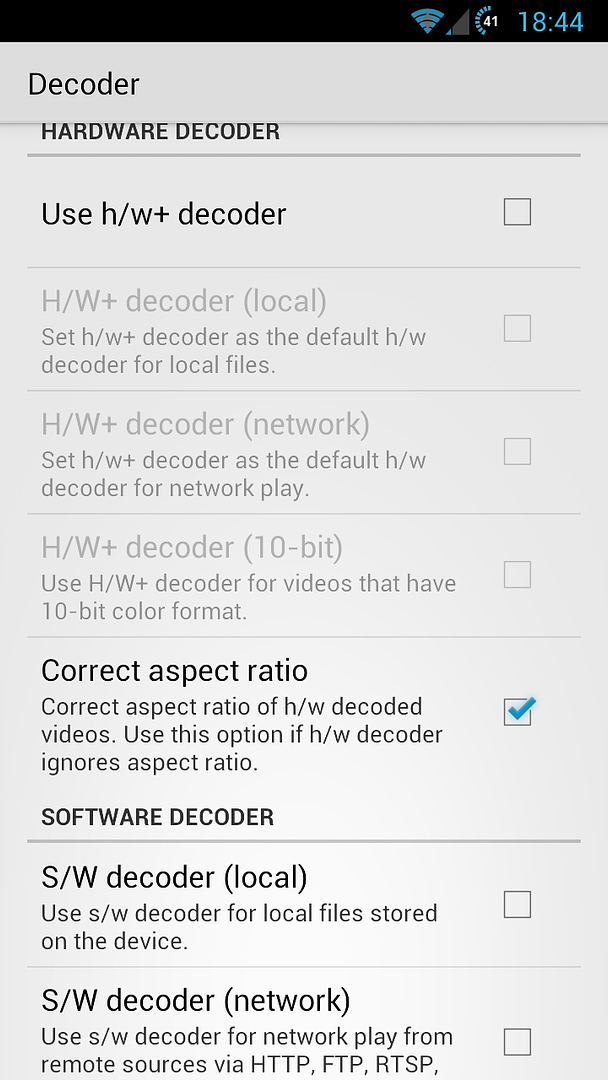
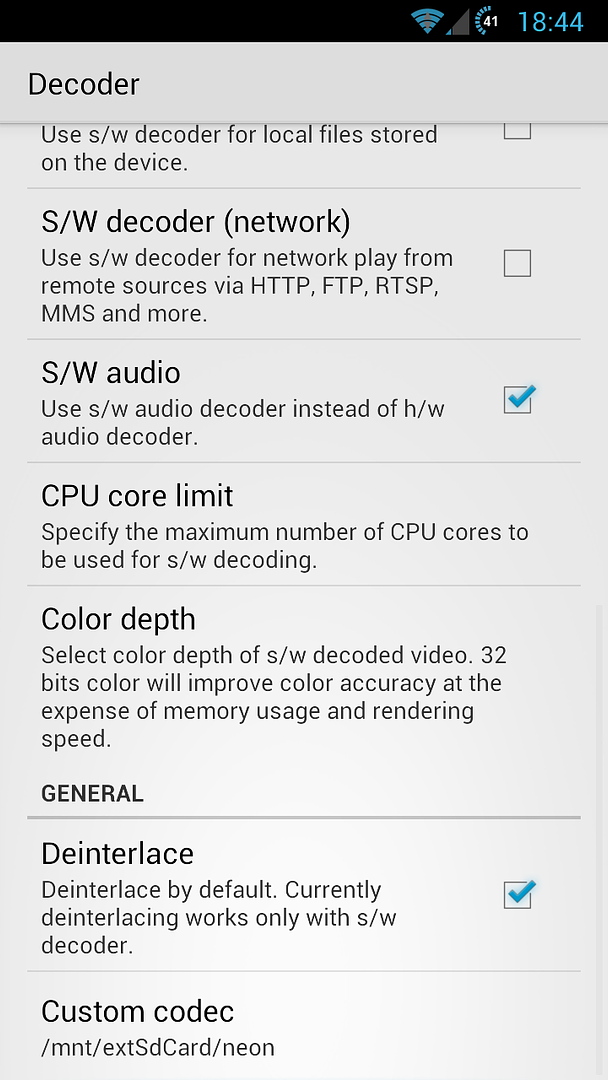
4 - Set the following settings within MX player:

Screenshot_2012-12-29-18-44-08.png


Screenshot_2012-12-29-18-44-31.png


You'll notice the custom codec at the bottom points to the folder in step 3. When you click this to select, go into the neon folder and select by (pressing) the file "libavcodec.mx.so"

Hope this works as well for you as it does for me.

Enjoy.

Dan
 
I've now managed to get DTS audio to work over my WLAN from my NAS with full Audio and no jerky video on a 1080p encoded, DTS MKV file.

Here is how:

1 - Installed MX player

2 - Downloaded a custom Codec (Arm 7 Neon Version) from here

3 - Extracted the folder for codec to my SD card (/extSdCard/neon)

4 - Set the following settings within MX player:

Screenshot_2012-12-29-18-44-08.png


Screenshot_2012-12-29-18-44-31.png


You'll notice the custom codec at the bottom points to the folder in step 3. When you click this to select, go into the neon folder and select by (pressing) the file "libavcodec.mx.so"

Hope this works as well for you as it does for me.

Enjoy.

Dan

Thank You soooooooo Much!!!!

Works Great!!!!!!!
 
+1 for MX Player! Use it and changed to use hardware decoder for network and stream all my content from my Synology box. All content I have is in MKV format and so far its worked a charm.
 
Back
Top Bottom