
Install the app
How to install the app on iOS
Follow along with the video below to see how to install our site as a web app on your home screen.
Note: This feature may not be available in some browsers.
-
After 15+ years, we've made a big change: Android Forums is now Early Bird Club. Learn more here.
You are using an out of date browser. It may not display this or other websites correctly.
You should upgrade or use an alternative browser.
You should upgrade or use an alternative browser.
Help Mystery Screen Icon
- Thread starter Thumb Peg
- Start date
-
- Tags
- samsung galaxy s3
- Status
- Not open for further replies.

Best I can tell is a Wi-Fi connected. Anyway, is it one of these?

Best I can tell is a Wi-Fi connected. Anyway, is it one of these?
Thanks but it's not the Wifi Icon or any of the above
I figured when I saw you trying to post the screenshot. I can't tell if it didn't work or if it is blocked by my work firewall.
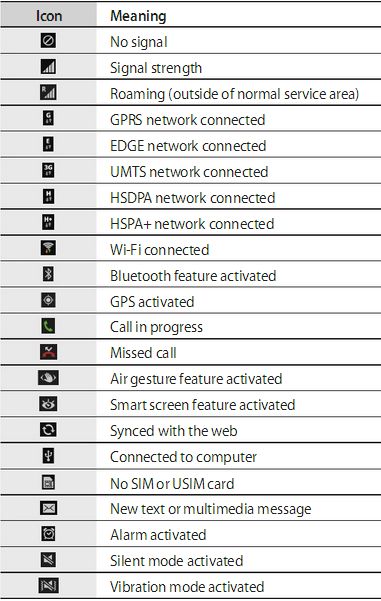
I found it, your description is spot on. It's "Smart screen feature activated." I have no idea what that means, but it should get you going in the right direction.

The ICON on the leftPost a screenshot because that is a horrible description, lol.
In case you missed it, see my post above this. It is a smart screen icon.
I found it, your description is spot on. It's "Smart screen feature activated." I have no idea what that means, but it should get you going in the right direction.
According to Google when it's selected the phone has the ability to recognise when you're looking at the screen and it doesn't dim.
Neat, a little creepy as it must be using the FFC, but neat.According to Google when it's selected the phone has the ability to recognise when you're looking at the screen and it doesn't dim.
freakshow85
Android Enthusiast
This doesn't work for me. Maybe because I'm 4.1.2. Maybe I'm doing it wrong lol.This is quite correct, it is "smart stay", to toggle it on or off do a two finger swipe (fingers separated) of the notification bar down, rather than a one finger swipe and you'll get the quick toggles you can turn on or off.
I use Smart Stay, though. Has seemed to work pretty good. I like it. I've noticed no noticeable extra battery drain from it at all. I mean, in all technicality, it's going to use a little juice, but it's not noticeable at all.

dynomot
Android Expert
I like smart stay, it works well, smart scroll makes you look like a nodding dog holding the phone at eye level, and is just a gimmick. Smart pause works well too.
Both smart stay and smart pause use the front facing camera (FFC) to detect normal human blinking, you can stare it out! A bit creepy as stated, but it does work.
Both smart stay and smart pause use the front facing camera (FFC) to detect normal human blinking, you can stare it out! A bit creepy as stated, but it does work.

androidlover9
Android Enthusiast
Not all gimmicks on phones work all that well lol, you can turn it off in settings and then going to display I believe? Not entirely sure but I think if you hold on your rotation toggle you'll find it there.

Madbat
Android Expert
Just to mention, 2 finger pulldown is the default in stock lollipop .Not all gimmicks on phones work all that well lol, you can turn it off in settings and then going to display I believe? Not entirely sure but I think if you hold on your rotation toggle you'll find it there.

androidlover9
Android Enthusiast
Just to mention, 2 finger pulldown is the default in stock lollipop .
Yeah, but the user is using jelly bean as visible from the green battery icon, so it didn't have a two finger pulldown thingy

androidlover9
Android Enthusiast
I'm on Jellybean 4.3 and the two finger pulldown works for me ☺
Okay so just do the two finger swipe, hold on the eyeball thing, and disable smart stay


nickdalzell
Extreme Android User
Smart Stay is why keep a Samsung, and LG. (has similar option).
Smart Scroll is useless, finiky if you can't hold still, and Smart Pause is so sensitive i found it pausing videos on YouTube if i so much as barely tilted the screen, such as when family are watching (my nephew and his sister love Thomas the Tank Engine)
FYI: Samsung doesn't recognise a two finger swipe. at least as far back as my Galaxy S3 (ran 4.1.2) it was just built into the notification shade. one swipe down with one finger, all the quick toggles (scroll to the right to see more or tap the pencil icon to edit, or the icon to the right of the pencil to see all) including Smart Stay are there.

Smart Scroll is useless, finiky if you can't hold still, and Smart Pause is so sensitive i found it pausing videos on YouTube if i so much as barely tilted the screen, such as when family are watching (my nephew and his sister love Thomas the Tank Engine)
FYI: Samsung doesn't recognise a two finger swipe. at least as far back as my Galaxy S3 (ran 4.1.2) it was just built into the notification shade. one swipe down with one finger, all the quick toggles (scroll to the right to see more or tap the pencil icon to edit, or the icon to the right of the pencil to see all) including Smart Stay are there.

Last edited:
Madbat
Android Expert
I know that. You said it was just a phone gimmick, I was letting you know that starting in lollipop it is part of the os. Not just a 1 phone gimmick anymore. That's all.Yeah, but the user is using jelly bean as visible from the green battery icon, so it didn't have a two finger pulldown thingy
nickdalzell
Extreme Android User
My Nexus 10 has LP but it doesn't have any Smart Stay feature at all. another neutered feature on the 10?
Madbat
Android Expert
I was talking about the two finger pulldown for toggles/quick settings.My Nexus 10 has LP but it doesn't have any Smart Stay feature at all. another neutered feature on the 10?
Madbat
Android Expert
My s3 has two finger pulldown. Running stock 4.4.2 KitKat.Smart Stay is why keep a Samsung, and LG. (has similar option).
Smart Scroll is useless, finiky if you can't hold still, and Smart Pause is so sensitive i found it pausing videos on YouTube if i so much as barely tilted the screen, such as when family are watching (my nephew and his sister love Thomas the Tank Engine)
FYI: Samsung doesn't recognise a two finger swipe. at least as far back as my Galaxy S3 (ran 4.1.2) it was just built into the notification shade. one swipe down with one finger, all the quick toggles (scroll to the right to see more or tap the pencil icon to edit, or the icon to the right of the pencil to see all) including Smart Stay are there.
- Status
- Not open for further replies.