

enesthebigboss
Newbie
Does anybody know how can I use the Notch from Xiaomi Mi 8 into Landscape mode?
Follow along with the video below to see how to install our site as a web app on your home screen.
Note: This feature may not be available in some browsers.
Bringing the notch to landscape mode? That could be the worse invention of the year

But do you know how to do is?

 .
.
No, I don't.
But do you know what the notch is for? If you know it you will see why no one needs the notch in landscape mode.
I know but example the Iphone can you use the Notch on Landscape mode and on Xiaomi Mi 8 not.
iPhone has the notch in landscape mode? Another reason to not buy an iPhone
Sorry, but what do you mean by "use the notch"? I think that's what everyone is misunderstanding. The notch cannot rotate (this is true for iPhones as well), and no sane person would want it to. So you must mean something different. But what do you mean?I know but example the Iphone can you use the Notch on Landscape mode and on Xiaomi Mi 8 not.
Sorry, but what do you mean by 'use the notch'? I think that's what everyone is misunderstanding. The notch cannot rotate (this is true for iPhones as well), and no sane person would want it to. So you must mean something different. But what do you mean?
The only guess I can make is that you are referring to the notification icons, which in protrait mode sit either side of the notch (but are not part of it). But even then you might mean hiding them (which is called 'immersive mode' in Android, and is nothing to do with the notch) or keeping them around the notch rather than rotating (which isn't an option as far as I know). But that is only a guess at what you mean. So could you explain what you are actually wanting to do?

I mean when you Iphone turn to Landscape mode the Notch will rotate it.
But that's simply not true. The notch is a physical cut out in the display containing the earpiece, sensors and cameras. It is fixed in place and does not rotate:I mean when you Iphone turn to Landscape mode the Notch will rotate it.

But that's simply not true. The notch is a physical cut out in the display containing the earpiece, sensors and cameras. It is fixed in place and does not rotate:
As you can see here, the gesture bar rotates along with the rest of the UI, but the notch does not.
Just to be clear, the 'notch' is the black cut-out at the top of the phone (in portrait mode - left and right in these 2 pictures respectively). If you mean anything else then what you are talking about is not the 'notch'.
No. I'm having trouble with my definition of rotation as it relates to my understanding of your rotation description.
I don't understand what's going on here. I presume English is not the OP's first language.
OK, let's be clear. In my last post I included 2 pictures. In the top one there is a black bar on the left-hand side of the iPhone. In the bottom one it's on the right, because the phone was turned the other way. That is the notch. That is what everyone means when they talk about a notch.You have probably not readed right. The Picture do you posted it the Notch has been rotated. You was wrong.
Actually 'OP' is forum jargon for 'Original Poster'. So in this thread 'the OP' means you, since you started this thread.
OK, let's be clear. In my last post I included 2 pictures. In the top one there is a black bar on the left-hand side of the iPhone. In the bottom one it's on the right, because the phone was turned the other way. That is the notch. That is what everyone means when they talk about a notch.
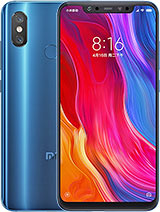
Here's a picture of the Xiaomi Mi 8 from GSMArena:
That black bar at the top, between the clock and the signal and battery icons, with cameras and an earpiece, is the notch.
So is that what you mean when you talk about the notch?
If it is, then if I rotate that picture through 90 degrees to the left it looks like the top picture of the iPhone in my previous post. And if I rotate it to the right it looks like the bottom picture. It cannot do anything else, because it is fixed to the phone. So if you do mean 'notch' to mean the same as everyone else, why do you say that the iPhone does something different? What do you think is different, and what is it you actually want?
And if that isn't what you mean when you talk about the notch, then what do you mean?
I have said Notch. Read carefully.

