

Rallye James
Newbie
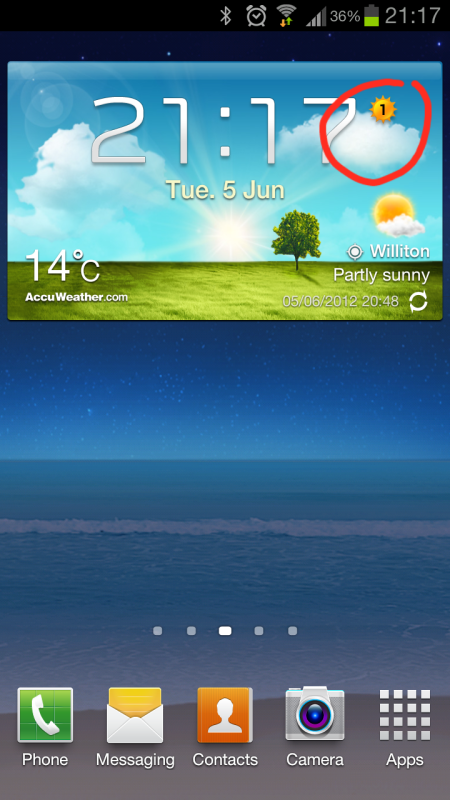
After a little play with Touchwiz and Nova Launcher, I've decided to stick with Touchwiz as I like the weather widget. The only problem is, there is this '1' to the right of the clock that's bugging me, what is it?!
Follow along with the video below to see how to install our site as a web app on your home screen.
Note: This feature may not be available in some browsers.


I tried Tokyo yesterday, no '1' again. I wish it could be turned off really.
"

My next query on the weather widget is that it doesn't seem to update my location as (I think) it should. When I go to work, it refreshes the weather as I've asked it to, but keeps my home location.
Mine is the same, surely it should update to wherever you are at the time..?
Do you have enable current location in the widget settings? It should show a small gps location icon on the homescreen next to the weather and name of location when you have it enabled and it should update every so many hours (you choose)
I have current location enabled and update every hour, I've got the GPS icon next to my location (my screenshot at the top shows this). Yet the current location always seems to be where I first turned on widget.
aha. so in that case try going onto settings - location services and look if you have "use wireless networks" checked. That is the one that determines your actual location every time it checks. Otherwise it leaves the one you selected the first time you activated the widget.[/QUOTE.]
My "use wireless networks" checkbox was ticked , I have un ticked then ticked and accepted the terms, will see tomorrow at work if this has helped. Cheers.

I tried Tokyo yesterday, no '1' again. I wish it could be turned off really.
My next query on the weather widget is that it doesn't seem to update my location as (I think) it should. When I go to work, it refreshes the weather as I've asked it to, but keeps my home location.
At this rate I think I'll find a different, similar style widget.

Same problem here. I read somewhere that there might be a bug with the weather widget. The only way I've found to get the "current city" to reflect my actual location is to turn if off, then back on. A pain indeed!

 just your time zone
