• After 15+ years, we've made a big change: Android Forums is now Early Bird Club. Learn more here.

Help OMG horrible picture quality???

moespeeds

Member
I just got back from a trip to AZ. When I'm out there I do a ton of riding, and I use my phone to take a lot of pictures while on the bike. This was my first trip out with my RAZR MAXX and the picture quality while moving is absolutely horrible. I tried all kinds of modes, Automatic, Landscape, Sport, etc and 90% of the pictures came out blurry, or parts of the picture were blurred. What's up with that? I was so disappointed in the camera, I'm an inch from ditching this thing. My Droid X did a pretty decent job, though I gotta say my best picture quality came from my old Blackberry. The issue seems to come from that funky focus thing where you can tell it where to focus. Any way to turn that off? Also, is there a way to make the phone take the picture from a side button, instead of having to tap the screen? Look at the pic below, pretty much all of my pictures came out like this...

2012-03-30_11-10-35_493.jpg
 
Try a different camera app. I don't have any focus issues with Camera Zoom FX (although I've never really had much of a problem with the default camera app either).
 
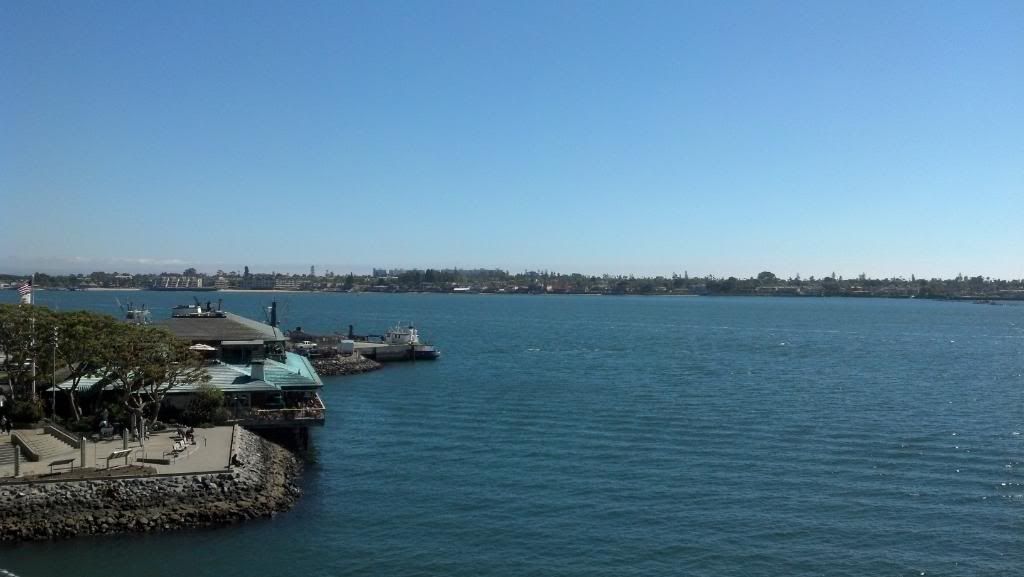
That is really strange how the fuzzy focus is only seen in parts of the image... it would lead me to believe the lense might be dirty? That would be the first thing to check, and alcohol swabs work great for small spots like the lense. I snapped a few quick photos of landscape in San Diego, and had no such issue:

2012-03-22_15-13-08_477.jpg


So I am not sure, if not a dirty lense, what could be causing the blur? You should write Motorola about it, or consider exchanging the phone under warranty for a new model (as a last resort, assuming a different camera app or something else doesn't fix the issue). Anyways, good luck, and update us on the process.
 
If I'm standing still, it doesn't do that. It just can't focus if I'm moving. The pictures were taken while riding my motorcycle. The first thing I tried was cleaning the lens.
 
That is really strange how the fuzzy focus is only seen in parts of the image... it would lead me to believe the lense might be dirty? That would be the first thing to check, and alcohol swabs work great for small spots like the lense.
Agreed, notice how it goes from in focus to out of focus back into focus. That's says that your lenses are either dirty (possibly internally) or misshaped.
 
It was either in Landscape or Auto mode. But basically factory settings with the factory app. The panoramic pictures came out really well too.
 

Attachments

  • 2012-03-31_12-05-31_704.jpg
    2012-03-31_12-05-31_704.jpg
    1.3 MB · Views: 158
The problem IMHO is that you have to follow that green focus box and keep the camera perfectly still. This is very difficult, at least for me, to do.
 
I took pictures while going through two construction sites at about 30 mph... they came out clear enough to read the "Two Left Lanes Closed" sign with no problems.
 
theres your problem....

i wouldnt knock a phones camera because it takes blurry pics off a motorcycle while moving...
I'd say there are two most likely culprits:

1. As you're moving, the "camera" can't pic a spot to focus on. When it does find focus, by the time the shutter clicks that spot that was focused is no longer in the picture. So depending what changed in the screen in that time, it could cause focus issues.

2. With the focus button on the screen, it's hard to hold the camera still. That is even more the case when you're not able to dedicate both hands to steady the phone when the shutter clicks. So if you're holding the phone with one hand and trying to take a pic, the odds of camera shake and thus blur increase substantially.
 
If picture quality is really that big of a deal, get yourself a good little point and shoot camera. I picked up a Canon Elph Powershot 310 for $217.00 I did this because at the time I had the Droid 3 which IMHO has one of the worst cameras. Took forever to be able to take a picture and even longer to save the picture. But with the MAXX I don't have that problem. It is picture ready in under 2 seconds. And does take pretty good photos. If you are having trouble with your photos I would do what others have recommended. Clean the lens(even if it looks clean) and if that doesn't work, you can go the warranty route and get it replaced.
 
Hold on just a second... everyone keeps talking about the green focus box. There should not be a focus box if you are in the correct settings for motion pictures! Sport mode is the only setting on the factory camera software designed to take motion pictures. I guess I hadn't mentioned this before because I assumed you were still having problems in Sport mode.

With camera open, there should be a slide out panel at the bottom of the screen. The third button from the left lets you choose modes. Auto is best for almost any everyday picture, and allows you to touch the screen where you want to focus. Portrait is for pictures of people, at close distance. Landscape is for long distance, and allows a further depth of field for the lense to focus (less fore/aft blur). Sport is for motion pictures, and attempts to snap a quick still without the white/green focus box. Night portrait is the same as portrait with better exposure for darker settings. Sunset is landscape with higher exposure as well. Macro is for very close images, less than five feet (allowing focus in very close, which Auto setting cannot achieve). Finally, low light is Auto mode with increased exposure settings. You can just use Auto and change the exposure manually to get similar effect.

Hopefully these general comments regarding the stock camera are helpful to you. I would suggest you might try some motion shots in the Sports setting and see if there are still blur issues.
 
Remember to that there is going to be much more vibration transfered through your body while riding a motorcycle than riding in a car. I can see that affecting picture quality as well. I know that if I try to take a picture in the morning, it normally comes out blurry as I have drank 12 cups of coffee and I got the shakes. Don't have the issue in the PM.
 
Back
Top Bottom