• After 15+ years, we've made a big change: Android Forums is now Early Bird Club. Learn more here.

Help phone wont connect to pc?

Just got the phone and when i plug it into the pc it says "usb device not recognized "
I dont know if that has to do with me running vista, if so, getting new os isnt an option. ..but my last smartphone worked with it, and according to lgs website, as best i can tell, it should have worked.

The phone shows it is "slow charging" but thats all and the pc says its unrecognized. Im tying mainly to use for file transeferring because there isnt a lot of storage on the phone, also if possible would like to use the hotspot service i just added with it.

Does anyone know what is wrong?
 
I have Windows 7 so I am not sure if this will work but its worth a shot. When you plug your phone into pc go to Control Panel/ Device Manager. There is an option where you can scan for new hardware. When I did it showed up. Go to properties by right clicking, then to change settings, update driver. Your pc will scan your computer for any, or you can do it manually,
 
Would the phone be called by its name or something else? There are tons of devices listed here most i dont know what they are, nothing called l70, optimus, or lgms323
 
Re:usb debugging:

Im not sure. I looked for it but dont see it, and Im not sure what it is actually. .. Do i want to turn it on or off, and where would i look to find it??
 
Re:drivers

I got the impression from the lg website that pc users should already have the drivers, wasnt sure if they meant the phone came with them or they were just a standardized driver that pcs have..but they might have been assuming windows 7...i only have yhe droid for net at home, so I will try downloading the driver tomorrow and see if they work.
 
To connect your phone to your PC, you shouldn't need drivers. Anything after 4.1 will connect in MTP (media transfer protocol). To confirm you have that enabled go to menu>settings>storage, tap on the menu key and select USB computer connection. MTP mode should be checked.

Don't worry about debugging mode. For that to work you will need the drivers and it still wouldn't make your phones files browsable.

Also, when you connect an MTP device for the first time running Android 4.2.x and higher, it will ask for permission to connect. Plug in the USB cable to the phone, but not the PC. Unlock the phone and make sure the screen is on. Now plug in the USB cable to the PC and see if you have a notification for permission to connect. Once you do this, you won't have to do it again.
 
It should be there.
 

Attachments

  • Screenshot_2014-09-05-20-51-37.jpg
    Screenshot_2014-09-05-20-51-37.jpg
    29 KB · Views: 255
My screens dont look like that at all not even the bar up top. I did find mtp under something called pc connection menu instead of storage, but mtp was already checked...i took a screenshot because i dont understand why my screen is different and my menu was in a diff place, o thought maybe that would help explain if theres some other kind of spec thats diff about my phone. Im not sure how to attach the screenshot though, the button that looks like it should do thag wants a url instead of browsing the phone.
 
While my phone is made by LG, the Nexus is pure Google and has no manufacturer skins, which is why your screens look different. In order to attach a screen shot when making a post, click "go advanced" and then choose "manage attachments". You will be able to upload a file that way.
 
I clicked go advanced but it doesnt say manage attachments, i even used "find in page" and it didnt find it. I tried all of the icons in case there was an icon i should have known meant that but none of them let be attach from phone, only from a url.

Do you have any thoughts what the problem connecting to pc might be since mtp was set right??
 
guxu said they had to install drivers so I went to LG LGMS323 Support: Find Manuals & Warranty Info | LG USA clicked on the "Software Update & Drivers" link and there was a download for USB drivers. Now, this is usually only necessary when connecting in Fastboot mode, but maybe LG did something that requires a specific driver to connect in MTP mode. Try installing the drivers, then reboot both your phone and your PC and then see if it will connect.
 
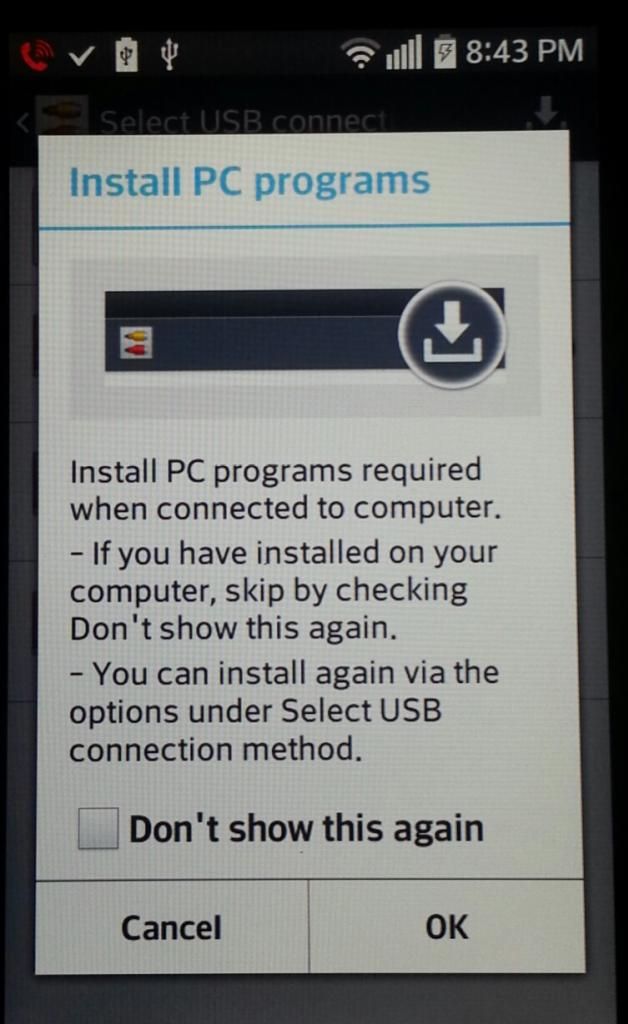
I just got a MetroPCS L70 today. I loaded the drivers on my Win 7 computer. When I plug the phone into my computer I always get this message: "Install PC Programs". But I have just pushed Cancel every time because I don't know what this will do. Does anybody know what happens if I choose OK?
(After I choose Cancel I am able to connect via MTP connection.)

screen1_zpsd8f43d62.jpg
 
I just got a MetroPCS L70 today. I loaded the drivers on my Win 7 computer. When I plug the phone into my computer I always get this message: "Install PC Programs". But I have just pushed Cancel every time because I don't know what this will do. Does anybody know what happens if I choose OK?
(After I choose Cancel I am able to connect via MTP connection.)

screen1_zpsd8f43d62.jpg

If you click OK, you will see a flash drive on your PC with LG software in it. I actually wanted to check the software. But the flash drive always disconnected before I could install anything. Later I found the software is in a zip file.
 
If you did it once then it is good to go. Just check the DONT SHOW THIS AGAIN box then hit cancel. I had the same thing happen to me.
 
Back
Top Bottom