
Install the app
How to install the app on iOS
Follow along with the video below to see how to install our site as a web app on your home screen.
Note: This feature may not be available in some browsers.
-
After 15+ years, we've made a big change: Android Forums is now Early Bird Club. Learn more here.
You are using an out of date browser. It may not display this or other websites correctly.
You should upgrade or use an alternative browser.
You should upgrade or use an alternative browser.
Help Phone wont sleep
- Thread starter chrcol
- Start date
-
- Tags
- samsung galaxy ace
wearethestorm
Member
BetterBatteryStats is the one you want, I think.
It will tell you 'partial wakelocks' (among other things). Giving you a count of how many times it's caused a wakeup and the % of battery it's drained.
I got the app when my battery started draining too quickly and I kept finding it had been awake for long periods of time- turned out it was the Hotmail app causing issues for me.
It will tell you 'partial wakelocks' (among other things). Giving you a count of how many times it's caused a wakeup and the % of battery it's drained.
I got the app when my battery started draining too quickly and I kept finding it had been awake for long periods of time- turned out it was the Hotmail app causing issues for me.
ok these are the top culprits.
Activitymanager-sleep
Alarmmanager
RILJ (dialer)
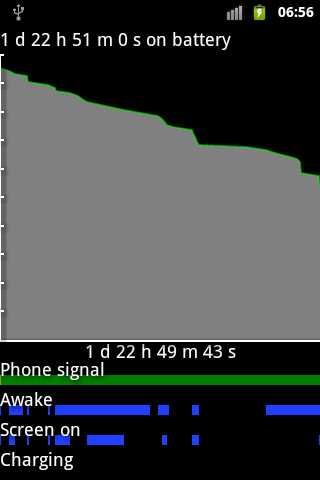
after installing this app and droidwall (and also blocking most apps on droidwall) the awake issue stopped completely for a few days but then yesterday the phone was awake for a while with the screen off.
Activitymanager-sleep
Alarmmanager
RILJ (dialer)
after installing this app and droidwall (and also blocking most apps on droidwall) the awake issue stopped completely for a few days but then yesterday the phone was awake for a while with the screen off.
wearethestorm
Member
None of those are causing a problem I don't think, mine is pretty similar.
I guess all you can do is after realising your phone has been awake a long time then check BetterBatteryStats. By the sounds of it that isn't really helping though. Sorry I can't be of more help!
I guess all you can do is after realising your phone has been awake a long time then check BetterBatteryStats. By the sounds of it that isn't really helping though. Sorry I can't be of more help!

wearethestorm
Member
Have you had any luck with sorting the problem?
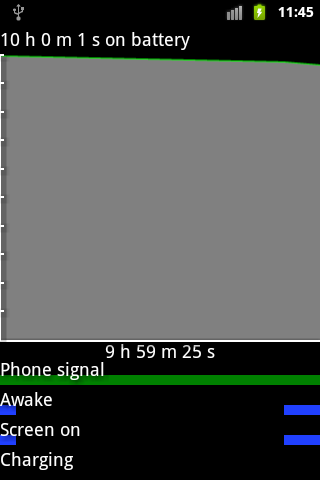
Annoyingly, since I rooted, froze some system apps and then unrooted the problem has come back for me. Not as extreme as yours but still regularly waking up and draining the battery. I can't think of anything else I've done to the phone or apps I've installed that have caused this..
Annoyingly, since I rooted, froze some system apps and then unrooted the problem has come back for me. Not as extreme as yours but still regularly waking up and draining the battery. I can't think of anything else I've done to the phone or apps I've installed that have caused this..

GrahamF
Android Enthusiast
latest screenshot.
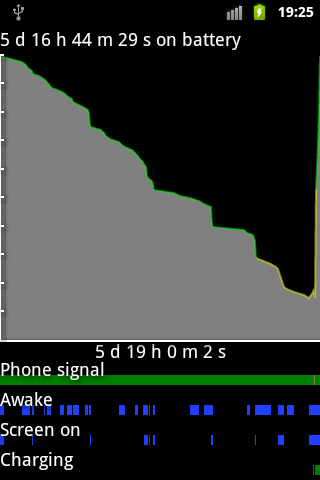
5 days 16 hours...!!!! is that on one charge??
that's excellent, what is there to complain about??

Graham
it is (for a smartphone) but I like perfection, clearly it can be better if it keeps waking up 
setcpu may have been the culprit as since I have disabled that all the awake bars match with the screen on bars.
autostarts helped me get that kind of life by the way, I disabled a lot of stuff that kept auto starting the software update app. It seems tho underclocking the cpu via setcpu is a negative. Will see how long it lasts till low again as it may be those wakeup's werent affecting actual drain much. So its extra sleep now vs lower clock speeds.
incidently a 1500mah battery I got was noticebly weaker (this is stock 1350mah battery) the 1500mah struggled to get 4 days, and you can see on that 5 day graph I still had charge left before I started charging. Although once below 10% the phone is barely useable as it keeps agressively prompting for the charger and will cut off calls.
setcpu may have been the culprit as since I have disabled that all the awake bars match with the screen on bars.
autostarts helped me get that kind of life by the way, I disabled a lot of stuff that kept auto starting the software update app. It seems tho underclocking the cpu via setcpu is a negative. Will see how long it lasts till low again as it may be those wakeup's werent affecting actual drain much. So its extra sleep now vs lower clock speeds.
incidently a 1500mah battery I got was noticebly weaker (this is stock 1350mah battery) the 1500mah struggled to get 4 days, and you can see on that 5 day graph I still had charge left before I started charging. Although once below 10% the phone is barely useable as it keeps agressively prompting for the charger and will cut off calls.