
Install the app
How to install the app on iOS
Follow along with the video below to see how to install our site as a web app on your home screen.
Note: This feature may not be available in some browsers.
-
After 15+ years, we've made a big change: Android Forums is now Early Bird Club. Learn more here.
You are using an out of date browser. It may not display this or other websites correctly.
You should upgrade or use an alternative browser.
You should upgrade or use an alternative browser.
pick contact to send a text message
- Thread starter Boria
- Start date
skimminstones
Android Enthusiast
Usually long press and hold on the contact and a menu comes up. One of the options is send sms
I don't think I was quite clear enough.
Let's say I want to forward a text/picture. I go to the forward screen. In the TO: field I want to pull up my list of contacts instead of typing in a name or number. Is there a way to do this?
I want to pick from my contact list who to forward to instead of typing in names or numbers.
Let's say I want to forward a text/picture. I go to the forward screen. In the TO: field I want to pull up my list of contacts instead of typing in a name or number. Is there a way to do this?
I want to pick from my contact list who to forward to instead of typing in names or numbers.

rcrott1
Android Enthusiast
if you are using Handcent, in the "to" field there is a "+" symbol that brings up your contact list in order for you to choose.I don't think I was quite clear enough.
Let's say I want to forward a text/picture. I go to the forward screen. In the TO: field I want to pull up my list of contacts instead of typing in a name or number. Is there a way to do this?
I want to pick from my contact list who to forward to instead of typing in names or numbers.
hope that helps.

Roze
Hiding behind a mystery
Is Handcent an app or a setting? I don't see a "+" symbol to bring up my contacts list.
It'a an app.
http://www.androlib.com/r.aspx?r=handcenthttp://www.androlib.com/android.application.com-handcent-nextsms-jCzz.aspx

saecrow
Newbie
Is Handcent an app or a setting? I don't see a "+" symbol to bring up my contacts list.
handcent is a 3rd party app. . . so you probably aren't using it. if you are just using the stock messaging program, once you are in the "forward" screen, just to the right of the "to" field you should see a little person (not a "little person") icon. . . just a round head and shoulders. if you click that icon, (it may prompt you to pick the appropriate program to complete the action. . . just choose "ContactPhoneMailPicker) and it will bring up your contacts in list form and you can check all those you wish to forward to.
I guess I am just an idiot but I haven't gotten this phone to send a video message yet and I have been on it for two hours.
I am trying to forward a message.
I installed handcent so I could look up the recipient. That seems to work ok.
Once I get it to check the recipient name and hit send nothing happens.
this can't be that hard. I use to do this all day long with my other phone.
The message is listed in my list of messages but hasn't been sent.
What the hell am I doing wrong?
I can't believe I had to install Handcent just to look up a contact.
Handcent seems kind of iradic. Is there another way to look up a contact without manually typing it in the TO: field?
I am trying to forward a message.
I installed handcent so I could look up the recipient. That seems to work ok.
Once I get it to check the recipient name and hit send nothing happens.
this can't be that hard. I use to do this all day long with my other phone.
The message is listed in my list of messages but hasn't been sent.
What the hell am I doing wrong?
I can't believe I had to install Handcent just to look up a contact.
Handcent seems kind of iradic. Is there another way to look up a contact without manually typing it in the TO: field?
saecrow
Newbie
I guess I am just an idiot but I haven't gotten this phone to send a video message yet and I have been on it for two hours.
I am trying to forward a message.
I installed handcent so I could look up the recipient. That seems to work ok.
Once I get it to check the recipient name and hit send nothing happens.
this can't be that hard. I use to do this all day long with my other phone.
The message is listed in my list of messages but hasn't been sent.
What the hell am I doing wrong?
I can't believe I had to install Handcent just to look up a contact.
Handcent seems kind of iradic. Is there another way to look up a contact without manually typing it in the TO: field?
my previous post above yours did not yield the expected result?
my previous post above yours did not yield the expected result?
I don't see the little person or head you are referring too.
There is nothing to the right of my TO: screen or in the TO: field.
skimminstones
Android Enthusiast
Whats wrong with just typing the persons name in the too field? WHy are you complicating a simple procedure?
Because when I type the persons name in the too field it tells me its invalid and its placing numbers in place of the letters sometimes. Plus it would be much quicker to flip through my contacts and pick the recipient or recipient's.
On my last phone which wasn't a smart phone, all I did was hit the forward button, pick a contact from the phone book, and click send.
I just figured a smart phone should be just as easy.
Maybe I'm wrong.
On my last phone which wasn't a smart phone, all I did was hit the forward button, pick a contact from the phone book, and click send.
I just figured a smart phone should be just as easy.
Maybe I'm wrong.
saecrow
Newbie
I don't see the little person or head you are referring too.
There is nothing to the right of my TO: screen or in the TO: field.
that's strange. . . . see my screenshots. . . not sure what's going on then.
Attachments


that's strange. . . . see my screenshots. . . not sure what's going on then.
How did you post the screen shots?
Mine is similiar but not exactly the same. I don't have the little person and above the TO: field is a droid icon with a little x in a circle on the right side of the field.
my Keyboard at the bottom doesn't look exactly like yours either.
saecrow
Newbie
i used shootme for the screen caps. . . .
ShootMe (Screen Grabber) - Android app on AppBrain
not sure what's up with your configuration. . . do you still have handcent installed (does it take over the messaging app automatically or do you have to choose it?) i don't have any experience with handcent so i'm not sure. my messaging app and keyboard are the stock ones on the htc evo, so that may be the difference
ShootMe (Screen Grabber) - Android app on AppBrain
not sure what's up with your configuration. . . do you still have handcent installed (does it take over the messaging app automatically or do you have to choose it?) i don't have any experience with handcent so i'm not sure. my messaging app and keyboard are the stock ones on the htc evo, so that may be the difference
puneeth10joy
Lurker
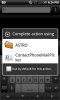
Am Using HTC Desire which has Android running, the problem which am facing is when I go to New Message-> clcik on the person icon next to the "TO" Recepient field. I get a pop which says "Complete action using" which displays 2 options 1-"Astro File Manager" and 2-"ContactPhoneEmailPicker".handcent is a 3rd party app. . . so you probably aren't using it. if you are just using the stock messaging program, once you are in the "forward" screen, just to the right of the "to" field you should see a little person (not a "little person") icon. . . just a round head and shoulders. if you click that icon, (it may prompt you to pick the appropriate program to complete the action. . . just choose "ContactPhoneMailPicker) and it will bring up your contacts in list form and you can check all those you wish to forward to.
This was not the case yesterday it used to display Astro File Manager and "People" in the complete action using pop up window.
Can you please help me on how to get back that option "People"?
One more question, how do we set an application as default for example HTC sense was set as default but now I cleared it and am not able to set it as default again. How do i set this as default?
Additional info:
The 1st issue maybe because of me changing some settings in manage applications.