• After 15+ years, we've made a big change: Android Forums is now Early Bird Club. Learn more here.

Post Battery Life Thread!

Wolfedude88

Android Expert
Time for those who have their new phones to post how their battery life is doing.

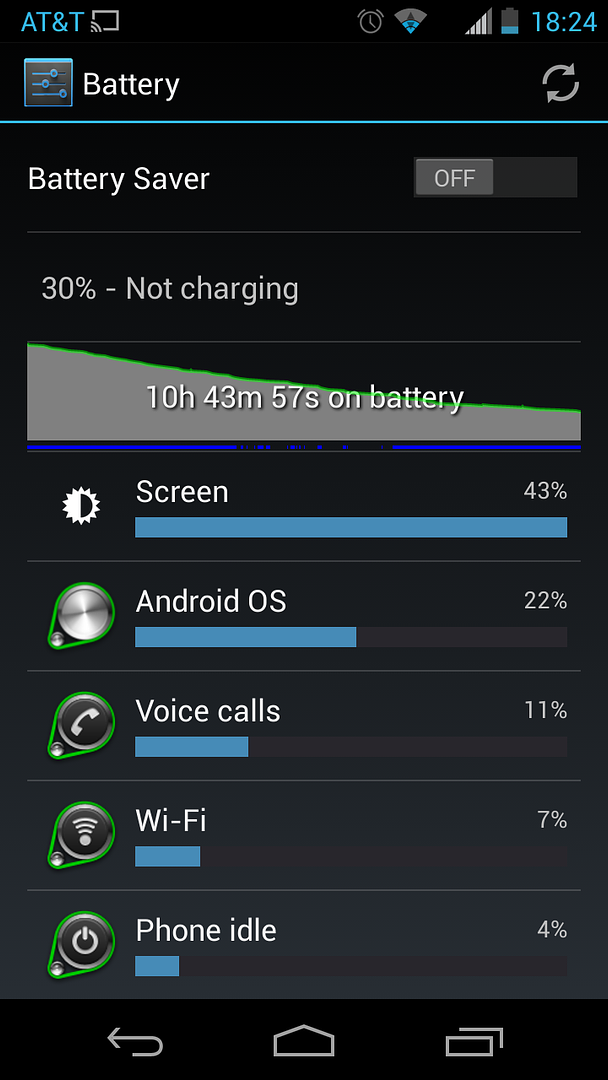
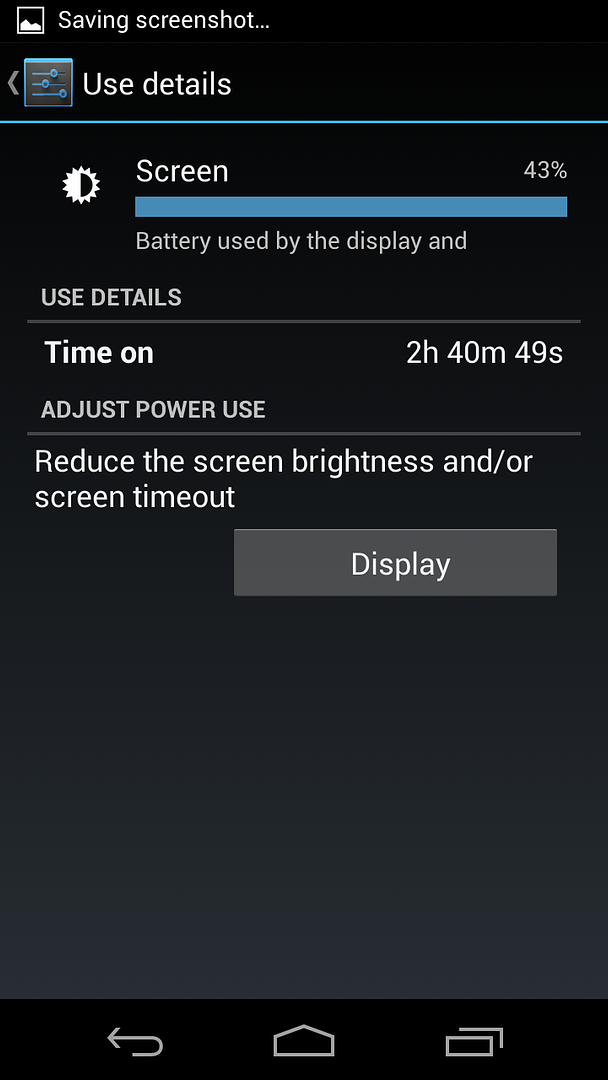
Didn't get a whole lot of use today but I'm still impressed nonetheless.

o40d.png


p82.png
 
No wifi. Heavy use. And try one playing a movie over and over, preferably something with a lot of color like Toy Story.
 
Ill be going to work today, so I wont be in wifi for most of the day, I will see how it does, I will also try and download a movie to play as well.
 
First day of use. Stats so far:

8 hours off the charger (wifi for 7 hours of that ...poor service area)
1 hour screen on time

70% battery left :)
 
I had 15% battery left with I started charging.
 

Attachments

  • uploadfromtaptalk1377742820544.jpg
    uploadfromtaptalk1377742820544.jpg
    53.2 KB · Views: 151
  • uploadfromtaptalk1377742837788.jpg
    uploadfromtaptalk1377742837788.jpg
    38.8 KB · Views: 142
Final numbers from yesterday:

28% battery left
16 hours off the charger (majority spent on wifi...maybe 3 hours on cell network)
3 hours screen on time

I can easily live with this :)
 
I have not been so lucky...


7 hrs and 30 min off charger

29% battery left

used WIFI / APPS / Screen on highest brightness


I guess that the brightness is my issue..but damn this battery is no better then my Galaxy S4 Active.... : - (
 
I've noticed my wifi has been eating away at my battery. Note... I've had it on in an area that can not connect (for testing purposes) . I downloaded a wifi timer as a stop gap but I like to keep everything on normally just so I don't forget to turn wifi on when I need it. Any advice?
 
I've noticed my wifi has been eating away at my battery. Note... I've had it on in an area that can not connect (for testing purposes) . I downloaded a wifi timer as a stop gap but I like to keep everything on normally just so I don't forget to turn wifi on when I need it. Any advice?

The first few days I owned the phone, i had wifi on all the time just to see what would happen. Battery life actually wasn't too bad, but I got sick of always seeing the "wifi networks available" notification. So I downloaded Smart WiFi Toggler and I've been very happy with it. When I get home from work, the first time I unlock the phone I'll get a message saying that wifi is being enabled. It's definitely off for most of the day, so no more pesky "wifi networks available" notification. I guess there's the added benefit of less battery drain, too. Anyway, it's pretty seamless.
 
The first few days I owned the phone, i had wifi on all the time just to see what would happen. Battery life actually wasn't too bad, but I got sick of always seeing the "wifi networks available" notification. So I downloaded Smart WiFi Toggler and I've been very happy with it. When I get home from work, the first time I unlock the phone I'll get a message saying that wifi is being enabled. It's definitely off for most of the day, so no more pesky "wifi networks available" notification. I guess there's the added benefit of less battery drain, too. Anyway, it's pretty seamless.

You can go into settings, wifi, tap menu and advanced, and turn off that notification when networks are available. It's one of the first things I do with my phone when I get a new one.
 
You can go into settings, wifi, tap menu and advanced, and turn off that notification when networks are available. It's one of the first things I do with my phone when I get a new one.

Good point, I didn't think about that. It's still nice to have wifi turn on only when I want it to, though. The annoying notifications were only a motivation to do something about it...
 
Good point, I didn't think about that. It's still nice to have wifi turn on only when I want it to, though. The annoying notifications were only a motivation to do something about it...

That isn't turning off wifi. It will still connect to networks you have already connected with before.
 
That isn't turning off wifi. It will still connect to networks you have already connected with before.

I only have my home wifi hotspot saved. So when I go to work, once I'm out of range of home, Smart Wifi Toggler turns off the wifi radio. When I get home, it turns it back on. It's based on coarse location using cell towers, so it's not exactly precise. But since work and home are pretty far apart, it works for me.
 
I only have my home wifi hotspot saved. So when I go to work, once I'm out of range of home, Smart Wifi Toggler turns off the wifi radio. When I get home, it turns it back on. It's based on coarse location using cell towers, so it's not exactly precise. But since work and home are pretty far apart, it works for me.

I hope it works for you. I did just want to point out that setting for the benefit of those who weren't aware of it.

These are the type of battery saving games I used to try with my older android phones. One of the reasons that I switched to the Maxx was so that I'd never have to worry about doing things like that to save battery. Also, I should point out that I used llama with cell tower location aware wifi toggling. I tried it for a week and found that it had very little effect on battery life compared with just leaving the radio on, and there was always the annoyance that my phone wouldn't connect to home wifi until I powered it up again. But, for me, that was important; I had/have weak mobile signal at home, so any data use by 3G/LTE/1xRTT is horrible for the battery. I hope this helps your situation better than it did for me.
 
I only have my home wifi hotspot saved. So when I go to work, once I'm out of range of home, Smart Wifi Toggler turns off the wifi radio. When I get home, it turns it back on. It's based on coarse location using cell towers, so it's not exactly precise. But since work and home are pretty far apart, it works for me.

I actually read your post wrong. Either way, leaving wifi on all day has very little effect on my Galaxy Nexus. 4-5% tops. It also allows for better GPS (quicker or less battery intensive when fine GPS isn't needed). In 4.3 there is a new option that allows the phone to turn on passive wifi for GPS checks and then turn it off.

I do know that leaving the "Notify of Hotspots" option on in the wifi settings "seems" to drain the battery more.
 
I actually read your post wrong. Either way, leaving wifi on all day has very little effect on my Galaxy Nexus. 4-5% tops. It also allows for better GPS (quicker or less battery intensive when fine GPS isn't needed). In 4.3 there is a new option that allows the phone to turn on passive wifi for GPS checks and then turn it off.

I do know that leaving the "Notify of Hotspots" option on in the wifi settings "seems" to drain the battery more.

Agreed, I didn't notice much of a drain with wifi on. I just installed the toggler to get rid of the notifications since I didn't know about that setting. I kind of like the idea of turning the radio off when not needed anyway... one less frequency irradiating my left leg. :)
 
As I sit and wait for my custom Moto X ... I am forced to wonder, what happened to this thread, did everyone's battery die? :D

So how is everyone's battery life now that the phone has settled in? Have you used the smart actions (type) app to turn functions on and off? Will I make it through a whole day with my new Moto X?
 
Day 2 on my phone and I went from 6am to about 2pm before I got the first low battery notification. Not impressed at all. That was with moderate web browsing and maybe two phone calls. Was on WiFi most of the time too. Screen seemed to be the biggest draw. Are you guys doing anything special to get these results?
 
Back
Top Bottom