• After 15+ years, we've made a big change: Android Forums is now Early Bird Club. Learn more here.

Post Your Quadrant Benchmark Results Here!

Of course! EXT2/3/4(?) is supported by CM

You need to flash a script tho additionally

Which script... man
I actually did an ext partition from clockworkmod recovery and now the phone isn't booting with the sd card on ...
So I have to remove the sd card everytime... I have just repartitioned but thought I would ask u if nightlies actually do support...
Plz let me know the script and r u using an ext????
 
Which script... man
I actually did an ext partition from clockworkmod recovery and now the phone isn't booting with the sd card on ...
So I have to remove the sd card everytime... I have just repartitioned but thought I would ask u if nightlies actually do support...
Plz let me know the script and r u using an ext????
You would be best partitioning from Linux - have you access to a Ubuntu or Parted Magic live CD? You could burn one yourself

I think Darktremors A2SD script works, you can search

I dont use an EXT, with TPT repartitioned internal memory I have enough space :)
 
You would be best partitioning from Linux - have you access to a Ubuntu or Parted Magic live CD? You could burn one yourself

I think Darktremors A2SD script works, you can search

I dont use an EXT, with TPT repartitioned internal memory I have enough space :)

TPT repartitioning whats that....
I have heard coverting fron Gen 1 to Gen 2 using TPT but never heard repartitioning... how can we achieve that???
 
Repatriationing is modifying your phones partitions (generally to give more /Data space for apps and data)
If you do the Gen2 TPT you will get a layout with a much bigger /Data partition than what you have now
 
Repatriationing is modifying your phones partitions (generally to give more /Data space for apps and data)
If you do the Gen2 TPT you will get a layout with a much bigger /Data partition than what you have now

Ohh that way well I already had a gen 2 device so didn't had to worry about that... :)

and I checked the script u said but couldn't find it for zte blade ... :(
A rom names Amen actually have it inbuilt but choosing that would mean leaving Nightlies and who would wanna do that... :)
 
Well I haven't included a screenshot as my scores aren't outstanding (I can if need be though).

ROM: CM7 Nightly 104
Kernal: 2.6.32.9-perf tom@TomsComputer #28
Processor Speed: 600Mhz
Score: 912


ROM: CM7 Nightly 104
Kernal: 2.6.32.9-perf tom@TomsComputer #28
Processor Speed: 710Mhz
Score: 1059

I haven't dared trying a higher clock speed incase it bursts into flames or something! :D
 
It wont burst into to flames, but may become unstable. 710MHz is about the median overclocking Max for the Blade, so that's not bad :)
 
It wont burst into to flames, but may become unstable. 710MHz is about the median overclocking Max for the Blade, so that's not bad :)

Well am on 710 to as on 729 the system crashes a bit but donno y the system actually works great on 748 though the battery drains quickly.... :)
 
Orange SF / ZTE Blade Gen1
2.2 FroYo Swedish Spring RLS5

So what do we do to tweak these for speed?

CAP201108220151.png
 
Have you oc with no-frills CPU, you got it as system app in SS5.....

have you enabled hw acceleration....use Blade Buddy to set debug.sf.hw = 1 this is disabled by default in Froyo 2.2.

While you are using Blade Buddy, enable the Stagefright settings also, in Advanced Settings, also for the hw acceleration.

those settings start with media.stagefright.xxxxxx whatever, there are four

Check VM Heap with VM Heap Tool, system App in SS5......set VM Heap to 32(may be already, can't remember now).

Do your Quadrant again, you may be surprised by results.......but don't get excited. Stagefright is broken in 2.2, and your results mean nothing....but you get that warm fuzzy feeling :D

When finished, disable the Stagefright again, as it performs no useful function in this ROM........but leave HW Acceleration on (It probably is on already).

Cheers
 
What min/ max values should you set in oc, and which profile?
Set it to: min 122; max 691; performance

HW exceleration was on

I'd increased the heap to 36. 32 is 'recommended' so put that back.

Benchmark : 925
 
Toldya :p

which profile? oh-oh bad word :)

From the horses mouth: [APP][Aug 20th][1.12.1] "NoFrills" CPU Control: configure cpu frequencies & governor - xda-developers

Q: Do you plan on adding profiles? I'd love to select a different profile for when my screen is off!
A: Short answer is "No". I think that profiles are useless, because that's what governors are already: a profile for your CPU to follow while changing frequencies.
Adding profiles would mean adding the need for more memory, the need to run more often, check if something is happening (screen on, screen off and so on)... all of this without a real benefit.

Q: What are governors and which one should I choose?

A: CPU frequency scaling allows you to change the clock speed of CPUs on the fly. This can save power, because the lower the CPU clock speed, the less power the CPU consumes. Governors are different policies to scale frequency.

- powersave will always set the "min" and never change it
- performance will always set the "max" and never change it
- ondemand (usually the default) will raise the value by a step up when the cpu is used, and lower the value by a step down when the cpu is not (much) used.
- conservative is like ondemand but will be slower when changing frequencies
- interactive is (conceptually) like ondemand but will be quicker when changing frequencies.
- smartass is (conceptually) like interactive, but I haven't understood yet why it's so much smart and loved by users.
- userspace will do nothing at all, so don't choose it. I may hide it in a future release to avoid confusion

I don't go as low as 122, set 245 as min, 691 as max, interactive governor, NOOP scheduler......

Word is 122min is inefficient CPU usage, apps don't work well at this freq??? Goes into "coma"....hard to wake up!!!

Also, safety valve unclean shut down is a life-saver.....saves you from yourself.
 
Heh :D

Thanks very much for that. Read that thread.

This was said about smartass:

Technical Details-originally posted by erasmux

smartass governor - is based on the concept of the interactive governor.
I have always agreed that in theory the way interactive works - by taking over the idle loop - is very attractive. I have never managed to tweak it so it would behave decently in real life. Smartass is a complete rewrite of the code plus more. I think its a success. Performance is on par with the "old" minmax and I think smartass is a bit more responsive. Battery life is hard to quantify precisely but it does spend much more time at the lower frequencies.
Smartass will also cap the max frequency when sleeping to 352Mhz (or if your min frequency is higher than 352 - why?! - it will cap it to your min frequency). Lets take for example the 528/176 kernel, it will sleep at 352/176. No need for sleep profiles any more!

Performance is nice at those (your) settings. Noticibly more responsive and I feel I'm a little more in control. Thanks a lot ;)
 
Heh :D

Thanks very much for that. Read that thread.

This was said about smartass:


Performance is nice at those (your) settings. Noticibly more responsive and I feel I'm a little more in control. Thanks a lot ;)

Your welcome.....:)

For smoother GUI experience, use Launcher Pro, you probably already do.

Also, save Battery by setting mobile data to 2g, unless you need mobile data constantly.....settings/wireless & networks/mobile networks/gsm.umts options/use only 2g networks checked
 
I use the bloated Go Launcher Ex :( Must wean myself off that!

K will do that with 2G. Thanks again ;)
 
I use the bloated Go Launcher Ex :( Must wean myself off that!

K will do that with 2G. Thanks again ;)

Is Go bloated???

Not sure, but I use LP coz it seems to be snappy on the Blade. There are lots of peeps who swear by Go, or ADW....:)

On the OH, GO is totally free, and LP is paid-for with LP Plus.....

Swings and roundabouts.......all I will suggest is try LP out, if you don't like, nothing lost. That's Android for ya, configure it as you like.

There are comparison threads here and here, and a Comparison Spreadsheet here

BTW, GO looks pretty good to me, I may try it meself :p

BTW again, I use LP Keep in memory feature, seems to work, never had a FC.... Preferences/General Settings.....
 
Well it seems feature packed :P

I tried it on my first phone a couple of months back (had to go back due to a hairline crack in the top of the case on arrival... I was on my way to a long holiday abroad so got to keep it a few weeks to play with!)

I tried Launcher before and found it restrictive. I've been playing today and either they improved it or it does pretty much what I want now. So I'm pleased. The screen draw seems snappy, which wasn't great on Go (though I see they've updated today with a supposed fix for that).

Nice spreadsheet BTW. All I'm missing, if anything, are the home screens organiser, and the ability to rename and change the icons on the desktops. Oh... and I also liked the task killer in the app drawer lol ;)

Shall see if I get any FC's now!

Thx again! ;)
 
Well it seems feature packed :P

I tried it on my first phone a couple of months back (had to go back due to a hairline crack in the top of the case on arrival... I was on my way to a long holiday abroad so got to keep it a few weeks to play with!)

I tried Launcher before and found it restrictive. I've been playing today and either they improved it or it does pretty much what I want now. So I'm pleased. The screen draw seems snappy, which wasn't great on Go (though I see they've updated today with a supposed fix for that).

Nice spreadsheet BTW. All I'm missing, if anything, are the home screens organiser, and the ability to rename and change the icons on the desktops. Oh... and I also liked the task killer in the app drawer lol ;)

Shall see if I get any FC's now!

Thx again! ;)

Now, some Android Puritans would baulk at that, about TK's......even Cyanogen refuses to deal with bug reports if you are using a TK :p

Good article here, not sure if we really care, but I can see the logic of letting Android manage memory, as designed.

But ppl should hunt down and destroy Apps which mis-behave, wake up when they should not and eat your battery. And use the Power Control, like manually, turn off all Radio/WiFi/Mobile Data/GPS/BT when not needed, and sync manually.

BTW, I find Gemini App Manager a good App, which can freeze Apps, and stop Autoruns and Auto Restarts completely.

And it can also kill Apps :o and a lot of other stuff....basically allows you to dispense with a number of other Apps, even paid-for ones.

You would need to pay for Titannium and Autoruns to achieve same result.

LP is pretty snappy, regardless :D
 
Point taken! Thanks again Danny, excellent links :) Gave me a lot to consider. Gemini App Manager definitely is a great app. Only thing is I can understand the autorun options! :) But I've thinned out a few apps I no longer run but kept there just in case, that were active anyways. Only wish I had smaller fingers to hit those tiny icons! :D
 
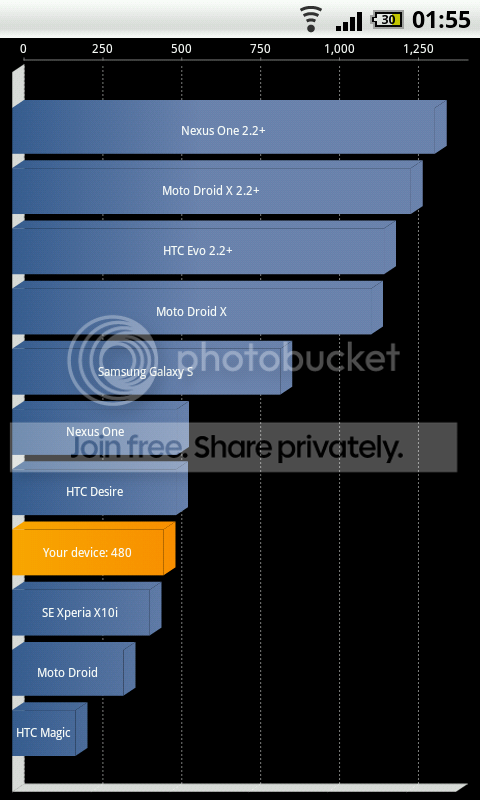
Well here is what I got from mine. The only reason I even tried to see the result was because I downloaded Dead Space and it actually worked. It had a little lag here and there but afar from that it looked good.

I never really overcloked or did anything at all to my phone. I bought it as it is with Cyan7. I do not know what version it is though. But for a budget phone that I just bought to have a decent Android phone I am totally impressed.

Results varied from 890 to 910.
BladeResults.jpg
 
Back
Top Bottom