• After 15+ years, we've made a big change: Android Forums is now Early Bird Club. Learn more here.

Post your RAZR Screenshot!

geemacd

Well-Known Member
think this only works if rooted at present. I am using an app called screenshot from the market that seems to be working well doing this.

Image 1 - Main Screen - tajm clock, camera shortcut, switchpro widget
Image 2 - 1 Right - frequent contacts surrounding pic of my dogs & vlingo widget
Image 3 - 2 right - Calender
Image 4 - 3 right - weather
Image 5 - 1 left - Media Page - Browser Bookmarks widget, tapatalk, phandroid, xda, world newspapers & bbc + short term position for battery widget
Image 6 - 2 left - Entertainment - Mixzing music widget, acast podcast widget, shortcut buttons to general entertainment apps (youtube, movies, sky+ & tunein radio).

Running launcherpro plus with ubercon icons

What you lot sporting then ?? lol
 

Attachments

  • Image00001.jpg
    Image00001.jpg
    9.9 KB · Views: 686
  • Image00002.jpg
    Image00002.jpg
    12.8 KB · Views: 589
  • Image00003.jpg
    Image00003.jpg
    11.7 KB · Views: 518
  • Image00004.jpg
    Image00004.jpg
    9.6 KB · Views: 485
  • Image00005.jpg
    Image00005.jpg
    15.7 KB · Views: 436
  • Image00006.jpg
    Image00006.jpg
    12.2 KB · Views: 408
I like a simple homescreen and easy access to all my apps, so I've got Launcher Pro Plus running with Beautiful Widgets for time and Circle Widgets for my app loading, grouped by app type. I used SimpleText to make my icons.
 

Attachments

  • ScreenShot.jpg
    ScreenShot.jpg
    51.4 KB · Views: 583
  • ScreenShot (1).jpg
    ScreenShot (1).jpg
    62.3 KB · Views: 502
think this only works if rooted at present. I am using an app called screenshot from the market that seems to be working well doing this.

Image 1 - Main Screen - tajm clock, camera shortcut, switchpro widget
Image 2 - 1 Right - frequent contacts surrounding pic of my dogs & vlingo widget
Image 3 - 2 right - Calender
Image 4 - 3 right - weather
Image 5 - 1 left - Media Page - Browser Bookmarks widget, tapatalk, phandroid, xda, world newspapers & bbc + short term position for battery widget
Image 6 - 2 left - Entertainment - Mixzing music widget, acast podcast widget, shortcut buttons to general entertainment apps (youtube, movies, sky+ & tunein radio).

Running launcherpro plus with ubercon icons

What you lot sporting then ?? lol

Geemac,

Probably a silly question but what widget did you use to place a Picture of your dogs on the screen? I could not find any native widget that allowed that. Am I missing something or do I need to download it from the market? I know that my wife's other phone had Photo Frame widget that allowed this.
 
Can somebody tell me how you get your screens and Widgets to look like that.
I mean can you give me step by step instructions please. I really think your screens look cool as hell, but don't know how to do that.


Thanks
Wolvie
 
Geemac,

Probably a silly question but what widget did you use to place a Picture of your dogs on the screen? I could not find any native widget that allowed that. Am I missing something or do I need to download it from the market? I know that my wife's other phone had Photo Frame widget that allowed this.


Downloaded the widget from the market, called big picture widget and because I use launcherpro, I can resize it, so it sits perfect where I want it
 
Thanks Gee but I was wondering how LE did his also with the round Widgets etc.
I really don't know how to set up screens etc on any smart phones.

Thanks
Wolvie
 
Please post screenshots and apps/widgets you are using.

How to take screenshots: [How To] Get Screenshots with Android SDK of Your Unrooted RAZR Desktop

I ran into problems with the SDK not finding ADB. Once youre done installing everything, go to the tools folder in the android SDK tools folder and read the read-me file.

Lockscreen:
Widgetlocker with Beautiful Super Clock, Weather 1x1, and Battery Indicator.

WidgetLocker themes sliders can be found here: [THEMES] WidgetLocker Theme Collection - xda-developers


device-2012-02-18-112004.png


device-2012-02-18-112107.png


Center Homescreen:
Beautiful Widgets 4x1 Smaller Home and 3 Circle Launcher Widgets that opens horizontally.
No longer using a 3rd part launcher (launcher pro and miss the scrolling dock with the swipe gestures so went with Circle Launcher)

device-2012-02-18-112118.png


1st Right: Utilities and System
SwitchPro Widget, Tiny Flashlight, Audio Manager Pro with Synergy Skin
device-2012-02-18-112131.png


2nd Right: Multimedia
More Icons Widget, Power Amp 4x2, Soundhound

device-2012-02-18-112208.png


1st Left: News/Calendar
Beautiful Widgets 4x1 Forcast
Pure Calendar Widget

device-2012-02-18-112216.png


2nd Left: Shopping/Social
Google Traffic Widgets, TapaTalk Widgets, More Icons Widgets

device-2012-02-18-112224 resized.png
 
Wow, love this! I need to explor widget locker some more, and I like the circle launcher widgets.

I don't think your 2nd left screen (shopping/social) is showing up, at least not for me.
 
Not sure why it's not showing up, i've tried adding it again and shows up in the preview but does not show up in the post.

Resized and attached the last screenshot.

WidgetLocker is really nice, a lot of themes to use for lockscreens and very easy to use, no root necessary. You can disable the clicks on the widget, for example none of the widgets will open if touched.
 
No root Screenshot It works great on my unrooted razr.


Is this the one that needs to be plugged into a computer to use? I can screen shop a web page via an app, but not the overall screen and having to plug in seems like a lot of work. (at least until ICS gets here and has the ability to do so)
 
Is this the one that needs to be plugged into a computer to use? I can screen shop a web page via an app, but not the overall screen and having to plug in seems like a lot of work. (at least until ICS gets here and has the ability to do so)

Plug in to enable it, but then you don't habe to do it again till you reboot your phone , which i don't do much so for me its a non issue.
 
Sooo.... we need a screenshot thread for us RAZR users. Anyways here it is! Post your screenshots people! (Hold power button & volume down button at same time) the screenshot will be saved to "My Gallery".
 

Attachments

  • uploadfromtaptalk1341203753412.jpg
    uploadfromtaptalk1341203753412.jpg
    27.1 KB · Views: 395
GoLauncher on ICS (.215, rooted) - At this point, phone has been off the charger for 1h24m but I've been doing a LOT of FB and Ebay downloading.

And, that's one of my favorite shots of my DW!


Screenshot2012-07-19-05-59-42-M.png


Have a great day!
 
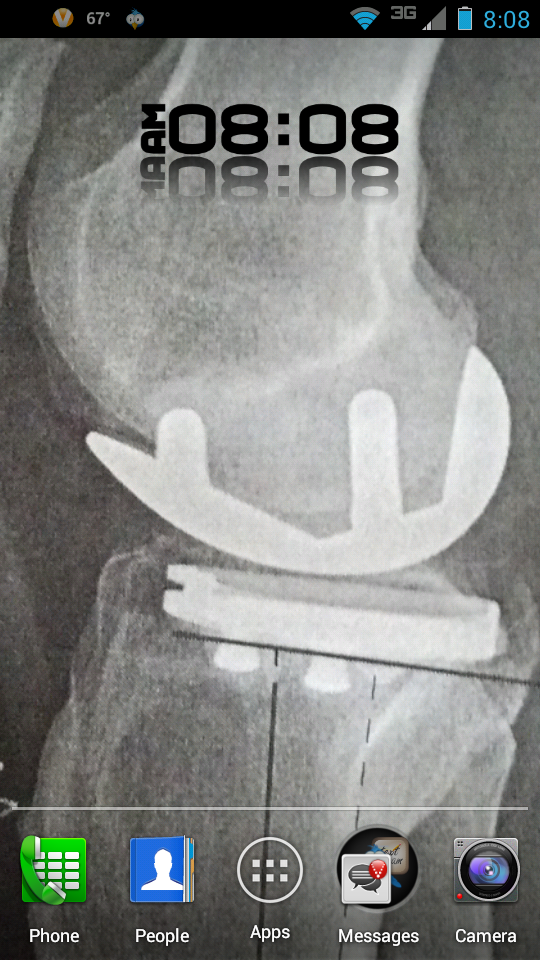
Keepin it simple....
Screenshot_2012-07-19-08-08-30.png

That is my titanium knee that the doctor installed 4 weeks ago.
My doctor is the team physician for Team USA Women's Soccer, they're going to the Olympics.
 
Back
Top Bottom