
I don't think it's possible to figure this thing out. I do the same types of things on phone every day. Some days I have "android system" eating a high percentage. Others I have "Kernel" doing crazy things. Yesterday I had "Maps" doing 45% and I didn't do anything with maps at all yesterday. It's very annoying because some days my batt life is great and others it's simply horrible.
Install the app
How to install the app on iOS
Follow along with the video below to see how to install our site as a web app on your home screen.
Note: This feature may not be available in some browsers.
-
After 15+ years, we've made a big change: Android Forums is now Early Bird Club. Learn more here.
You are using an out of date browser. It may not display this or other websites correctly.
You should upgrade or use an alternative browser.
You should upgrade or use an alternative browser.
Help Processes that kill battery....
- Thread starter Putty
- Start date
-
- Tags
- samsung galaxy s3
K
KOLIO
Guest
I don't think it's possible to figure this thing out. I do the same types of things on phone every day. Some days I have "android system" eating a high percentage. Others I have "Kernel" doing crazy things. Yesterday I had "Maps" doing 45% and I didn't do anything with maps at all yesterday. It's very annoying because some days my batt life is great and others it's simply horrible.
I would also like to know about how MAPS works w/other apps,if it indeed does,(GPS & location services come to mind)as it usually is good for about 10% of my battery consumption, yet I seldom use MAPS.
THX for any help/information on this.

I don't think it's possible to figure this thing out. I do the same types of things on phone every day. Some days I have "android system" eating a high percentage. Others I have "Kernel" doing crazy things. Yesterday I had "Maps" doing 45% and I didn't do anything with maps at all yesterday. It's very annoying because some days my batt life is great and others it's simply horrible.
I was just thinking about this yesterday. Some days I get extremely good battery life, other days, like the last few days, it's really bad. But I must say I have more good days than bad. I have no idea as to why it changes from time to time. For me I don't know what's eating up the battery.
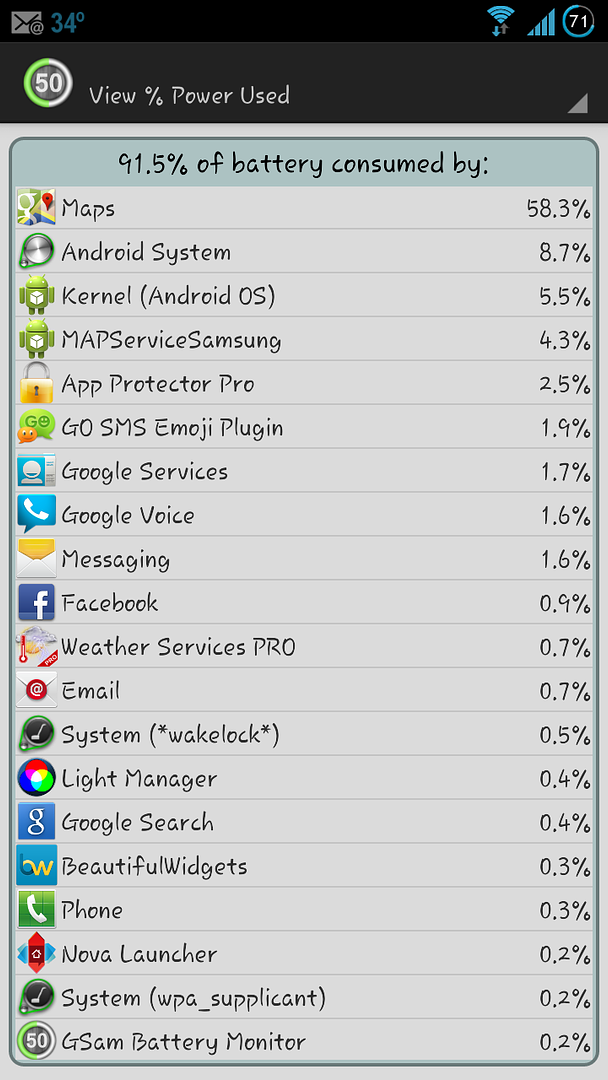
I just killed all Maps processes and then did a force stop on maps. Can't imagine what's doing it other than Google now cards that tells me how far I am from home or work when I am away from either place. However, been using that forever. This just started. I also do not use Latitude.

UserName872
Android Enthusiast
Are you running the stock ROM? Which carrier? You mentioned you have Google Now enabled for traffic, did you happen to recently turn on travel, places around me, transit or any other Google Now location based service?
While not happening on my rom'd GS3, my nexus 7 on 4.2.1 has been staying awake lots for location services for some strange reason. Since the tablet never leaves home it didn't bother me to turn location off.
While not happening on my rom'd GS3, my nexus 7 on 4.2.1 has been staying awake lots for location services for some strange reason. Since the tablet never leaves home it didn't bother me to turn location off.
Are you running the stock ROM? Which carrier? You mentioned you have Google Now enabled for traffic, did you happen to recently turn on travel, places around me, transit or any other Google Now location based service?
While not happening on my rom'd GS3, my nexus 7 on 4.2.1 has been staying awake lots for location services for some strange reason. Since the tablet never leaves home it didn't bother me to turn location off.
Yes, I am on the stock JB release for AT&T. No, all the google now settings have been this way. Killing all the processes took it down on the list, but "MapsamSungservice" climbed to the top. That's never been up there either.
UserName872
Android Enthusiast
Yes, I am on the stock JB release for AT&T. No, all the google now settings have been this way. Killing all the processes took it down on the list, but "MapsamSungservice" climbed to the top. That's never been up there either.
Haven't seen that service either. Tried clearing your maps cache/data? What about trying better battery stats to see what specific process is causing the wake locks?