nuttmeg
Extreme Android User
Source: DroidViews | Install Galaxy S4 Weather Clock Widget & Music Player on Your Samsung Galaxy Phone
Install Galaxy S4 Weather Clock Widget & Music Player on Your Samsung Galaxy Phone
Originally posted by Rakesh Shukla

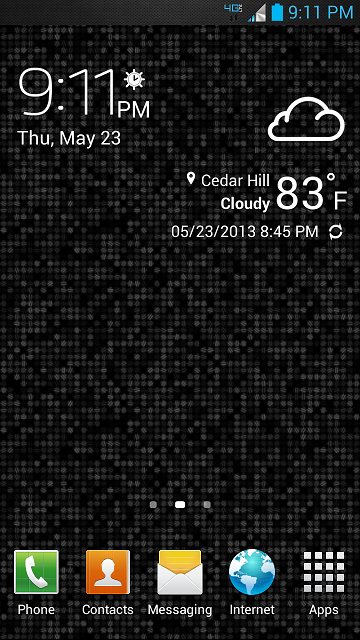
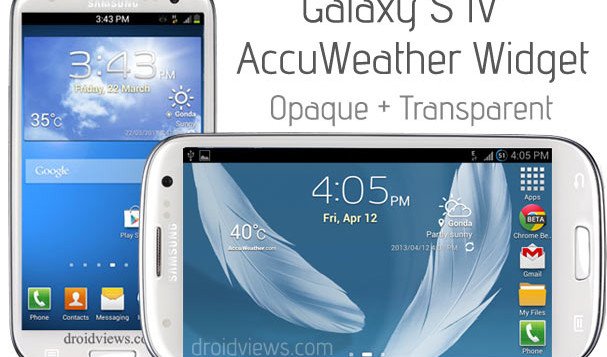
If you like the new weather clock widget of the upcoming Samsung Galaxy S4 and want to have it on your Galaxy S3, Note, Note 2, S2, etc., you can now have it. XDA member XdroidPerfect has come forward with his modded AccuWeather widget that will replace the original widget found in current Galaxy phones to look like that of Galaxy S4. The mod is so perfect that one cannot point out a difference
The widgets available below have been made by different modders and now they contain the original png files from Galaxy S3′s system dump. So they look more genuine now. Most of the S4 Weather widgets for S2 nd S3 have been modded by dr30ma so all due credits to him.
Note:
Most of these mods work on a deodexed stock-based custom ROMs. Make sure you have it on your phone before attempting to install. To avoid any mishap, do not forget to backup your current ROM in CWM.
For All Android Phones with Deodexed JB ROM:
Galaxy S4 Launcher and AccuWeather Widget
Galaxy S3 Only:
Make sure your phone in on latest rooted stock or a TouchWiz-based custom ROM like Omega, FoxHound, WanamLite, Neat ROM etc. If your phone has older firmware, the mods might not work on it.
For Galaxy S3 on Leaked 4.2.1
4.2.1_AccuWeather Widget S4 +Main_New.zip
25% Trans_4.2.1_AccuWeather Widget S4_New.zip
50% Trans_4.2.1_AccuWeather Widget S4_New.zip
75% Trans_4.2.1_AccuWeather Widget S4_New.zip
100% Trans_4.2.1_AccuWeather Widget S4_New.zip
For Galaxy S3 on Leaked 4.1.2
4.1.2_AccuWeather Widget S4 +Main_New.zip
25% Trans_4.1.2_AccuWeather Widget S4_New.zip
50% Trans_4.1.2_AccuWeather Widget S4_New.zip
75% Trans_4.1.2_AccuWeather Widget S4_New.zip
100% Trans_4.1.2__AccuWeather Widget S4_New.zip
1. Copy the zip file to your phone’s internal or external SD Card storage without extracting it.
2. Now boot your phone into ClockWorkMod recovery mode: press and hold Volume Up+Home+Power buttons for about 3-5 seconds.
3. Needless to say, you will have to use the volume and power keys to scroll up or down and select options.
4. Do not forget to backup your current ROM using “backup and restore” option in CWM.
5. Go to “advanced” and “wipe dalvik cache” (do it before and after installation)
6. Now scroll to “install zip from sdcard> choose zip from sdcard“, navigate to the widget file and select it.
7. It will be installed in a few seconds and when it is done, reboot the phone.
8. If your phone is on stock rooted firmware and you do not find the widget after flashing, install a root file explorer and navigate to the system/app folder. Here, you will find the following files: AccuWeatherWidget.odex and AccuWeatherWidget_Main.odex. Copy single/ both the files to the external storage of your device and then delete the original Odex files from the System/app folder. Finally, reboot the phone.
If you still have problem, clear app data from Settings> Application Manager> ALL> after flashing the zip:
Source: http://forum.xda-developers.com/showthread.php?t=2278436
Thanks to rush25 @ xda be sure to visit the thread and thank him personally and everyone else that was involve.
Just please have a backup
Features :-
-Flare Lock from S4 4.2.2 to S3 4.1.2
-Works on All Stock Roms [Odexed or Deodexed]
-S4 unlock sounds
Instructions :-
-Download the file
-Copy to sd card
-Reboot in recovery
-Flash the file
-Reboot
Credits :-
-Koulis2000 [Original Thread]
-salesale
-Villain Rom Team
Downloads :-
-Build 1
Mods :-
-Mod 1
Install Galaxy S4 Weather Clock Widget & Music Player on Your Samsung Galaxy Phone
Originally posted by Rakesh Shukla
If you like the new weather clock widget of the upcoming Samsung Galaxy S4 and want to have it on your Galaxy S3, Note, Note 2, S2, etc., you can now have it. XDA member XdroidPerfect has come forward with his modded AccuWeather widget that will replace the original widget found in current Galaxy phones to look like that of Galaxy S4. The mod is so perfect that one cannot point out a difference
The widgets available below have been made by different modders and now they contain the original png files from Galaxy S3′s system dump. So they look more genuine now. Most of the S4 Weather widgets for S2 nd S3 have been modded by dr30ma so all due credits to him.
Note:
Most of these mods work on a deodexed stock-based custom ROMs. Make sure you have it on your phone before attempting to install. To avoid any mishap, do not forget to backup your current ROM in CWM.
For All Android Phones with Deodexed JB ROM:
Galaxy S4 Launcher and AccuWeather Widget
Galaxy S3 Only:
Make sure your phone in on latest rooted stock or a TouchWiz-based custom ROM like Omega, FoxHound, WanamLite, Neat ROM etc. If your phone has older firmware, the mods might not work on it.
For Galaxy S3 on Leaked 4.2.1
4.2.1_AccuWeather Widget S4 +Main_New.zip
25% Trans_4.2.1_AccuWeather Widget S4_New.zip
50% Trans_4.2.1_AccuWeather Widget S4_New.zip
75% Trans_4.2.1_AccuWeather Widget S4_New.zip
100% Trans_4.2.1_AccuWeather Widget S4_New.zip
For Galaxy S3 on Leaked 4.1.2
4.1.2_AccuWeather Widget S4 +Main_New.zip
25% Trans_4.1.2_AccuWeather Widget S4_New.zip
50% Trans_4.1.2_AccuWeather Widget S4_New.zip
75% Trans_4.1.2_AccuWeather Widget S4_New.zip
100% Trans_4.1.2__AccuWeather Widget S4_New.zip
1. Copy the zip file to your phone’s internal or external SD Card storage without extracting it.
2. Now boot your phone into ClockWorkMod recovery mode: press and hold Volume Up+Home+Power buttons for about 3-5 seconds.
3. Needless to say, you will have to use the volume and power keys to scroll up or down and select options.
4. Do not forget to backup your current ROM using “backup and restore” option in CWM.
5. Go to “advanced” and “wipe dalvik cache” (do it before and after installation)
6. Now scroll to “install zip from sdcard> choose zip from sdcard“, navigate to the widget file and select it.
7. It will be installed in a few seconds and when it is done, reboot the phone.
8. If your phone is on stock rooted firmware and you do not find the widget after flashing, install a root file explorer and navigate to the system/app folder. Here, you will find the following files: AccuWeatherWidget.odex and AccuWeatherWidget_Main.odex. Copy single/ both the files to the external storage of your device and then delete the original Odex files from the System/app folder. Finally, reboot the phone.
If you still have problem, clear app data from Settings> Application Manager> ALL> after flashing the zip:
Source: http://forum.xda-developers.com/showthread.php?t=2278436
Thanks to rush25 @ xda be sure to visit the thread and thank him personally and everyone else that was involve.
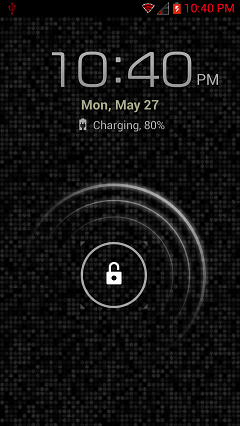
Galaxy S3 lockscreen
Just please have a backup
Features :-
-Flare Lock from S4 4.2.2 to S3 4.1.2
-Works on All Stock Roms [Odexed or Deodexed]
-S4 unlock sounds
Instructions :-
-Download the file
-Copy to sd card
-Reboot in recovery
-Flash the file
-Reboot
Credits :-
-Koulis2000 [Original Thread]
-salesale
-Villain Rom Team
Downloads :-
-Build 1
Mods :-
-Mod 1